Can not activate Brizy Pro

Helolo, can not activate Pro.
No License Tab but get the message : Br.. Pro: License Expired.
Have already tried to disable or deactivate the other plugins, but still pro can not be activated.
No we see only some brizy code on the website or some parts are blank.
Whats going on?
-

Hi Johan,
You can also manage your licenses directly from your Brizy account console: https://www.brizy.io/account/member
Please go to the Licenses tab, where you should be able to disable your existing licenses or create a new one.
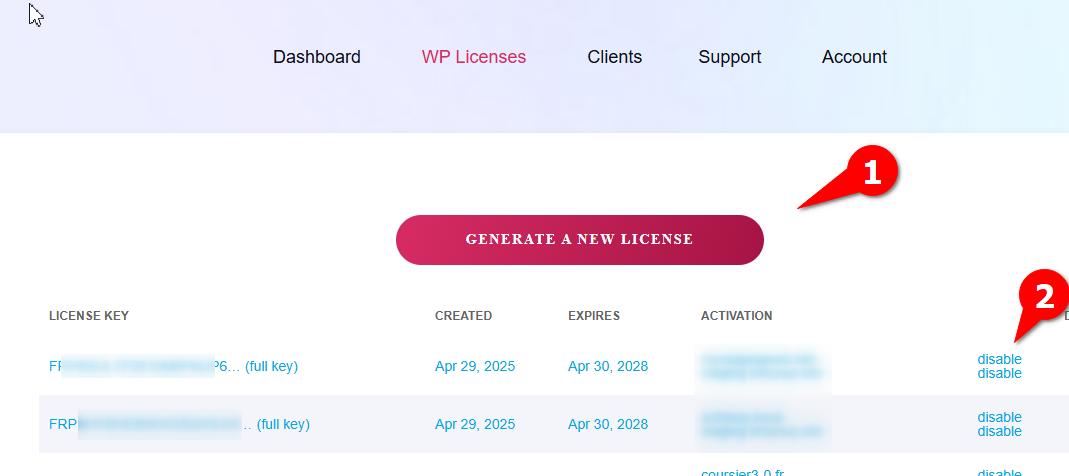
Once done, you can return to your WordPress website and activate the license again.
I hope this helps!
Kind regards,
Ariel H.0 -
Hi Ariel,
I removed/deleted all expired licenses and then in the WP dashboard activate pro but still get that message. Also when I removed Pro plugin and install the latest version of the Pro I get that message after activating the plugin.
0 -
Can I see somewhere in the website environment which license key the website is using?
0 -
Hi Johan,
Thank you for the update.
I'll ask someone from our team to look into the license activation issue and investigate further.
Unfortunately, the WordPress dashboard does not show which license key is currently being used by the website. You will need to log in to your account console to check and manage your license keys.
Could you also share your WordPress admin credentials with us so we can access your website and try to replicate the issue from our end? Please add us as an Admin user to your WordPress Dashboard and send the following details to communitysupport@brizy.io.
Community Post link: https://support.brizy.io/hc/en-us/community/posts/41174975594642
WordPress Admin URL:
Username:
Password:I'll get back to you as soon as I receive an update from our team.
Thank you for your patience.
Kind regards,
Ariel H.0 -
Hi Johan,
We tested the license activation on our end and did not encounter any issues.
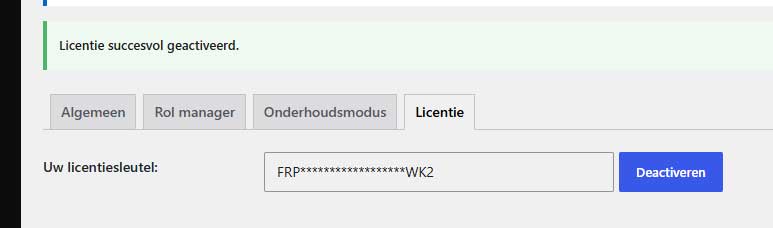
If the issue still persists on your end, could you please try using a different browser and see if you experience the same problem?
Please let us know how it goes.
Kind regards,
Ariel H.0 -
Hi Ariel,
Thanks for your help. It works indeed.
Thanks.
Regards, Johan
0
Please sign in to leave a comment.
Comments
6 comments