License

I recently downloaded Brizy Pro to Cloudways and have not completely used it but later decided not to use Cloudways because of their response downtime. I decided to just use WordPress for my website and now Brizy Pro stated my license is already with another domain. I deleted it from Cloudways and it is still not working. Can someone please direct me on what I should do next. I see the information about the Brizy reseller account, but I do not believe that I need this, considering I have not used Brizy Pro to anything yet.
-

Hi Adrianne,
Thank you for reaching out.
You can resolve this by manually disabling the existing license connections. Please log in to your Brizy account console and navigate to the License tab. From there, click Disable to deactivate the license for both your live domain and the Cloudways staging site.
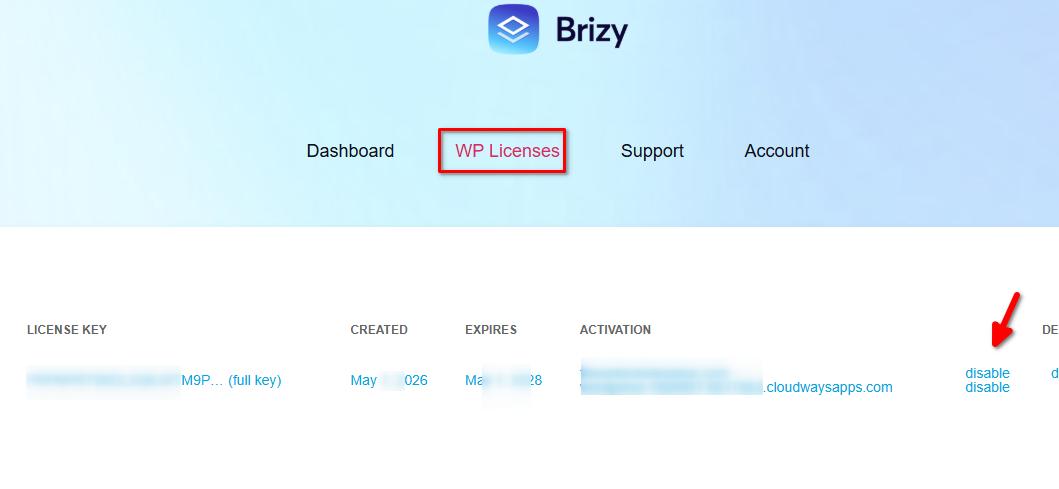
Once you've done that, go back to your WordPress admin dashboard and try activating your Brizy Pro license again.
This should release the existing domain connections and allow you to activate the license on your current website.
If you have any further questions, please let us know.
Best regards,
Ariel H.0
Please sign in to leave a comment.
Comments
1 comment