Creditos AI

Hola, buenos días.
Estoy algo desconcertado por un mensaje que apareció al intentar utilizar el asistente de IA de Brizy. El aviso indica que “se han agotado los créditos de IA”.
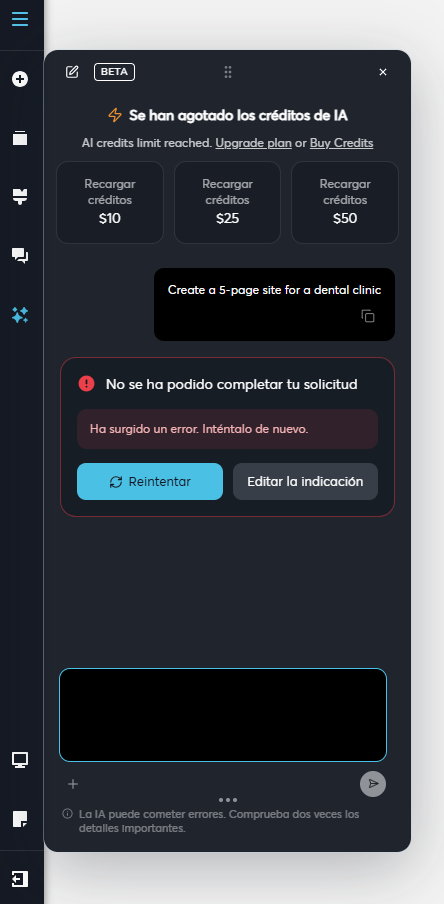
¿Debo tener créditos de IA adicionales? ¿No están incluidos en mi plan?
Me llama la atención que puedo crear un sitio web utilizando IA al iniciar un proyecto, pero cuando intento hacer lo mismo desde el asistente de IA (dentro de un proyecto iniciado, aunque sea en blanco), aparece el aviso de que debo utilizar créditos.
Por eso, agradecería que me ayudaran a entender, por favor:
-
¿Qué ha cambiado respecto del uso del asistente de IA y desde cuándo se aplica esta modalidad?
-
¿Qué funcionalidades de IA están incluidas en los planes y cuáles requieren créditos adicionales?
-
¿Cómo se aplica este sistema a mi suscripción antigua (que mantiene las condiciones originales)?
-
¿Cómo funcionan los créditos, cuánto consume cada operación y dónde puedo consultar el saldo disponible y las opciones para obtener más?
He buscado información en la página de ayuda, pero no he encontrado una explicación clara sobre este sistema ni sobre cómo afecta a los suscriptores antiguos.
Les agradecería que me orientaran para comprender esta nueva modalidad y saber qué condiciones se aplican concretamente a mi cuenta.
Muchas gracias de antemano.
Saludos cordiales,
Gustavo Varela
-

Hello Gustavo,
I understand that seeing the "AI credits have run out" notification can be confusing, particularly if you have previously used Brizy AI without needing to purchase additional credits. To clarify why you're seeing this notification, it may help to understand how Brizy AI has evolved and how its different AI technologies work.
-
June 2024 – Brizy AI Builder (First Version): We introduced the first version of Brizy AI Builder, powered by our in-house AI technology. It allowed users to generate AI websites without any additional charges. You can read the original announcement here: Brizy connects with Google My Business for effortless website creation .
-
January 2026 – Brizy AI 1.5: We introduced an enhanced version of Brizy AI Builder, featuring more advanced in-house technology and improved website-generation capabilities. This version also continued to offer AI functionality without additional costs. Read more: Meet Brizy AI 1.5 .
-
July 2026 – Brizy AI Chatbot: We introduced the Brizy AI chatbot directly in the Brizy Cloud editor. Unlike the earlier AI Builder versions, the chatbot uses API connections to external Large Language Models (LLMs) to understand user instructions and generate or modify websites through conversational interactions. Since these external AI services involve usage-based costs, using the chatbot requires purchasing LLM credits. Learn more about this version: Meet Brizy AI 1.7 .
It's important to distinguish between the original AI Builder and the newer conversational AI chatbot, as they use different technologies and have different usage requirements.
-
Original Brizy AI Builder: You can continue using the original AI website-building technology at https://ai.brizy.io/ without purchasing additional LLM credits.
-
Brizy AI Chatbot: If you want to use the conversational chatbot integrated into the Brizy Cloud editor to generate or modify websites, you will need to purchase LLM credits to cover the usage of external AI services.
In other words, AI features powered by Brizy's in-house technology are included in your subscription, while features that rely on external LLM APIs require additional credits. This distinction explains why you're seeing the "AI credits have run out" notification in the Brizy Cloud editor, even though you can use Brizy AI builder without purchasing credits.
We understand that knowing how your credits are being consumed is important, especially when using AI for different tasks. To address this, we're currently working on a credit usage log that will show when credits are consumed and how many credits each AI activity uses. This feature will help monitor your usage and understand how credits get used for different tasks. This is still under development and is not available yet.
In the meantime, to get a rough idea of how far your credits go, you could start with a small $5 LLM credit purchase and experiment with the chatbot. This should give you a practical idea of how many tasks you can complete with that amount before deciding whether you need additional credits.
I hope this clarifies the difference between the two Brizy AI experiences and explains why the chatbot requires LLM credits. If anything is still unclear, please don't hesitate to reach out. We'll be happy to help.
0 -
-
Hola de nuevo. Gracias por la respuesta, me ha quedado muy claro. Lo valoro mucho.
Lamento la demora en contestar (y agradecer), pero no quería extender innecesariamente este comentario. Ahora lo retomo porque me surgió una duda respecto de la compra de Crédito IA para el Chat: los creditos que compre quedan asociado a un espacio de trabajo o para toda la cuenta?.
Me explico. Cada uno de mis clientes tiene su propio espacio de trabajo (obviamente), por lo que me preocupa que, al comprar créditos IA, para un proyecto (o cliente) en particular, los termine usando otro cliente con otro proyecto. ¿Es posible limitar el uso de estos creditos, por ejemplo, por roles o espacio de trabajo?.Quedo atento a la respuesta. Muchas gracias.
Gustavo Varela
0 -

Hi Gustavo,
Thank you for bringing up this question. It's a very valid concern, especially when managing multiple client projects through separate workspaces.
AI Credits are linked to your Brizy Cloud account rather than to an individual workspace or project. This means that purchased credits are associated with your account, rather than being assigned to a specific client workspace.
According to our Terms and Conditions (Section 7.10), purchased AI Credits are associated with your Brizy account and are automatically deducted when AI features are used. However, the Terms do not explicitly specify whether these credits can be allocated to individual workspaces or restricted based on user roles.
I understand why you'd want to keep each client's resources separate and prevent credits purchased for one project from being consumed by another. I'll forward this suggestion to our team as a feature request for consideration in future updates.
Thank you again for taking the time to bring this to our attention. We appreciate your feedback!
Best regards,
Ariel H.0 -
Hola nuevamente.
Para probar el chat, hice una compra de 5 dolares.
Le hice una preguntas y respondió muy bien, pero ahora me cabe la duda de cuánto crédito gasté o cuánto me queda... ¿existe alguna forma de saberlo? (no puedo encontrarlo)
Gracias!
0 -
Hello Gustavo,
We're currently working on a Credit Usage page that will provide a detailed breakdown of your AI credit consumption, including when credits are used and how many credits each AI activity consumes. This feature is designed to give you visibility into your usage, making it easier to track your credits and understand how they're being allocated across different tasks. It's still under development, so it's not available just yet.
In the meantime, once your credits run out, you will get a rough idea of how many AI activities you could perform with the amount. Please note that actual consumption may vary depending on the type and complexity of each task.
0
Please sign in to leave a comment.
Comments
5 comments