LCP background image preload and fetchpriority – Brizy Pro + NitroPack cache inconsistency

Hello Brizy Support,
I'm investigating a persistent Largest Contentful Paint (LCP) issue on my WordPress website and would like your technical advice on how Brizy handles CSS background images, preload hints and fetch priority.
Page under investigation:
https://jutekoffiezakken.nl/dienbladen-medium_cp2/
LCP element identified by PageSpeed Insights:
section#hero > div.brz-section__content > div.brz-bg > div.brz-bg-image
The element is a Brizy CSS background image (.brz-bg-image), not a standard HTML <img> element.
1. Current PageSpeed Insights findings
PageSpeed Insights has repeatedly reported the following warning:
-
“fetchpriority=high should be applied”
-
The LCP image is not discovered early enough.
The relevant LCP breakdown from a mobile test using ?nonitro was:
-
Time to First Byte: 30 ms
-
Resource load delay: 4,220 ms
-
Resource load duration: 40 ms
-
Element render delay: 1,560 ms
The LCP image loads very quickly once the browser starts requesting it. The main concern is therefore the delay before the request begins, together with the subsequent rendering delay.
Interestingly, this was the first PageSpeed Insights test in which the LCP request discovery warning disappeared, even though the resource load delay remained 4,220 ms.
2. The background image and preload implementation
The desktop hero image is:
https://jutekoffiezakken.nl/wp-content/uploads/2025/09/Koffieboer-BG-Maynor-Guatemala-CP-sfw.jpg
The mobile hero image is:
https://jutekoffiezakken.nl/wp-content/uploads/2025/09/Koffieboer-BG-Julycelo-Brazilie-CP-sfw.jpg
I added a small PHP snippet using template_redirect and ob_start() to insert the following preload hints immediately before </head>:
-
Desktop image:
rel="preload" as="image"withfetchpriority="high"and a media condition for screens from 768 px wide. -
Mobile image:
rel="preload" as="image"withfetchpriority="high"and a media condition for screens up to 767 px wide.
The snippet is page-specific and targets WordPress page ID 17991.
3. Reproducible inconsistency with NitroPack
The following behaviour has been observed repeatedly:
-
When I load the page with
?nonitro, both preload tags are present in the HTML response. -
Immediately after purging the NitroPack cache, the normal URL can also return HTML containing both preload tags.
-
After a subsequent refresh, the normal URL returns
x-nitro-cache: HITandx-nitro-cache-from: drop-in, but the preload tags are missing from the HTML response. -
The
?nonitroresponse continues to contain the preload tags. -
The normal response's
Linkheader contains no preload for either hero image.
This suggests that the cached HTML served by NitroPack does not consistently preserve the preload hints added by the PHP snippet. I am also contacting NitroPack Support to investigate this aspect.
4. Questions for Brizy
I found in your official changelog that Image Fetch priority was introduced in Brizy 2.8.18.
Could you please clarify the following?
A. CSS background images and fetch priority
Does Brizy's Image Fetch priority functionality also apply to background images rendered through .brz-bg-image, or only to standard HTML image elements?
If CSS background images are not covered, is there a supported way to assign high fetch priority to a Brizy background image without replacing the existing design with a standard image element?
B. Early discovery of the LCP background image
Is there a recommended Brizy-native method to make a CSS background image discoverable by the browser as early as possible, ideally through a preload hint in the document head?
C. The 4,220 ms resource load delay
Given that the image itself loads in approximately 40 ms but PageSpeed Insights reports a 4,220 ms resource load delay, are there known issues or limitations in Brizy's handling of CSS background images that could explain this behaviour?
Could the CSS generation, background-image implementation or responsive/hover styling delay discovery of the LCP image?
D. NitroPack compatibility
Are there known compatibility issues between Brizy's generated CSS/background images and NitroPack's HTML caching or optimisation?
In particular, is there a recommended integration point for preload hints that will remain effective when NitroPack serves cached HTML?
5. Environment details
-
Website:
https://jutekoffiezakken.nl/ -
WordPress page ID:
17991 -
Page builder: Brizy Pro for WordPress
-
Theme: Kadence
-
E-commerce: WooCommerce
-
Caching/optimisation: NitroPack
-
PHP version reported in the response headers: PHP 8.4.27
Installed software versions:
-
WordPress: 6.8.11
-
Brizy: 2.8.24
-
Brizy Pro: 2.8.12
-
Kadence theme: 1.5.2
-
NitroPack: 1.20.3
-
WooCommerce: 10.7.0
Before I proceed with disabling other plugins or changing the theme, I would appreciate your initial technical assessment of the questions above. This is a live WooCommerce website, so I would prefer to avoid disruptive tests on the production site unless they are necessary. If a conflict test is required, please specify the smallest test that would help isolate the cause.
I would particularly appreciate a clear answer on whether Brizy's Image Fetch priority feature supports CSS background images and what you recommend for this specific LCP issue.
Thank you for your help.
Best regards, Xander
-

Hello Xander,
Thank you for providing such a detailed report, including your PageSpeed Insights findings, implementation details, and reproducible observations. We appreciate the thorough investigation you've already carried out and understand your preference to avoid disruptive tests on your live WooCommerce website.
Please find our initial assessment of your questions below.
1. CSS background images and fetch priority
Brizy's Image Fetch Priority feature, introduced in version 2.8.18, applies exclusively to images added using the Brizy Image element. It does not apply to background images rendered through
.brz-bg-image.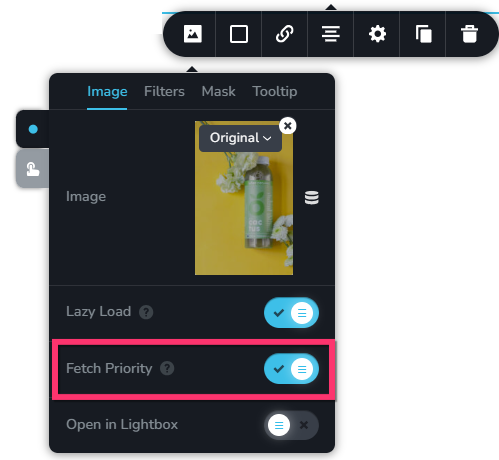
Unfortunately, Brizy does not currently provide a built-in option to assign high fetch priority to background images. If you need to use Brizy's native Image Fetch Priority setting for your LCP image, the recommended workaround is to replace the existing background image with a regular image added using the Brizy Image element, adjusting the layout as needed to preserve the intended design.
2. Preloading background images
Brizy's interface does not currently include a dedicated option to add preload hints for background images. However, it may be possible to implement this using custom code, as you have already attempted.
Regarding the inconsistency you observed, where NitroPack appears to serve cached HTML without the preload hints injected by your PHP snippet, we recommend contacting NitroPack Support for further investigation. Their team would be better positioned to determine why the cached HTML does not consistently preserve these hints and advise on the most reliable way to implement them within their caching and optimisation workflow.
3. The reported 4,220 ms resource load delay
We are not currently aware of any known issues or limitations in Brizy's handling of CSS background images that would specifically explain the 4,220 ms resource load delay you reported.
Since the image loads quickly once the browser initiates the request, further investigation into when the browser discovers the image and how the page's CSS and rendering process affect that timing may help identify the underlying cause.
As an initial troubleshooting step, you could also consider testing the page with the Blocksy theme to see whether the behaviour changes. We understand that changing themes on a live WooCommerce site requires care, so we recommend performing this test on a staging environment rather than directly on your production site.
4. NitroPack compatibility
We have not received reports of known compatibility issues between Brizy's generated CSS/background images and NitroPack's HTML caching or optimisation. At present, we are not aware of a confirmed incompatibility between the two.
We hope this clarifies the current capabilities of Brizy's Image Fetch Priority feature and provides a practical starting point for your investigation. Thank you again for sharing your findings with us.
0
Please sign in to leave a comment.
Comments
1 comment