New pages added to menus having display issues.

Created a new page and added it to a menu that sits on a Mega Menu. Issue is that any new page added to a menu displays as the "active" link.
Normal is white
Hover is red
Active is red
Add a new page to the menu and it is red. If I click on a link within the same menu block then that page and the newly added display as active (red).
Changed the active to be while, so white, red, white. Then it becomes active and doesn't have a hover color. It stays just white.
Brizy Version 2.8.23
Pro Version 2.8.12
-

Hello Jose,
Could you please confirm whether you’re experiencing the reported issue on https://azdiveshop.com? I checked the website but couldn’t reproduce the problem. Currently, all menu links are white, and they turn red when hovered over. It also appears that white is configured as the active-state color.
To help us investigate further, could you share the exact steps we need to follow to reproduce the issue on our end? If possible, a short screen recording or screenshot showing the unexpected behavior would also be very helpful.
Thank you for your cooperation. This will help us better understand the issue and identify the appropriate solution.
0 -
that is the website and it appears to be working without issue this morning. I just changed the a:active to red and will monitor its behavior. The client noticed the issue yesterday. Then when I recreated the issue and it was consistent through different computers, browsers and devices. It was strange. Any new page added to the menu acted as the active link regardless what page you went to and if a link in the same submenu was clicked then both links would appear as active. The new page in question is Baja Adventure: Whales.
I just removed it and readded it and added a dummy custom link to nowhere Just a Test and the behavior is presenting itself.
0 -
I just added another test to the classes > go pro menu and the same thing is happening.
Here is a link to a video.
https://videos.therbdigroup.com/vs/sharing/iLpAHHzm#!aG9tZV92aWRlby040 -
Hello Jose,
To help resolve the issue with the mega menu’s active state, please try the following steps in order, checking whether the issue is resolved after each step.Step 1: Make a minor change to a Brizy page
- Open any page built with Brizy in the editor.
- Make a small change to the header, such as increasing an element’s padding by 1 px.
- Click the "Update" button at the bottom-right corner to save your changes.
- Visit your website and check whether the mega menu’s active state is now working correctly.
Step 2: Recompile the Brizy layouts
If the first step doesn’t resolve the issue, try recompiling your Brizy layouts:
- Install the Layout Recompiler for Brizy plugin from the WordPress Plugin Repository.

- In your WordPress admin dashboard, navigate to Tools → Layout Recompiler.
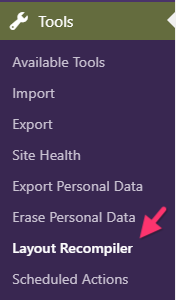
- Click Start Recompilation and wait for the process to finish.
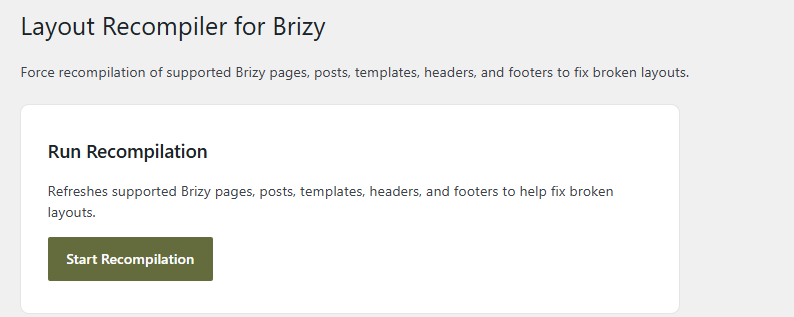
- Visit your website again and check whether the mega menu’s active state is working as expected.
Please let us know the outcome after trying these steps. If the issue persists, we’ll investigate further to help identify the cause.
0 -
Very strange. I went in this morning to follow your instructions and the menu was working perfectly fine. Nothing had been done yet.
I did make a small change to the header and increased the logo from 23 to 25% and saved it.
I will keep an eye on it. It is nice to know you have the recompiler. opening 100s of pages and making a small change and saving them is quite time consuming when upgrading the plugin requires it.
To test this, I added a new link to the menu again. And the problem presented itself. I changed the logo from 25% to 24% and saved it and the problem went away. So recompiling the header section did correct the issue.
It appears time or suggestion 1 corrects the issue.
0
Please sign in to leave a comment.
Comments
5 comments