Menu and Footer Not Displaying on Project Templates After Brizy Update

Hello,
I updated Brizy to the latest version on the website https://carpeggiani.eng.br/, but after the update, the website’s menu and footer disappeared from some pages.
I was able to add them back to most of the pages. However, I am having a problem with the Project templates in both English and Portuguese.
The following two project pages are examples where the issue can be observed:
-
English: https://carpeggiani.eng.br/en/projeto/mhnet-telecon-2/
-
Portuguese: https://carpeggiani.eng.br/projeto/mhnet-telecon/
The issues are:
-
The menu appears correctly while editing the template in Brizy, but it does not appear when viewing the page outside the editor.
-
In the Portuguese Project template, the footer appears correctly on the live page.
-
In the English Project template, the footer only appears inside the Brizy editor and is not displayed on the live page.
-
The menu and footer seem to be correctly assigned within the templates, but they are not being rendered properly on the published pages.
The issue started after updating Brizy to the latest version.
Could you please help us investigate and fix this issue?
Thank you in advance for your assistance.
Best regards,
Pâmela
-

Hi Pâmela,
Could you please share temporary WP Admin access so we can take a closer look at the issue? You can add us as an Admin user in your WordPress dashboard and send the details to communitysupport@brizy.io:
- Community post link: https://support.brizy.io/hc/en-us/community/posts/39469132324242
- WordPress Admin URL:
- Username:
- Password:
Best regards,
Ariel H.0 -
Hi Ariel,
Thank you for your response. I have already sent the temporary WordPress admin access to you by email so you can take a closer look at the issue.
0 -
Hi Pamela,
We’re currently getting a 403 Forbidden error when trying to access the website, which appears to be related to the firewall or security settings.
Could you please temporarily disable the website firewall/security protection so we can log in and inspect the issue? Once we’ve completed the investigation, you can re-enable it.
Please let me know once it has been disabled, and we’ll proceed with checking the website.
Best regards,
Ariel H.0 -
Hi Ariel,
I have temporarily disabled the ModSecurity protection on the Host server and added the recommended
.htaccessrule to allow access towp-login.phpandxmlrpc.phpfrom international IP addresses.Could you please try accessing the site again and let me know if you are still receiving the 403 Forbidden error?
Best regards,
Pamela0 -
Hi Pâmela,
Thank you for the detailed information.
I checked the template settings, and I noticed that the header/footer template has multiple individual display conditions assigned to specific Project templates/pages. This can cause the header or footer to appear inconsistently, particularly when separate English and Portuguese templates are involved.
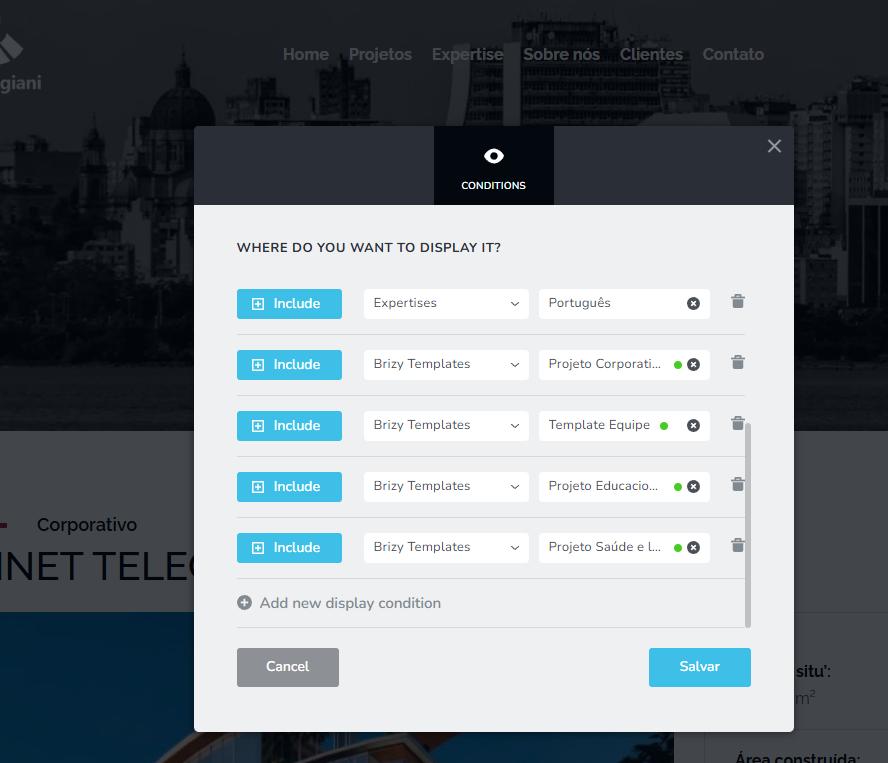
Instead of adding a separate display condition for each Project template, the best practice is to use a broader display condition that covers all Projects. For example:
Include > Project/Projeto > All
This ensures that the header/footer is automatically applied to all relevant Project pages, rather than maintaining multiple individual conditions.
I haven't made these changes on my end because the website uses multiple languages, and I don't want to risk changing the wrong display conditions or affecting pages that are currently working correctly. It would be safer for you to update these conditions on your end, since you are more familiar with which templates should be assigned to the English and Portuguese versions.
After updating the conditions, please save the template, clear any website/cache plugins, and check the affected Project pages again.
Best regards,
Ariel H.0 -
Hi Ariel,
I have made the changes to the display conditions for the footer on both the English and Portuguese versions of the site. However, the issue still persists: the footer and menu are not appearing on the project category pages or on the individual project pages.
Please see the examples below:
Portuguese
Project Category:
Page link: https://carpeggiani.eng.br/category/educacional/Individual Project Page:
Page link: https://carpeggiani.eng.br/projeto/mhnet-telecon/English
Project Category:
Page link: https://carpeggiani.eng.br/en/category/educational/Individual Project Page:
Page link: https://carpeggiani.eng.br/en/projeto/mhnet-telecon-2/Could you please take a look and help us identify what might be causing this issue?
Thank you!
0 -
Hi Pâmela,
Thank you for checking the display conditions.
Since the site is using Templates, the header and footer should normally be applied directly to the appropriate templates. This is particularly important for the project category and individual project pages, as these are generated through their respective templates.
I’ll need some time to study how the site is structured and how the templates are currently being used. It may take some time to review and replicate the issue.
Best regards,
Ariel H.0 -
Hi Ariel, how are you?
Okay, I'll look forward to hearing from you then. Thanks!
0 -
Hi Pâmela,
We’ve temporarily placed the website in maintenance mode as we’re getting the following error when updating a few translated pages:
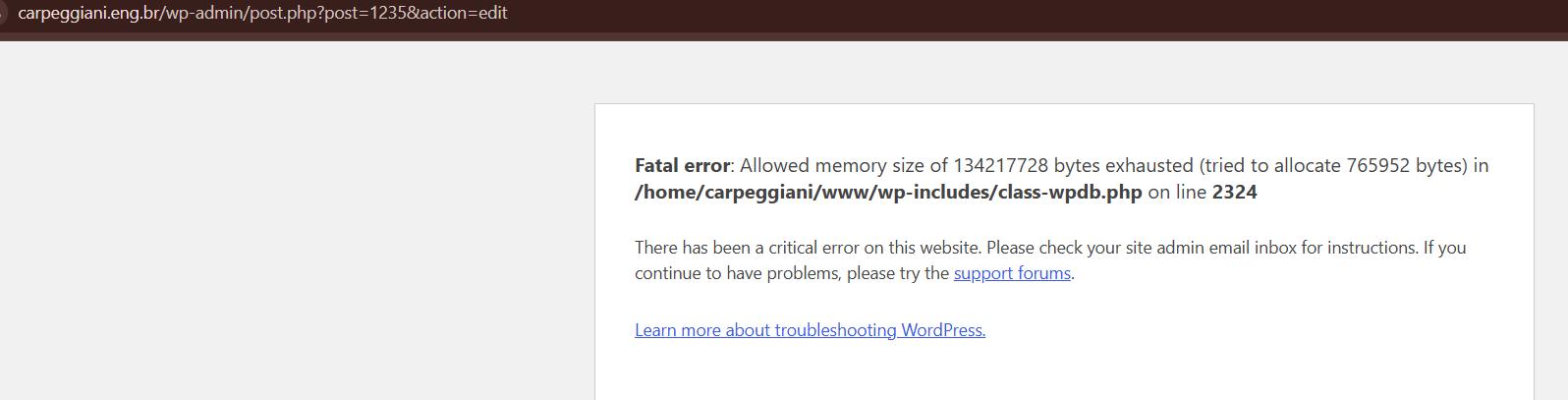
It looks like the current PHP memory limit is set to 128M. Could you please increase the PHP memory limit to 512M?
Once this has been increased, please let us know so we can continue working on your site.
Looking forward to your update.
Best regards,
Ariel H.0 -
Hi Ariel,
Unfortunately, I'm unable to increase the PHP memory limit to 512 MB, as the maximum available on my hosting plan is 256 MB.
0 -
Hi Pamela,
Thank you for the update. I’ll check the site again. I’ll let you know as soon as we’ve finished working on it.
Best regards,
Ariel H.0 -
Hi Pâmela,
I've made some changes to the header so the correct navigation menu should now display across the pages. One noticeable change is that I've switched to using the Polylang language switcher.
The Projects Template already includes its own navigation menu, which I believe is a better approach than relying on display conditions to show or hide different headers. This keeps the navigation directly within the template, making it easier to manage and ensuring that the correct menu is displayed on the relevant pages without depending on multiple display conditions.
Portuguese
Project Category:
Page link: https://carpeggiani.eng.br/category/educacional/Individual Project Page:
Page link: https://carpeggiani.eng.br/projeto/mhnet-telecon/English
Project Category:
Page link: https://carpeggiani.eng.br/en/category/educational/Individual Project Page:
Page link: https://carpeggiani.eng.br/en/projeto/mhnet-telecon-2/Could you please check if this approach works for you?
If you're happy with the result, I'll provide more details on how I accomplished this in my next reply.
Best regards,
Ariel H.0 -
Hello Ariel,
Thank you for your response and for your commitment to helping me resolve these issues.
Yes, I would appreciate it if you could provide me with the details on how to implement this solution.
I would also like to let you know that I have discovered two additional issues:
-
Header and footer missing on Expertise posts: The header and footer are also missing from the individual Expertise post pages.
-
Missing images on an Expertise post: I noticed that the page below contains two images that are registered in the content but are not displaying on the website. This issue appears to affect only this specific page.
Could you please investigate this issue as well?
Example of an Expertise post with missing images, header, and footer:
https://carpeggiani.eng.br/pt/post_expertise/construção-alta-sob-a-influência-do-vento/
The images that should be displayed are attached below.
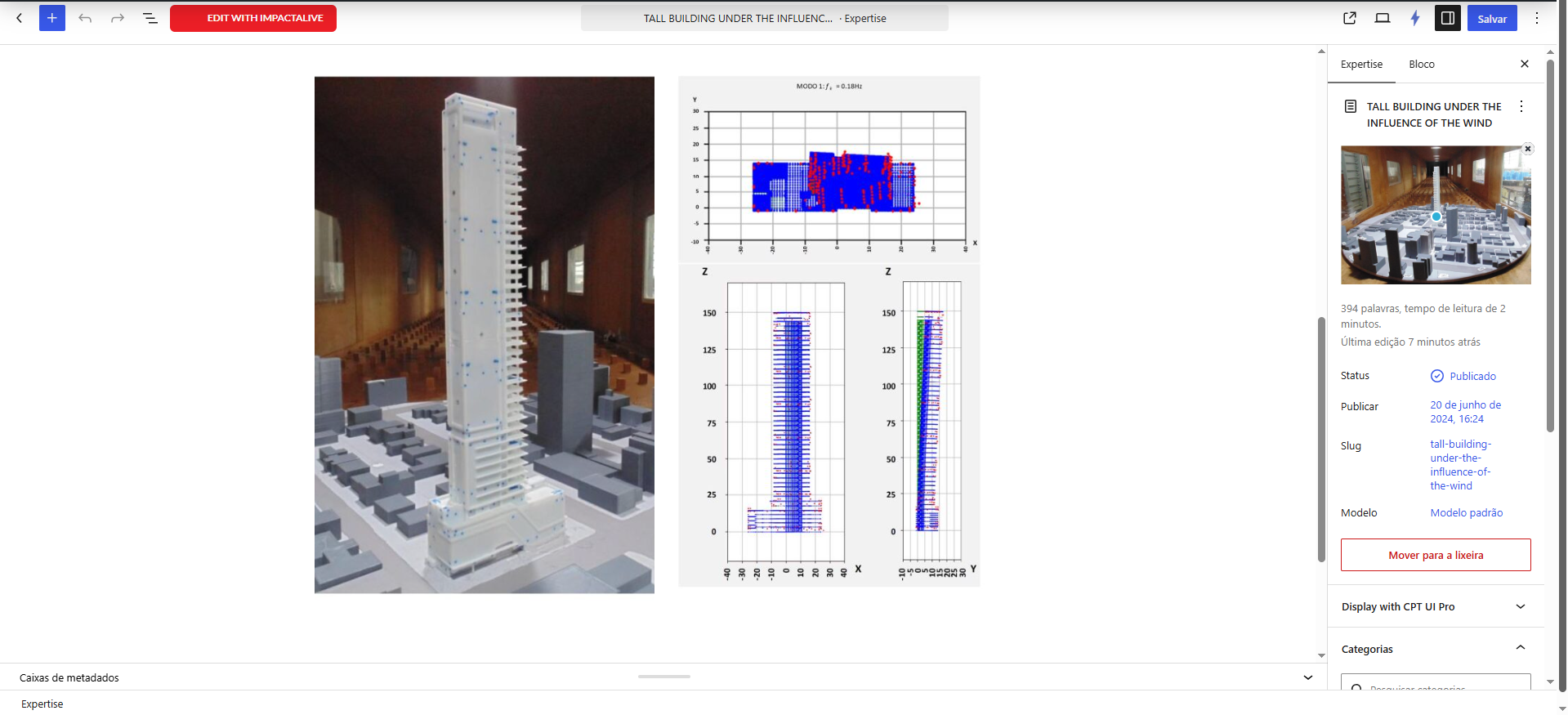
Thank you again for your assistance. I look forward to your guidance on how to resolve these issues.
Best regards,
Pâmela0 -
-
Hi Pâmela,
I've updated the Expertise Templates to include the header and footer.
Regarding the missing image, could you please try deleting the images from the post and re-uploading them to see if that makes any difference?
I'm currently on leave, but I'll make time to create a short screencast explaining the changes made. I'll let you know once it's ready.
Thank you for your understanding!
0 -
Hi Ariel, thank you for your assistance! I also managed to resolve the image issue on the expertise post.
0
Please sign in to leave a comment.
Comments
15 comments