Freelancer Account Access

I've purchased on Sept 4th the Brizy Freelancer account but don't know how to access it to add another WP license to it. I've had an account before with Brizy freelancer and I usually go into the dashboard to WP License and just get another one....
What's going on with my account?
I see the receipt for paying $119 per year but I also see a charge for $19 per month.
Help!
0
-

Hello Reveal Aesthetics,
Here is what I believe happened with your subscription:
- September 4, 2026: You purchased the "Freelancer WordPress" annual plan.
- October 18, 2026: You modified the subscription to the "Personal Cloud" monthly plan using the “Update Subscription” option on the Stripe billing page. This changed your plan from the annual Freelancer WordPress subscription to the monthly Personal Cloud subscription.
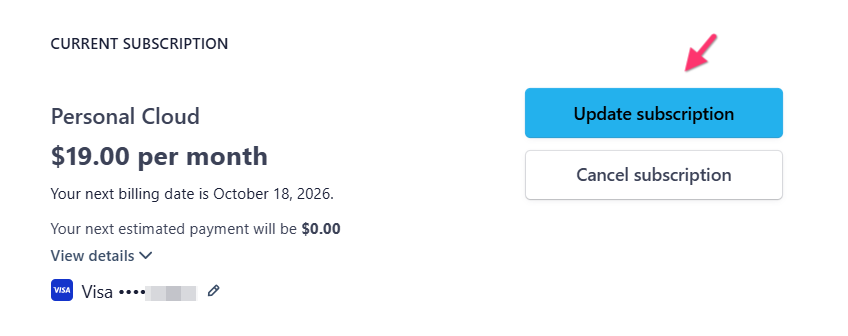
- After switching to the lower-priced plan, the $19 payment was adjusted against the remaining credit balance in your account.
If the subscription change was unintentional, you can switch your subscription back to the Freelancer WordPress annual plan by following these steps:
- Sign in to your Brizy account at https://www.brizy.io/account/login
- Go to Account → Billing. This will open your Stripe billing page.

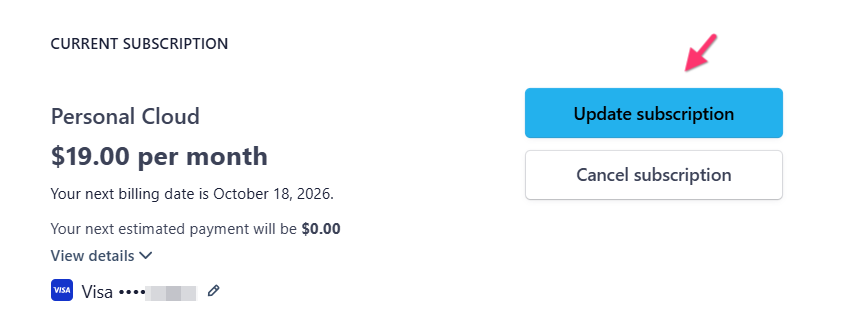
- Click "Update Subscription"
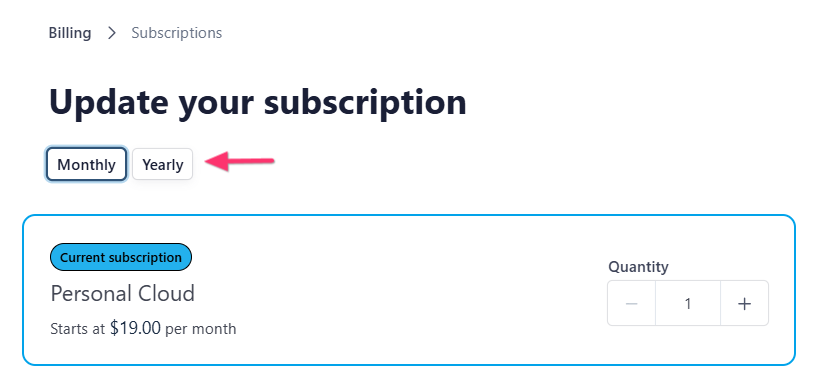
- Select the “Yearly” tab to view the available annual plans.
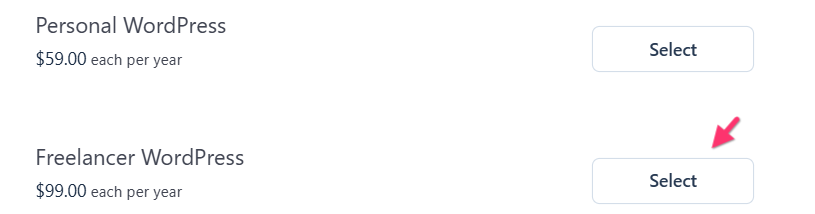
- Select “Freelancer WordPress” plan and click “Continue” at the bottom of the page.
- On the next page, review the payment calculation. If everything looks correct, click “Confirm” to switch your subscription back to the "Freelancer WordPress" annual plan.
0
Please sign in to leave a comment.
Comments
1 comment