Brizy Cloud — support request

Site: https://www.gabrielevasario.com Plan: Brizy Cloud Context: medical practice site (orthopaedic shoulder surgeon, Turin, Italy), 5 languages served under path prefixes: /it/ (default), /en/, /fr/, /es/, /ru/.
Hello,
I am optimising my site for search engines and for AI answer engines (ChatGPT, Claude, Perplexity, Google AI Overviews). Google PageSpeed Insights now runs an "Agentic browsing" category and my site fails two of its three audits.
I already received your reply about llms.txt in the community thread (thank you — noted below as point 1). The remaining points are still open. Where a feature already exists in Brizy Cloud, please point me to the exact location in the interface. Where it does not exist, please tell me plainly so I can plan around it.
1. llms.txt — follow-up on your reply
Thank you for confirming that llms.txt support is in progress. I will wait for the release, and I take your point that adoption is currently low and that Google does not use it for AI Overviews.
One small request in the meantime:
https://www.gabrielevasario.com/llms.txt currently returns HTTP 200 with a zero-byte body. An empty file causes the PageSpeed Insights audit to fail, whereas a path that simply does not exist would most likely not be audited at all.
Question: until the feature ships, could that path return 404 instead of an empty 200? An empty file is the worst of the three possible states.
2. AI credits cannot be purchased — "Buy Credits" redirects to the login page
I have received email invitations to try your new AI model, and the AI Builder (BETA) panel shows the banner:
AI credits limit reached. Upgrade plan or Buy Credits
I tested with 30 euros but i would like to know if with my LTD APPSUMO licence i get any monthly allowance.
3. Custom JSON-LD structured data — how do I replace the auto-generated schema?
My pages currently output a single JSON-LD block of type LocalBusiness with only four properties (name, telephone, email, address).
For a medical practice this is too thin. I need to output a Physician schema including medicalSpecialty, sameAs, geo, areaServed, openingHoursSpecification, availableService and potentialAction, plus a separate FAQPage block.
Questions:
- Can I replace or override the auto-generated
LocalBusinessJSON-LD site-wide? - Is there a global header code-injection field in Brizy Cloud where I can add my own
<script type="application/ld+json">block on every page? - If injection is per-page only, is there a way to apply it globally without editing every page individually?
4. HTML heading tags — a text element styled as a heading still renders as <p>
On my homepage the main headline "Specialista in Chirurgia della Spalla a Torino" renders at 47px and visually reads as the page's main heading, but the actual HTML tag is <p>. The page contains zero <h1> elements and ten <h2> elements.
This breaks the heading hierarchy and is one of the reasons PageSpeed reports that "the accessibility tree is not well-formed".
Questions:
- How do I set the underlying HTML tag (h1, h2, h3, p) of a text element in the editor?
- Is the typography preset ("Heading 1", "Heading 2") purely visual, or is it supposed to also control the HTML tag? On my site it appears to be visual only.
- Is there any way to audit a page's heading structure from inside the builder?
5. Image alt text — is there a bulk or AI-assisted way to add it?
Every image on my site is missing alt text: 15 of 15 on the homepage, 9 of 9 on /it/chi-sono. The site has roughly 40 pages in Italian alone, multiplied by 5 languages.
Adding alt text by hand, image by image, across all pages and all languages is not realistic.
Questions:
- Can alt text be set once in the Media Library and inherited by every element that uses that image, rather than set per element per page?
- You have recently added AI features to the builder (AI Builder, AI text generation). Is there — or is there planned — an AI-assisted bulk alt-text generator? For a multilingual site this would be a major time saver and it directly improves both accessibility scores and AI-crawler comprehension. (See point 2: I currently cannot obtain AI credits, so I cannot test this myself.)
-
Regarding the AI features, can I change the font for all the text across my entire website and all its pages? Is it able to do that?
Also, I cannot see anywhere how my purchased credits are being used, so I do not know which actions consume them or when. Is there any indicator planned for this? Or do I need to leave my work, interrupt my workflow, and go to the account settings?
- Is there any bulk or API method to set alt attributes across the site?
6. hreflang tags are missing from the HTML
My site serves 5 languages. The sitemap at /sitemap.xml correctly contains xhtml:link rel="alternate" hreflang="..." entries for every URL.
However, the rendered pages contain zero hreflang link tags in the <head>. I checked the homepage, /it/chi-sono and an article page: all have a self-referencing canonical but no hreflang alternates.
Google recommends hreflang annotations in the HTML head, not only in the sitemap.
Questions:
- Is this expected behaviour for Brizy Cloud multilingual sites?
- Can hreflang tags be emitted in the page
<head>automatically? - If not, can I add them through a global head-injection field?
7. Removing the demo shop pages inherited from the template
My sitemap still contains 9 demo product pages inherited from the template:
/it/shop/sample-blue-flannel /it/shop/sample-boardshorts
/it/shop/sample-flower-woven /it/shop/sample-jade-tank
/it/shop/sample-rimini-romper /it/shop/sample-sunglasses
/it/shop/sample-white-tank
These are sample clothing products on a medical website. They are indexable and they appear in my sitemap, which is bad for both search engines and for AI crawlers trying to understand what this site is about.
I have blocked them in robots.txt as a stopgap, but I want them gone.
Questions:
- What is the correct way to permanently delete these demo products and their pages so that they also disappear from the generated sitemap?
- Should I delete them from Products, from Pages, or both?
- I do not use the shop at all: can the entire Shop module be disabled so that no
/shop/URLs are generated?
Thank you very much for your help. If any of these features do not currently exist, I would be grateful to know whether they are on the roadmap — particularly the AI-assisted alt text and the custom structured data, which are the two with the largest practical impact for a multilingual medical site.
Best regards, Dr. Gabriele Vasario https://www.gabrielevasario.com
-

Hello Dr. Vasario,
Here are answers to your questions:
-
llms.txt
Thellms.txtfile is currently in the testing phase. We are testing different aspects of the feature, so what you’re seeing right now may change as testing continues. We appreciate your patience while we complete the testing and move toward a stable release. -
AI credit purchase
Clicking “Buy Credits” should take you to a Stripe payment page where you can purchase additional AI credits.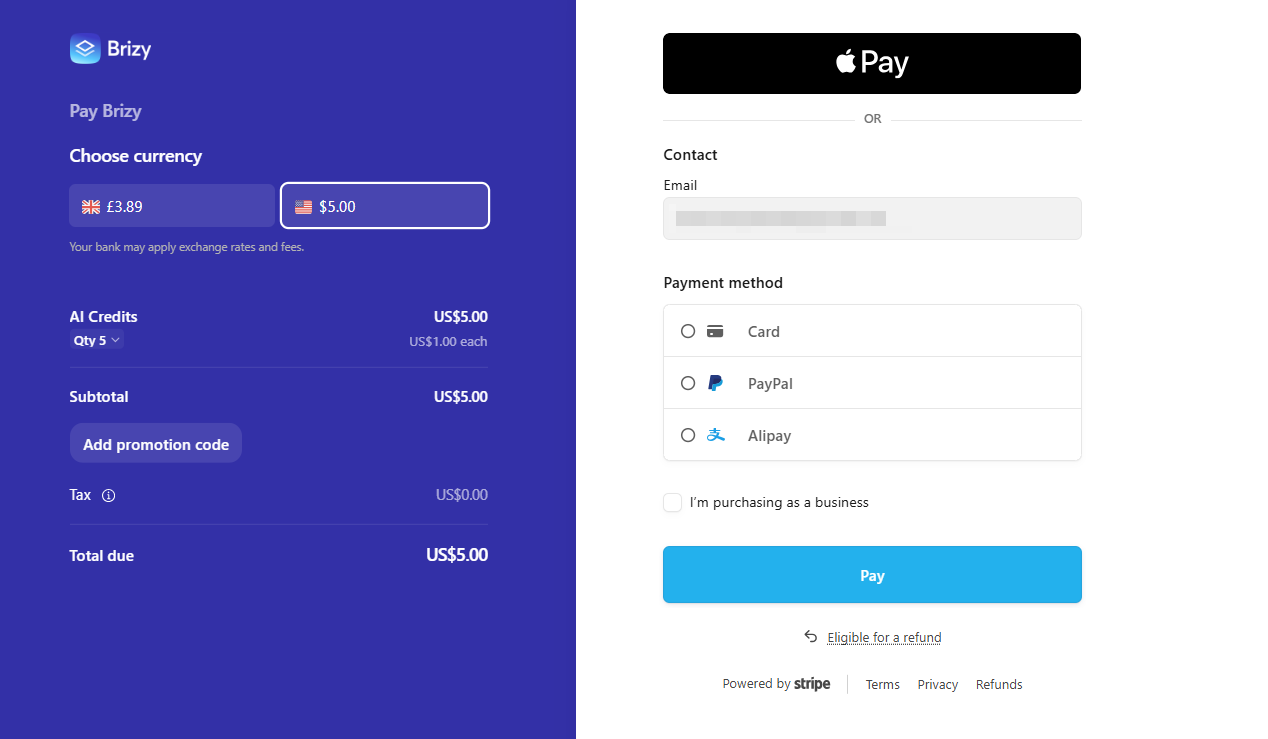
The AppSumo LTD plan does not include a monthly allocation of free AI credits. Brizy’s AI credit system works more like the credit model used by LLM aggregation services such as OpenRouter.
At the moment, Brizy Cloud does not have an option to track AI credit usage. -
Structured data markup
Brizy Cloud allows you to add structured data markup to individual pages. You can follow the instructions at Add structured data markup to a page. If you want to add structured data markup across the entire website, you can add the markup under CMS → Project Settings → Site → Code → Code Injection > Header.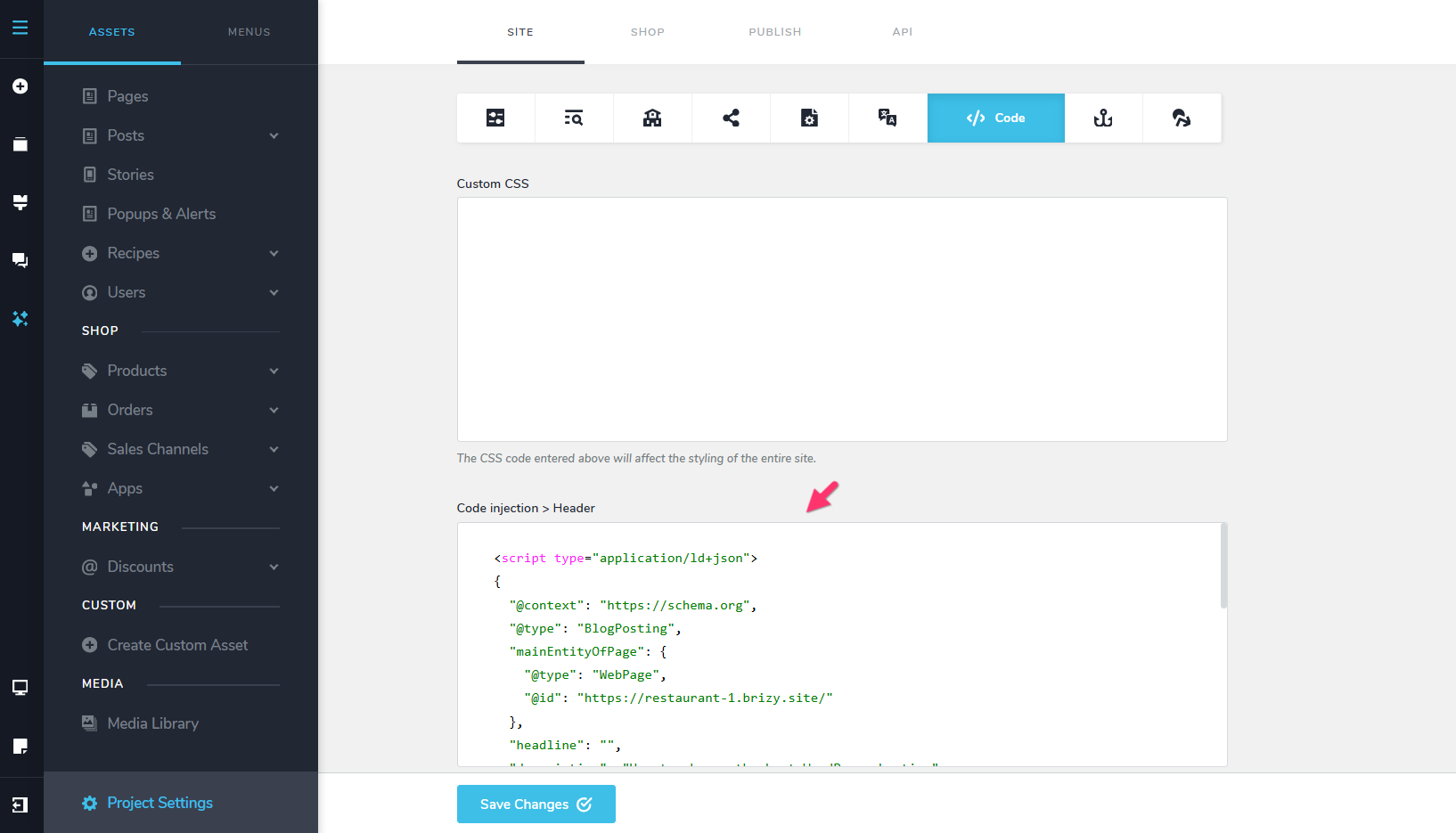
You can remove the LocalBusiness structured data markup by deleting the details you have entered under CMS → Project Settings → Site → Business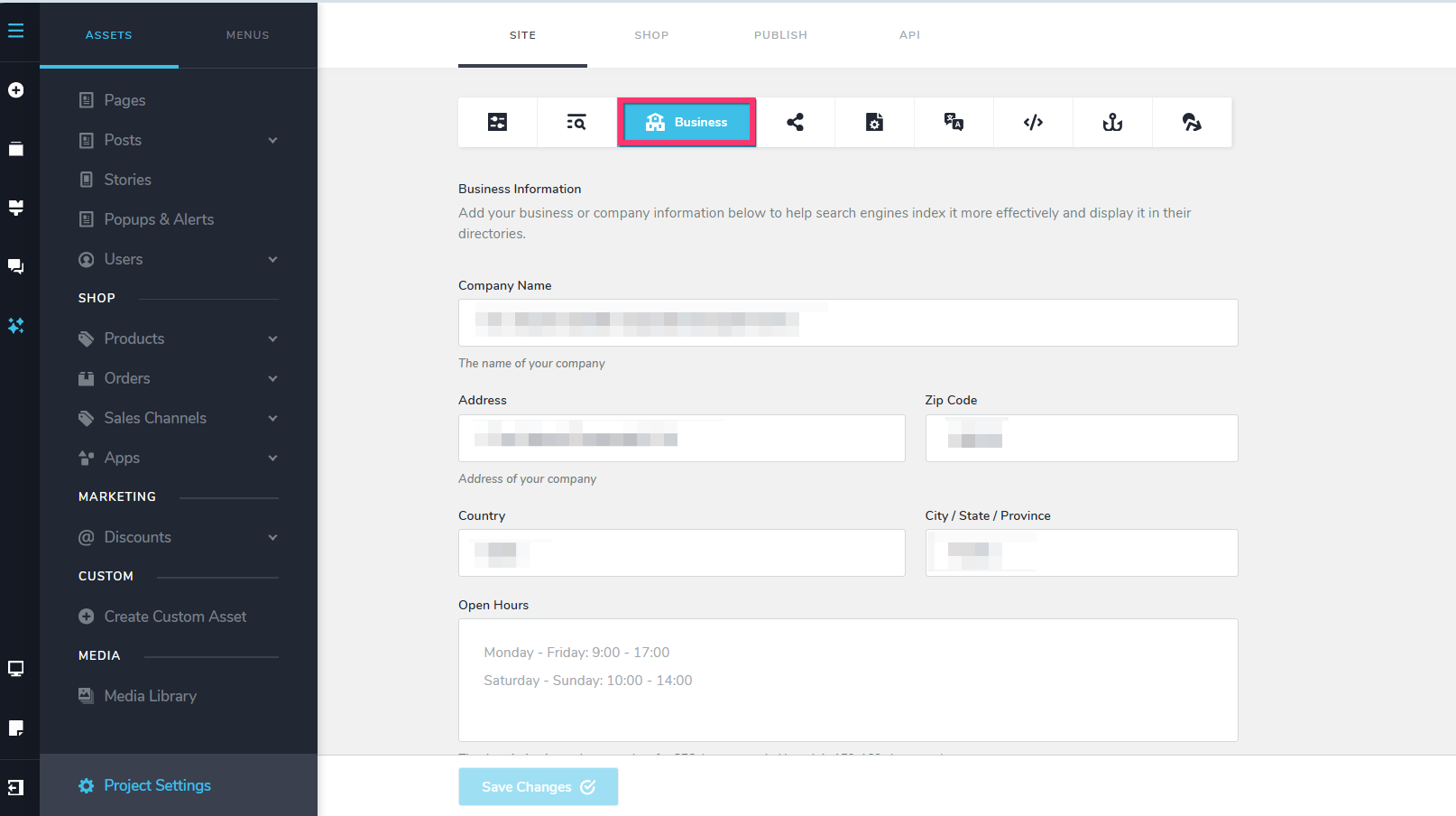
-
HTML heading tags
Brizy includes six global heading typographies: Heading 1 through Heading 6. When you apply one of these global typographies to your text, Brizy automatically assigns the corresponding HTML heading tag. For example:-
Heading 1 →
<h1> -
Heading 2 →
<h2> -
Heading 3 →
<h3>
Please see our tutorial: Elevate Your Design with Typography & Global Styling.
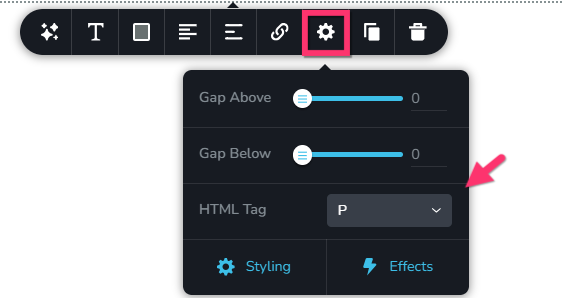
If you use custom typography instead of global typography, you can manually select the required HTML heading tag by selecting the "Cog" icon in the typography toolbar.
-
-
Image alt text
You can add alt text to images through the Media Library. Select the image and enter the text in the Alt Title field in the left sidebar.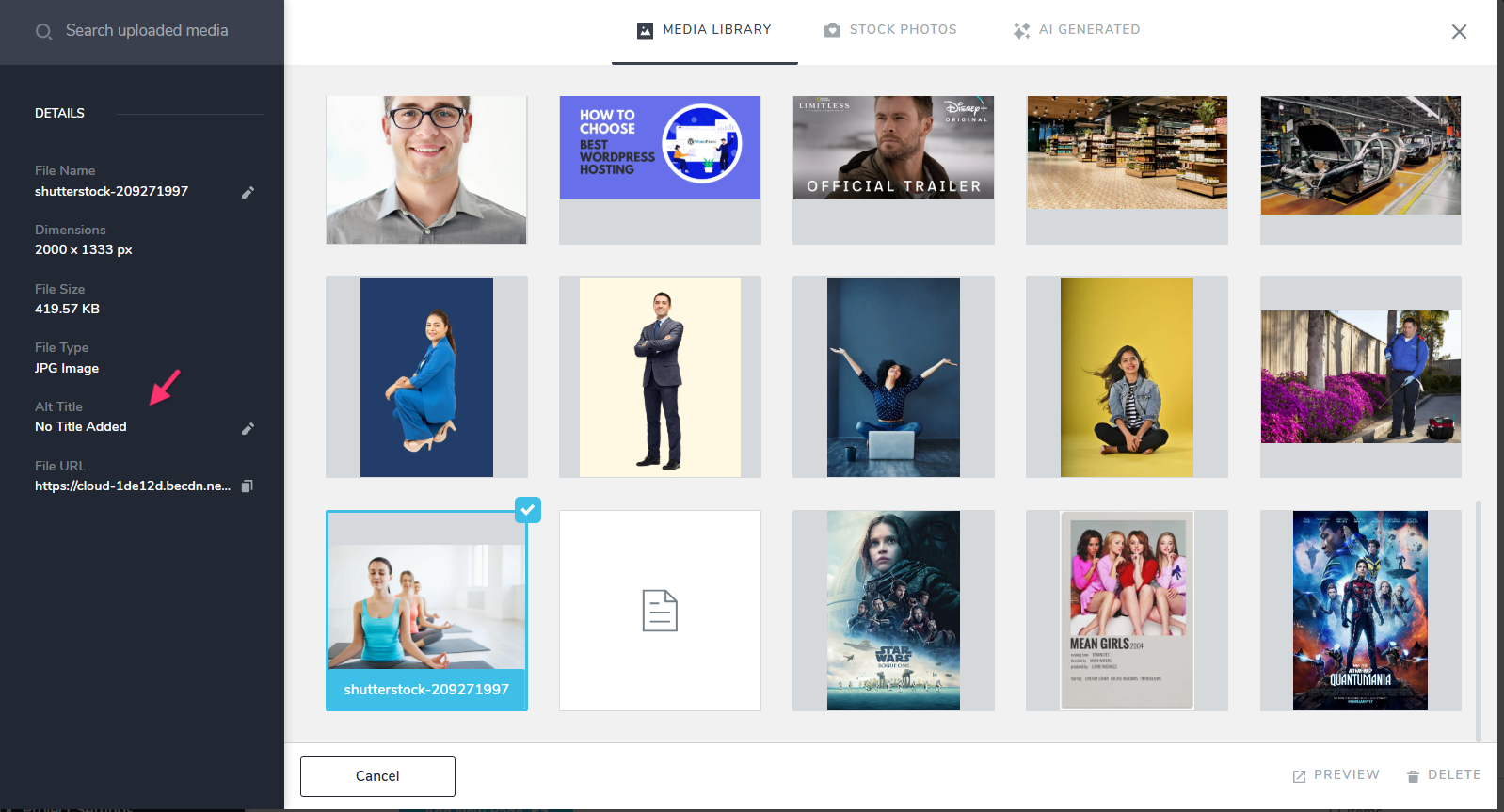
Brizy Cloud does not currently provide an AI-powered bulk alt-text generator. However, once you have AI credits in your account, you could try using the AI chatbot to assist with this task.
-
hreflang tags
I can see the hreflang tags in the source code of your homepage. You can also use TechnicalSEO.com’s hreflang testing tool to verify them.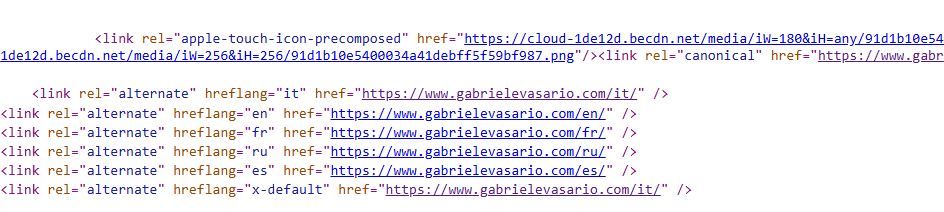
-
Removing the demo shop
You currently have the Shop Trial plan activated on your project. If you deactivate the Shop Trial plan, the shop pages should be disabled for the project.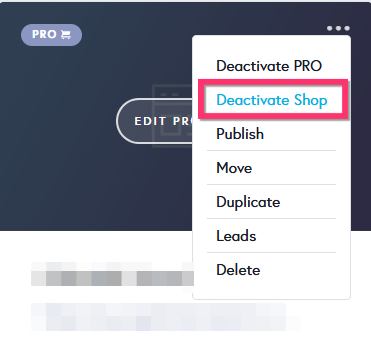
0 -
-
Hello KC,
Thank you very much for the detailed and precise answers — every one of them was actionable. Here is where I stand now:
H1: fixed. Switching the homepage headline to the global Heading 1 typography now outputs a real <h1>.
Demo shop: fixed. After deactivating the Shop Trial plan, the demo pages return 404 and have disappeared from the sitemap.
hreflang: you were right, the tags are in the <head>. Thank you for checking.
Structured data: I will add my schema through Code Injection > Header, as you suggested.
A few follow-ups and suggestions:1. AI alt text — the chatbot cannot do it. Following your suggestion, I asked the AI chatbot three questions before letting it change anything: whether it can edit the Alt Title field in the Media Library, whether it can see the visual content of an image (or only its file name), and whether an Alt Title set in the Media Library propagates to the pages where that image is already used. It answered "no" to all three and made no changes.
So at the moment there is no AI-assisted way to add alt text in Brizy Cloud. I would like to suggest it as a feature: an AI tool that looks at each image and proposes an alt text, which the user reviews and approves in bulk. My site has 84 unique images; for multilingual sites this would save hours, and it directly improves accessibility and how AI search engines understand the site.
2. Is alt text per language, or one for all languages? My site has 5 languages. If I set the Alt Title in the Media Library, does the same text appear on all language versions of the page, or can I set a different alt text for each language? If there is only one, the English, French, Spanish and Russian pages would show Italian alt text.
3. Does the Media Library Alt Title reach images already placed on pages? The chatbot said no. Could you confirm? If it does not, I would need to set the alt text on every single image element, page by page, and in that case the Media Library field would not help for existing content.
4. AI credit usage indicator. I bought AI credits, but inside the editor I cannot see how many I have left or how many each action consumes. I would suggest a small indicator in the AI panel showing the remaining balance and the cost of the last action, so users do not have to leave the editor to check.
5. Changing the font across the whole site with AI. I asked this in my previous message but it may have been missed: can the AI change the font of all text across every page of the site in one go? Or is the recommended way to change it once in the global typography settings?
Thank you again for your time and for the clear answers.
Best regards, gab
0 -
Hello Dr. Vasario,
Let me go over your questions:-
AI-assisted Alt Text
AI chatbot currently cannot configure Alt Text for images in the Media Library. You are correct; at the moment, Brizy Cloud does not have an AI-assisted way to generate or add Alt Text.
Thank you for the feature request. We’ll escalate your suggestion for an AI tool that can analyze each image, suggest appropriate Alt Text, and allow the user to review and approve the suggestions in bulk.
-
Translating Alt Text:
It is possible to translate the Alt Text assigned to images on a page. For example, if your default website language is Italian and you set the Alt Text of your photograph to “Dott. Vasario Gabriele”, this text will appear in the list of strings available for translation. You can then provide the corresponding translation for each language. When a visitor switches the website to English, the Alt Text will automatically change to the English version, such as “Dr. Vasario Gabriele”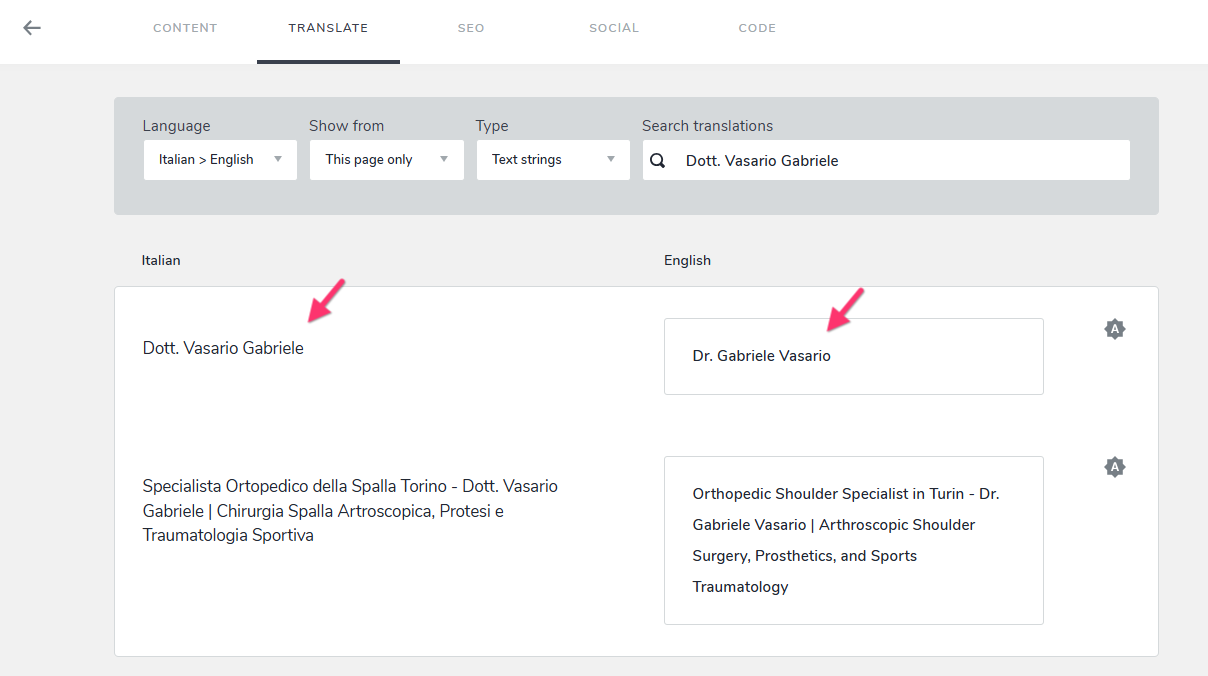
-
How Alt Text is applied from the Media Library
If you add Alt Text to an image in the Media Library before adding the image to a page, the Alt Text will be carried over to the page automatically. However, if the image has already been added to a page, changing its Alt Text later in the Media Library will not update the copies of that image that have already been placed on different pages.
-
AI Credit Usage Log
We already have a feature request for a credit usage log that will show when credits were used and how many credits were consumed for each activity. This should make it easier to understand how credits are being used for different types of AI tasks. We are working on this feature. -
Changing Fonts using AI
We do not recommend using AI to change the font across an entire website. This can unintentionally affect your existing typography design and create inconsistencies across the site.Instead, we recommend using Global Typography. You can configure each typography style centrally through the Global Styling panel and then apply those styles consistently throughout your website.
0 -
-
Hello Dr. Vasario,
We have added LLMS.txt feature to Brizy Cloud. Here’s how you can set it up:
-
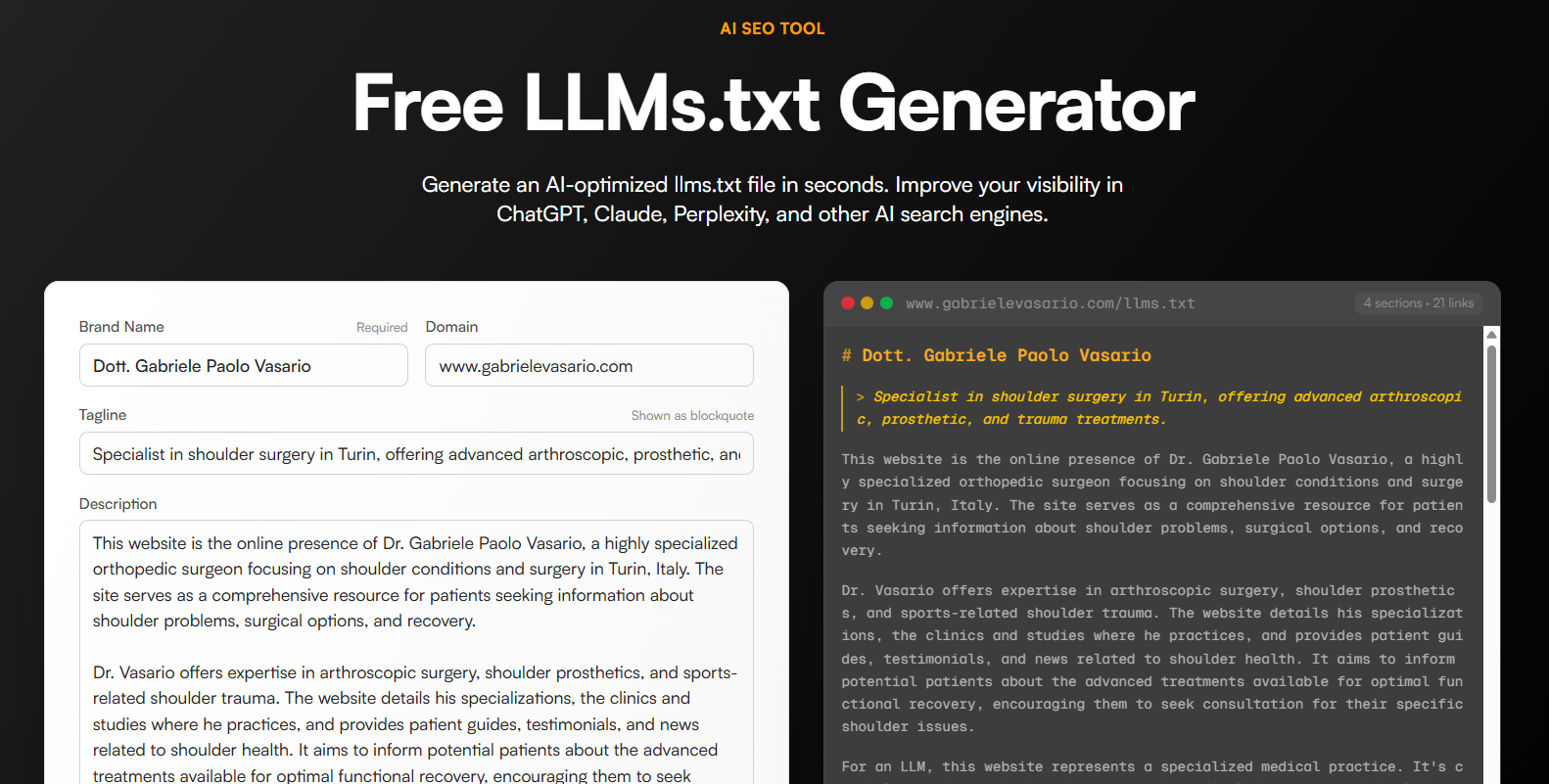
Generate your llms.txt content: Use a tool such as https://llmrefs.com/tools/llms-txt-generator to generate the LLMS content for your website. Enter your website URL and click “Generate.” The tool will crawl your website and create an llms.txt file. Once the file is generated, review the content carefully and make necessary changes. You can add missing pages, improve descriptions, or reorganize the sections so the information accurately represents your website.
-
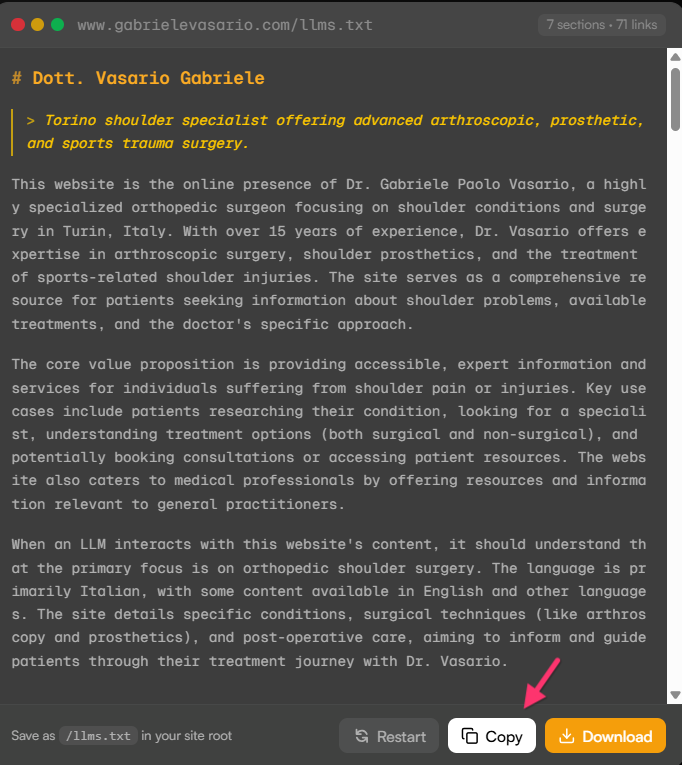
Copy the generated content: Once you’re happy with the content, click “Copy” to copy the complete llms.txt content.
-
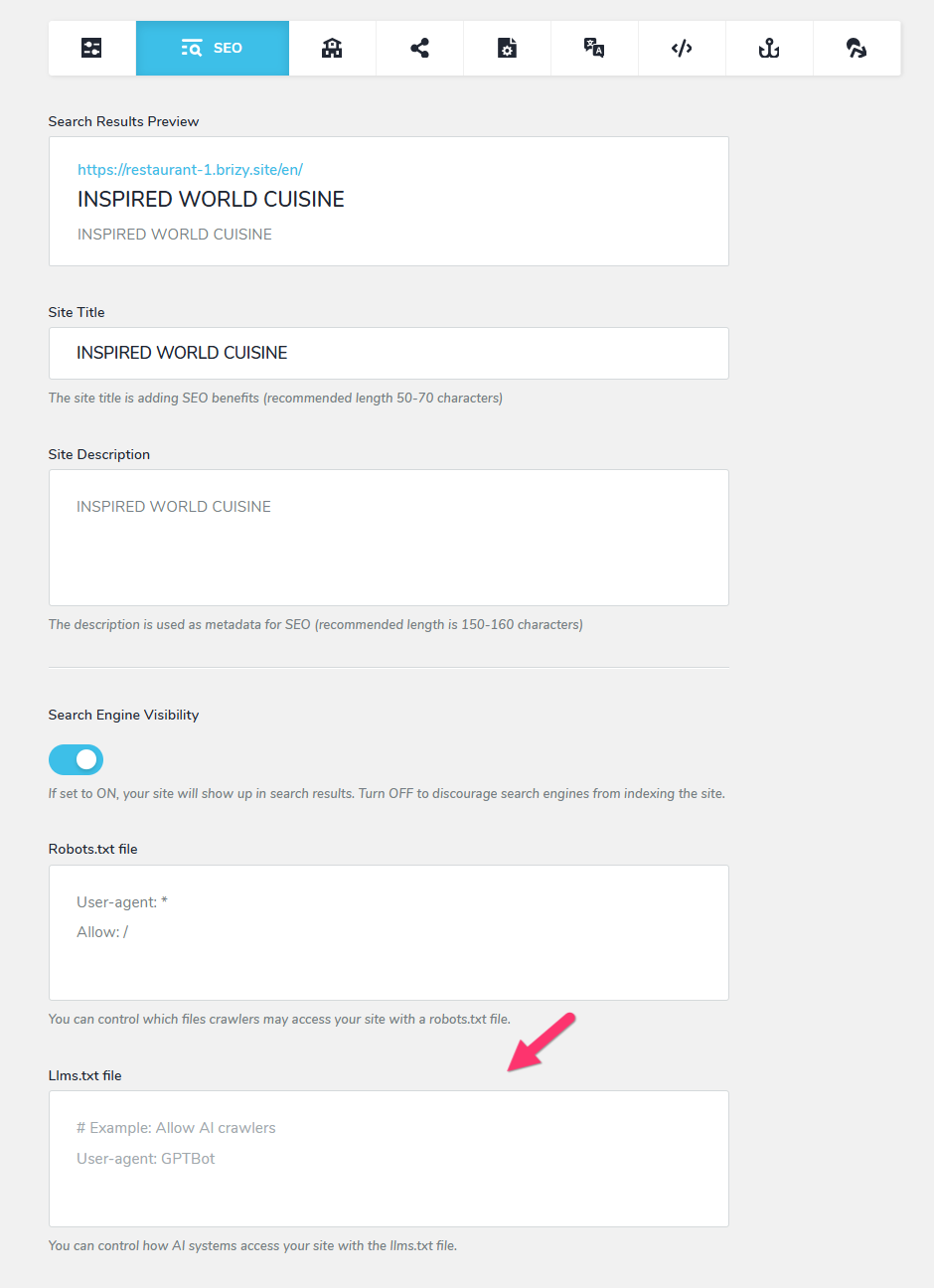
Add it to your Brizy Cloud project: In your Brizy Cloud project, go to: CMS → Project Settings → SEO and paste the copied content into the “llms.txt file” field. Once saved, you can see the file at https://www.gabrielevasario.com//llms.txt
0 -
Generate your llms.txt content: Use a tool such as https://llmrefs.com/tools/llms-txt-generator to generate the LLMS content for your website. Enter your website URL and click “Generate.” The tool will crawl your website and create an llms.txt file. Once the file is generated, review the content carefully and make necessary changes. You can add missing pages, improve descriptions, or reorganize the sections so the information accurately represents your website.
-
Hello KC,
Thank you very much ! This is excellent support, and the llms.txt release came faster than I expected. I will set it up under Project Settings → SEO today.
Thank you also for the clarifications on translating alt text, on the credit usage log and on using Global Typography instead of AI for fonts. All very clear.
**One observation about alt text and the Media Library**, because it affects how I will handle my 84 images:
You wrote that changing the Alt Title in the Media Library does not update copies of an image that are already placed on pages. On my site I saw something different. My portrait (DSC3388-rounded.webp) was already placed on several pages. I set its Alt Title **only in the Media Library**, published, and the alt text now appears on **all seven pages** where the image is used, in all five languages (/it/, /it/chi-sono, /en/, /en/chi-sono, /fr/, /es/, /ru/).
Could you help me understand which behaviour I should expect?
1. Is it possible that this image propagated because it sits inside a global block, and that a normal image placed on a single page would **not** update?
2. If Media Library changes do not reach images already placed, is there any way to re-apply the Media Library Alt Title to existing placements in bulk? Otherwise I would need to edit each image on each page by hand.**One small question about the Embed / Code element:** when I paste HTML into an Embed element on a page, is that HTML included in the page source that the server sends, or is it injected later with JavaScript? I would like to publish some patient testimonials as plain text that search engines and AI crawlers can read without running JavaScript.
Thank you again for your time and for taking the feature request forward.
Best regards,
gab0 -

Hi Dr. Vasario,
Thanks for the details.
I checked your site, and your portrait is stored twice in the Media Library. The copy with the Alt Title "Dr. G. Vasario" is the one used on the chi-sono pages, so the alt text appears there.
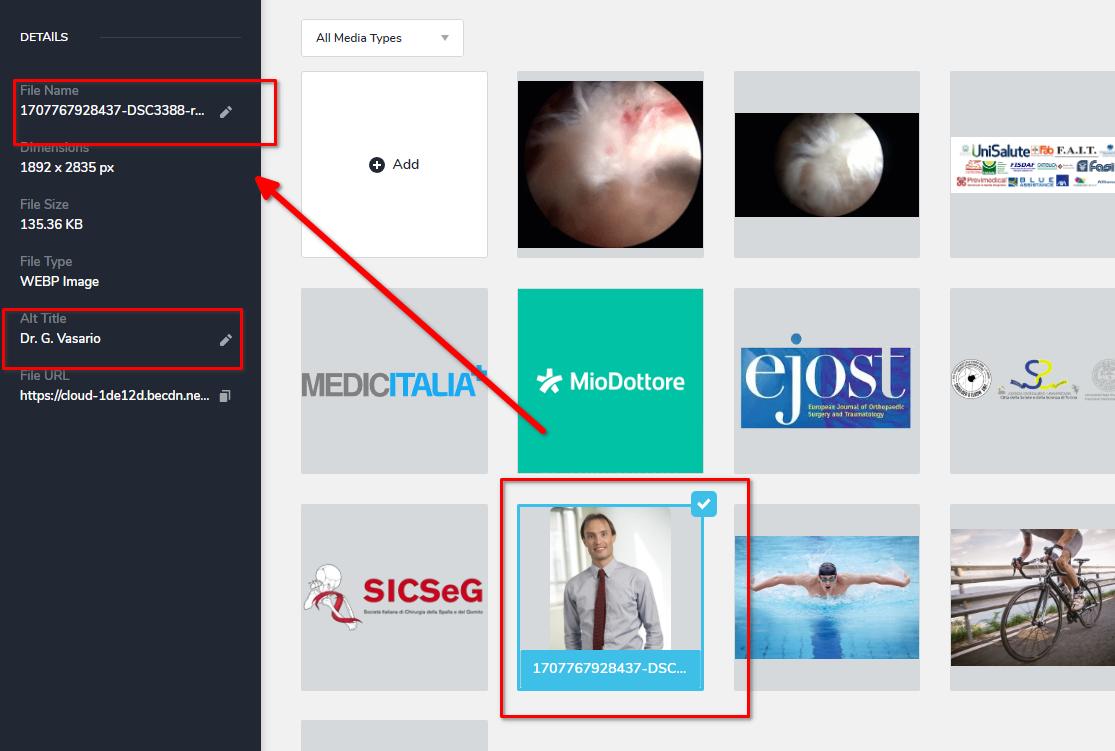
The homepages use a second copy that still has an empty alt.
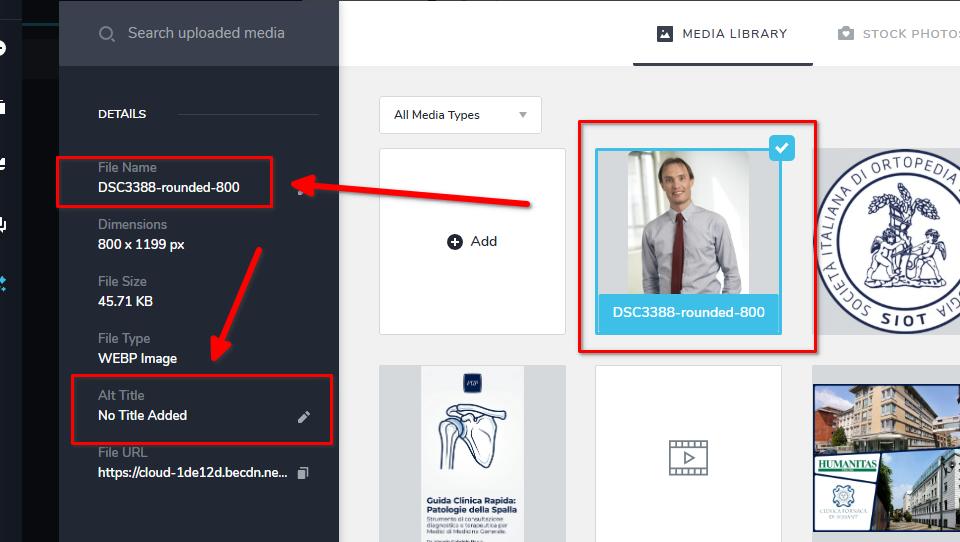
You can confirm this by going to CMS -> Media Library -> Choose the file -> Hit the Pencil Icon to add an Alt title.
Unfortunately, there's no bulk option for alt text, so the Media Library is the practical route for your remaining images for now.
For the Embed element, yes, your pages are rendered on the server, so testimonials added as text will be readable without JavaScript.
Best regards,
Ariel H.0 -
Hello Ariel,
Thank you for checking my site so carefully, and for confirming that pages are rendered on the server, so the testimonials I added as plain text are readable without JavaScript. That settles the question for me.
I have a few follow-ups, in order of importance.
1. Deleting a parent menu item seems to delete its sub-items. In the Main Menu I replaced the custom link "SPECIALIZZAZIONI" (a hand-typed "/specializzazioni") with a page item, moved things around and deleted the old item. All ten sub-items that were nested under it disappeared. Two questions:
Is deleting a parent expected to remove its children? Anyways i re-built it. My bad i guess.
2. Menu item that links to a page in the current language AND to a block on that page. My site has five languages. A "Page" menu item adapts to the visitor's language, but I need the item to land on a specific block (my block IDs are hero-9 ... hero-18). The only way I found is a Custom Link, and a link such as "/specializzazioni#hero-12" always sends visitors to the Italian version. I am now using a relative link without the leading slash ("specializzazioni#hero-12"), which the browser resolves in the current language.Is a relative custom link a supported way to do this?
Is there a native option to combine a Page item with a block anchor, so it follows the language automatically?3. Alt text and the Media Library. Thank you for finding the duplicated portrait. It explains that case, but not another test: I set the Alt Title of an image only in the Media Library (1709631341152-instabilita), and the alt text then appeared on the pages where that image was already placed (home and "specializzazioni"), in all languages. Could you tell me when exactly a Media Library change reaches images that are already on pages, and when it does not? It decides whether I set about 80 alt texts once, or image by image on each page.
4. Feature request: search and usage info in the Media Library. The Media Library has no search field, so with over 80 images I have to scroll one by one, and I can end up with duplicates like the portrait. A search box and a "used on these pages" list for each image would help a lot.
Thank you again for the help.
Gab
0 -
Hi Gab,
Thanks for the detailed follow-ups. Please see my answers below.
Deleting the parent menu will also delete the nested sub-menus. Unfortunately, you will have to start again from scratch.
There is currently no language-aware link option for a page or block anchor. However, it is possible to manually create menus for each language and apply them to the specific translated pages using display conditions. I’ll need to test this first in my testing environment and let you know the results. This may be the best solution we can try for now.
The Media Library ALT text should be visible right away after updating it from the Media Library or publishing the page. To make sure you see the updated result, please clear your browser cache or view the site in incognito mode.
We also appreciate your feature request for a search feature in the Media Library and understand the importance of having this functionality. We will submit this as a feature request for consideration in future versions.
Best regards,
Ariel H.0 -
Hi Ariel,
Thank you, that answers everything.
Menus. Understood about the parent item. I have rebuilt the sub-items, so nothing is pending on your side.
Language-aware anchor links. Please do not spend time testing separate menus per language for me: the relative link works. I now use custom links written without the leading slash, for example "specializzazioni#hero-12", and the browser resolves them in the visitor's current language. I checked the published site: from /en/ the menu opens /en/specializzazioni#hero-12, from /fr/ the French page, and so on, with the translated labels. It may be worth mentioning this in your article about anchor links in menus, because a link starting with "/" always sends visitors to the default language.
Alt text. Thank you for confirming that a change in the Media Library is visible right away on the pages. That matches what I see on my site, so I will set my alt texts once, from the Media Library.
One thing you may want to know. On my homepage, PageSpeed Insights (mobile) reports a console error coming from your script:
preview.7849.a7c42e92.js - Uncaught (in promise) NotSupportedError: The element has no supported sources.
The page has a background video (WebM, VP8, 1024x576, no audio track). The video plays correctly for me on desktop and on phone, so this is only a report, not a problem I need solved.
Thank you again for your help, and for passing on the Media Library search request.
Best regards,
gab
0 -
Hi Gab,
Thanks for the additional details. I’m glad to hear that the relative anchor links are working correctly for you across the different language versions.
About the PageSpeed message, we were able to confirm the same message in PageSpeed’s mobile test. However, the video played correctly during our browser checks, just as it does for you.
This message concerns video playback during the automated test, and we haven’t observed any issues with normal site use.
If you have any further questions, please let us know.
Best regards,
Ariel H.0
Please sign in to leave a comment.
Comments
10 comments