Auto-generated sitemap missing trailing slash on homepage URL

Hi Brizy Support,
I think I've found a small bug in the auto-generated sitemap.xml on my site (firstupcleaning.com).
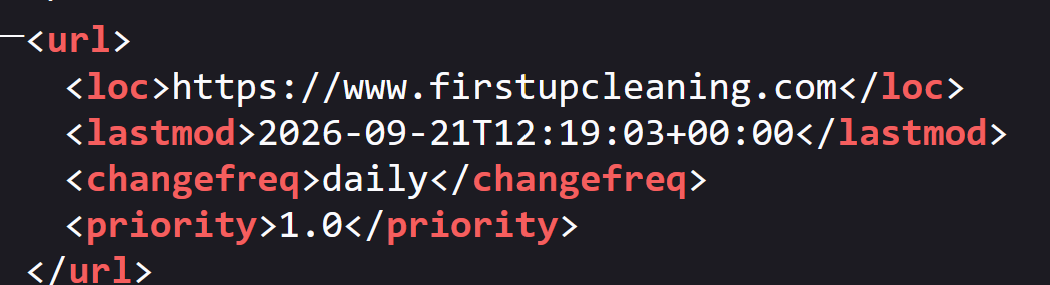
My homepage's Permalink field is explicitly set to "/" (confirmed in the page editor), and my site's global Permalink Structure is set to "/{name}". Every other page correctly includes a trailing slash in the sitemap (e.g., /faq-2/, /jobs-careers/), but the homepage entry in sitemap.xml is listed without one:
<loc>https://www.firstupcleaning.com</loc>
It should be:
<loc>https://www.firstupcleaning.com/</loc>
This seems specific to how the sitemap generator handles the homepage entry, since the permalink setting itself is correct. Could you take a look, or let me know if there's a setting I'm missing?
Thanks!
-

Hello Alan,
By default, Brizy Cloud does not include a trailing slash (/) at the end of page URLs. If you prefer URLs with a trailing slash, you can add one to individual page URLs using Custom Permalinks. However, Custom Permalinks are not supported for the homepage URL, so this workaround cannot be applied to the homepage.
We understand this may be inconvenient, and we apologize for the limitation. For all other pages, you can use Custom Permalinks to achieve the desired URL structure.
0 -
Hi, I understand that and the url shows correctly in the browser with the trailing slash, i am referring to the sitemap url for the homepage. I have attached an image to show it is missing from this one.
 0
0 -
Hello Alan,
Brizy Cloud does not add a trailing slash (
/) to URLs by default. Therefore, the URLs in the sitemap also do not include a trailing slash for the homepage or other pages.You may notice that your homepage URL appears with a trailing slash when you open it in a browser. This is normal browser behavior. For example, when you visit
https://example.com, the browser treats it as the root path/. The slash you see is not added by Brizy Cloud. For other pages, you can use Brizy Cloud’s Custom Permalink feature to add a trailing slash to the URL. However, Custom Permalinks cannot be used for the homepage.Since there is no option to add a trailing slash to the homepage URL in Brizy Cloud, the sitemap also cannot include one for the homepage. The sitemap simply reflects the URL structure used by Brizy Cloud. We understand that having a consistent URL structure is important for you, and we hope this makes the behavior of the homepage, other pages, and the sitemap clearer.
0
Please sign in to leave a comment.
Comments
3 comments