Add stacking card block

Is it possible to add stacking card block, when scrolling card stick at the top of the screen, when continue scrolling second card comes and stck on top of the previous one.
check app.leadora.ca
-

Hi Maf,
This is not currently an available feature in Brizy. However, I think we may be able to achieve the same effect using custom CSS.
Please give me at least 24 hours to look into this and see if I can come up with a working CSS solution similar to the stacking card effect on app.leadora.ca.
I’ll get back to you once I’ve had a chance to test it.
Best regards,
Ariel H.0 -
Hi Maf, could you please share your website URL so we can apply the stacking card effect? We’ll embed the necessary CSS and JavaScript so you can reuse it on other pages using the same block IDs.
0 -
Hi Ariel,
My website is leadora.ca0 -
A). CSS
/* Allow sticky positioning inside the Brizy page. */
.brz-root__container.brz-reset-all {
  overflow: clip !important;
}


/*
 * Limit the sticky cards to this wrapper.
 * The bottom padding gives block3 enough room to complete the stack.
 */

.card-stack {
  position: relative;
  display: flow-root;
  padding-bottom: 50px;

}

.cardblocks{
min-height: 450px !important;
}

/* First card: stays below the fixed 120px header. */

#block1 {
  position: sticky;
  top: 120px;
  z-index: 1;
}


/* Second card: leaves 20px of block1 visible. */

#block2 {
  position: sticky;
  top: 140px;
  z-index: 2;
}

/* Third card: leaves 20px of block2 visible. */

#block3 {
  position: sticky;
  top: 160px;
  z-index: 3;
}


/* Use consistent box sizing for all cards. */

#block1,
#block2,
#block3 {
  box-sizing: border-box;

}

/* Extend each Brizy background to its calculated card height. */

#block1 > .brz-section__content,
#block2 > .brz-section__content,
#block3 > .brz-section__content {
  min-height: inherit;
  box-sizing: border-box;
}
B). JS<script>
(function () {
const cardIds = ["block1", "block2", "block3"];
function getCards() {
return cardIds.map(id => document.getElementById(id));
}
function createStackWrapper() {
const cards = getCards();
if (cards.some(card => !card)) return null;
/* Reuse the wrapper when it already exists. */
if (cards[0].parentElement.classList.contains("card-stack")) {
return cards[0].parentElement;
}
const parent = cards[0].parentElement;
/* All cards must share the same parent. */
if (!cards.every(card => card.parentElement === parent)) {
return null;
}
/* The cards must be consecutive Brizy blocks. */
if (
cards[0].nextElementSibling !== cards[1] ||
cards[1].nextElementSibling !== cards[2]
) {
return null;
}
const wrapper = document.createElement("div");
wrapper.className = "card-stack";
parent.insertBefore(wrapper, cards[0]);
cards.forEach(card => wrapper.appendChild(card));
return wrapper;
}
function alignCards() {
const cards = getCards();
if (cards.some(card => !card)) return;
/* Measure the cards at their natural height. */
cards.forEach(card => {
card.style.minHeight = "";
});
const offsets = cards.map(card =>
parseFloat(getComputedStyle(card).top) || 0
);
const commonBottom = Math.max(
...cards.map((card, index) =>
card.getBoundingClientRect().height + offsets[index]
)
);
/* Make all cards leave the sticky wrapper together. */
cards.forEach((card, index) => {
card.style.minHeight =
`${Math.ceil(commonBottom - offsets[index])}px`;
});
}
function initializeCardStack() {
const wrapper = createStackWrapper();
if (!wrapper) return;
requestAnimationFrame(alignCards);
}
if (document.readyState === "loading") {
document.addEventListener("DOMContentLoaded", initializeCardStack);
} else {
initializeCardStack();
}
window.addEventListener("load", alignCards);
window.addEventListener("resize", alignCards);
if (document.fonts) {
document.fonts.ready.then(alignCards);
}
})();
</script>0 -
Hi Maf,
We've prepared a short screencast to show you step-by-step how to set up the stacking effect in Brizy Builder: https://youtu.be/8VQz7ceqFb0
We have also included all the necessary CSS and JavaScript code directly in this support thread, so you can easily copy and paste them into WordPress.
0 -
Hi Ariel,
Thank you for the guided video, i tried to follow instruction inside brizy cloud, unfortunately i failed to make it works.
In brizy cloud, i used to use custom css, add it to project in custom css section. But now with JS i'm completely lost.
Feel free to add stacking card section in my page.
Accordingly!0 -
Hi Maf,
Everything appears to be in place, except for this part:
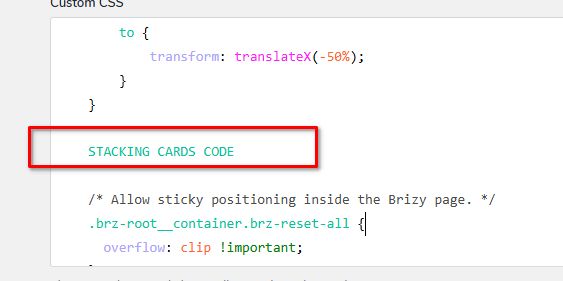
Which should be written as a CSS comment:
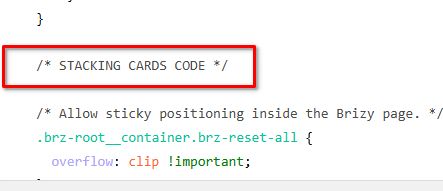
After making that change, everything appears to be working as expected - https://youtu.be/zowbUN1XAVk
0 -
Hi Ariel,
Thanks alot for the support you provided.
I added capture, optimize and grow block where i embeded 3 html block to sort as stached card, it seems working correctly, please check them, and give me your feedback. Also would you like to keep the stached card block you created just put it in hide mode, and i'll check it to better understand the structure.
Best regards!0 -
Also about the JS at the bottom of the page do i need to keep it.
0 -
Hi Maf,
The site is looking good! And yes, please keep the JS as well, since the CSS and JS complement each other.
0
Please sign in to leave a comment.
Comments
10 comments