Block library previews never loading

I'm hoping someone has seen this one, or can tell me what I've missed.
When I open the Blocks panel, the categories and counts load correctly. I can see 630 blocks, 267 heroes, and so on. But every preview tile sits on the loading spinner and never resolves. It doesn't matter how long I leave it, and switching category doesn't help.
Setup is WordPress with Brizy 2.8.22 and Brizy Pro 2.8.12, both current, Pro licence showing as active. The site sits on shared hosting behind Cloudflare.
What I've already ruled out, so nobody has to ask:
The template CDN is reachable and quick from inside the editor. A direct request to the get-kits endpoint comes back 200 in about 36ms, and the collections endpoint returns 200 with roughly 163KB covering all 630 block records. 629 of those records carry a thumbnail filename. So the editor seems to have everything it needs.
What it never does is request a single one of those thumbnail images. Not one image request, on first open or on switching category.
At the moment the panel opens, the editor throws 19 unhandled promise rejections, which is roughly one per visible tile. Nothing happens after that.
I've reproduced it in a clean Chrome incognito window with no extensions running, and after a hard reload with cache bypass. So it isn't a browser, cache or extension problem at my end.
My reading, and I may be wrong here, is that it's failing when it builds the image URLs from the filenames rather than when it fetches them. But I don't know the internals well enough to say.
Has anyone run into this, and is there something on the Brizy side I should be checking?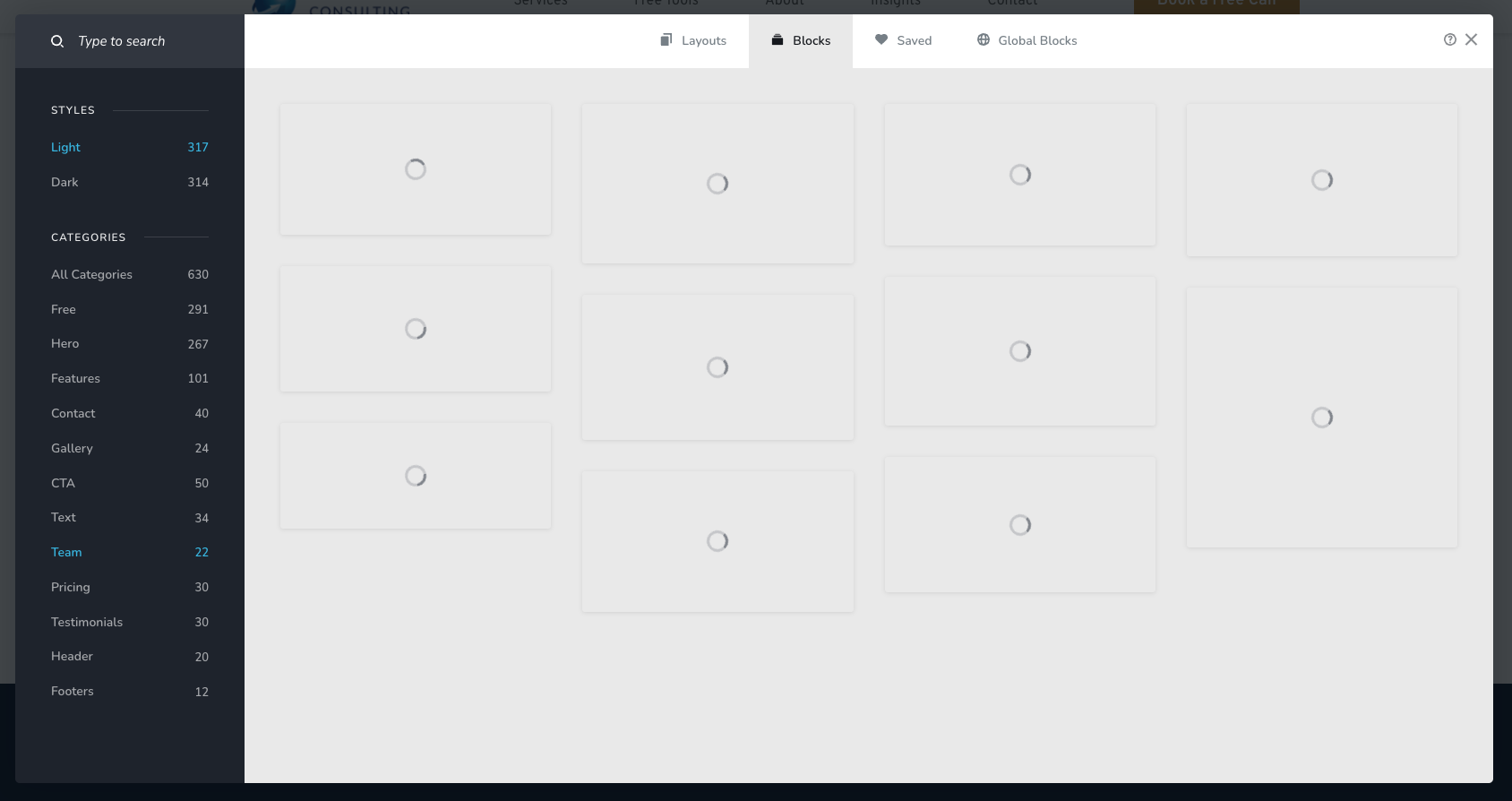
-

Hi,
Thank you for the detailed information.
We’ve tested this on our end, but unfortunately, we were unable to replicate the issue in our test environment. You can see the test in this screencast: https://youtu.be/zk_ma8pBAow
To investigate this further, we’ll need to inspect the issue directly on your website. Could you please provide temporary WordPress Administrator login details so we can take a closer look?
Kindly send the following details to communitysupport@brizy.io:
Community Support Link: https://support.brizy.io/hc/en-us/community/posts/38916148779026
WordPress Admin URL:
Username:
Password:We’ll review it as soon as we receive the access.
In the meantime, could you also try disabling all other plugins temporarily, leaving only Brizy and Brizy Pro active, and check if the issue still occurs? This will help us determine if another plugin is causing a conflict.
Best regards,
Ariel H.0 -
Hi Afzul,
Thank you for your cooperation.
We were able to identify that the issue is caused by a conflict with one of the active scripts in the WPCode Lite plugin. When it is is disabled, the saved blocks work properly, as demonstrated in this screencast: https://youtu.be/XTJ7kk2a4Wk
To fix the issue, you’ll need to check each of the active scripts in WPCode Lite to identify which one is causing the conflict.
Alternatively, you can temporarily disable WPCode Lite whenever you need to make changes to your pages, then reactivate it after you have finished and published your changes.
Best regards,
Ariel H.0 -
Hi Ariel,
Thank you for looking into this, and for pointing me to WPCode.
I've found the snippet that caused it. It sends a Content Security Policy header on the front end of the site, and the list of allowed image sources didn't include your image server (cloud-1de12d.b-cdn.net).
The editor canvas loads the front end inside an iframe, so the same header applied there. The browser then blocked every preview image in the block library.
I've changed the snippet so the policy isn't sent when the page loads inside the editor. The previews now load normally, and visitors to the site still get the full set of security headers.
It may be worth noting for other users. A strict security policy on the front end will also apply inside the Brizy editor, and the block library previews are usually the first thing to break.
I've removed the temporary administrator access, so you're welcome to close the ticket.
Kind regards,
Afzul0
Please sign in to leave a comment.
Comments
3 comments