License Inquiry

I have one site with the Personal WordPress and next bill on Mar 3, 2027.
I want to upgrade this to the next tier (I need Brizy Pro for a second site).
Can I upgrade this license or roll it into the next tier?
0
-

Hello Christopher,
You can upgrade your Personal WordPress subscription directly from your Brizy account. Please follow these steps:
- Sign in to your Brizy account at https://www.brizy.io/account/login
- Go to Account → Billing.

- Click "Update Subscription".
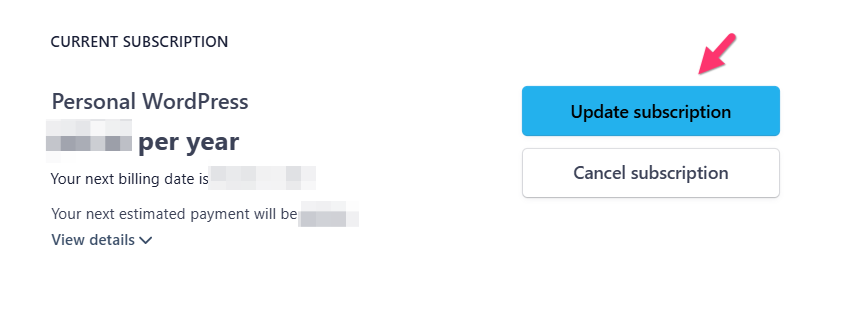
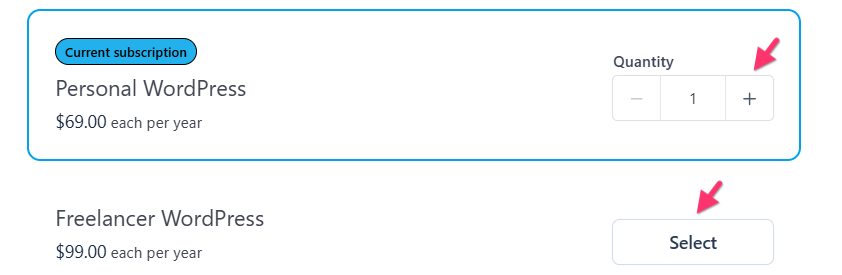
- Increase the number of licenses in your current subscription, or select a higher plan that meets your needs.
- The system will automatically calculate the amount due today based on your selection. If everything looks correct, click "Confirm" to complete the purchase.
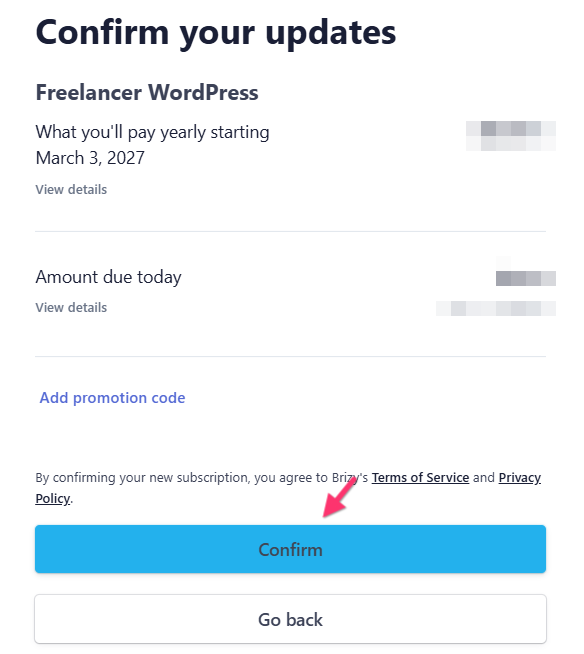
Once the purchase is confirmed, your subscription will be updated accordingly. Kindly get back to us if you need further assistance.
0
Please sign in to leave a comment.
Comments
1 comment