Online Courses For Brizy Website

Hi, do you have any instructional videos on creating an online course with videos using Brizy? Similar to Teachable.
-

Hello Edwin,
We have a tutorial video on creating an online course using the Lifter LMS plugin and Brizy:
How to Create a Course Website Step-by-Step in Wordpress However this tutorial is 6 years old and hence not recommended. I recommend the following approach for creating an online course website using an LMS plugin and Brizy.- Shortlist and finalize a Learning Management System (LMS) plugin according to the requirements of your online course website. You can start by visiting Best Free LMS for WordPress and Best LMS WordPress Plugins. Compare the features provided in the FREE and PRO versions of each LMS before finalizing your decision.
- Install the LMS plugin of your choice and setup the courses using the plugin.
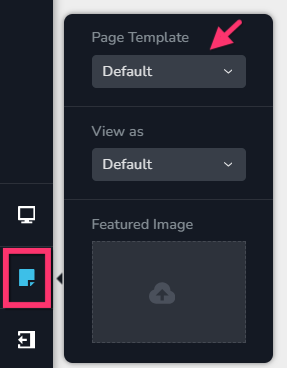
- Setup your Brizy pages using the Default Page Template by selecting the "Page" icon on the left sidebar and the "Default" option under the "Page Template". Your Brizy pages will start using your theme header and footer. If you've already added Brizy header and footer to any of your pages, delete them.
- Switch to a WordPress theme that has a good header footer builder (such as Blocksy) and use it to design your website's header and footer.
Getting Started with the Header elements
Getting Started with the Footer elements - Retain the LMS pages in the theme design and use Brizy only for non LMS pages like Home, Contact, About, etc.
0 -
Hi, thank you for the information.
1. For the best free WordPress LMS plugins, which one do you recommend?
2. Why do we have to use the "Default Page Template? Why can't I just use the Brizy Template? I only ask because my header and footer will change, right? And I would like to use what I have in my Brizy Template.
0 -
Hello Edwin,
-
When selecting an LMS plugin, the features required for your client’s project should be your primary consideration. It’s helpful to think about the specific needs of the website. For example, will students need to pay for courses? Do you want the website to automatically generate course certificates? Would you like students to be able to rate and review each course?
Keep in mind that some LMS plugins offer certain features only as paid add-ons. Ideally, choose a plugin that provides most of the essential features you need in its free version. This will give you a solid starting point while keeping additional costs to a minimum.
-
LMS plugins are generally designed to work with your WordPress theme by default, so compatibility with Brizy may vary. If you choose the Brizy Template for your webpages, you can only use LMS plugins that are compatible with Brizy. Alternatively, you can retain the LMS pages within your theme’s design and use the Default Page Template for your Brizy pages. This approach gives you the flexibility to use any LMS plugin from the WordPress plugin repository without having to be concerned about its compatibility with Brizy .
0 -
-
1. I understand that it's based on the client's project. However, I just wanted your personal opinion or Brizy's recommendation. I am curious to look into them.
2. Which LMS plugins are compatible with Brizy? I am confused by this statement, "Alternatively, you can retain the LMS pages within your theme’s design and use the Default Page Template for your Brizy pages."
0 -
Hello Edwin,
- We do not have a specific recommendation, as we have not set up a course website using an LMS plugin ourselves. We are also not aware of which LMS plugins are currently being used by other Brizy customers.
-
You are unlikely to find an LMS plugin that is 100% compatible with Brizy. If the LMS plugin provides shortcodes for displaying its pages or course content, you can display that content within a Brizy page by adding the relevant shortcode to the Brizy Shortcode element. However, it is best to work on the assumption that your chosen LMS plugin will not be fully compatible with Brizy, as we have not specifically developed Brizy integrations for LMS plugins.
LMS plugins are generally designed to work with your WordPress theme and rely on the theme’s templates and styling to display their pages. As a result, LMS pages and course content may not display well as expected when built along with Brizy. For this reason, our recommended approach is to allow the LMS plugin to display its pages using your theme’s design rather than attempting to display the course content within a Brizy page. Once you install an LMS plugin and set up a course, you will have a better understanding of how the LMS handles its pages and content, which should make this distinction clearer.
0 -
Got it. Thank you for the info.
0
Please sign in to leave a comment.
Comments
6 comments