Brizy 2.8.21 + Brizy Pro 2.8.12: pages request preview.min.css / preview.pro.min.css, which no longer ship (404, unstyled pages)

Site: https://uppage.us — WordPress 7.1, PHP 8.3, Blocksy theme. Brizy 2.8.21 (free) + Brizy Pro 2.8.12. Pro reports 2.8.12 as the latest available version.
After updating Brizy to 2.8.21 on Aug 20, 14 of our 20 pages rendered completely unstyled on the front end for logged-out visitors. The home page and a few others were unaffected.
What we traced: on the affected pages Brizy enqueues these two stylesheets, and neither file exists in the installed builds, so both return 404:
/wp-content/plugins/brizy/public/editor-build/prod/editor/css/preview.min.css
/wp-content/plugins/brizy-pro/public/editor-build/prod/css/preview.pro.min.css
The unaffected pages instead enqueue main.base.min.css and main.base.pro.min.css, which do exist and return 200. Both sets of pages use the identical WordPress style handles (brizy-asset-main-30--css and brizy-asset-main-30-pro-css) — only the resolved URL differs per page.
Additional findings:
- The strings "preview.min.css" and "preview.pro.min.css" do not appear anywhere in the database (postmeta, posts, or options), so the URLs appear to be produced at runtime rather than read from stored page data.
- The current editor bundles (editor.min.js, editor.pro.min.js) reference main.base.min.css and never preview.min.css.
- Re-saving an affected page in the Brizy editor does not change the behaviour. We also switched one page to draft and republished it, which bumped brizy-post-editor-version from 308-wp to 371-wp, and it still requested preview.min.css afterwards.
- Not a caching issue. We cleared the server page cache and confirmed with cache-busted, logged-out requests.
- brizy-need-compile is empty on both affected and unaffected pages.
As a temporary measure we created preview.min.css and preview.pro.min.css as copies of main.base.min.css and main.base.pro.min.css. That restored all pages correctly. We understand this will be wiped by the next plugin update and would prefer a supported fix.
This looks related to the earlier report "Brizy CSS broken after 2.8.18 / pro 2.8.11 WP 7.0.2" (post 37411630330642), where the same manual CSS copy was mentioned as a previously recommended workaround.
Questions:
1. Is this a known incompatibility between Brizy 2.8.21 and Brizy Pro 2.8.12, and is a matching Brizy Pro release planned?
2. Is there a supported way to make affected pages enqueue main.base.min.css instead, so we are not patching plugin folders by hand after every update?
Happy to provide any further detail. Thank you.
-

Hello Steven,
The above issue can be fixed by recompiling your website content. Kindly follow these steps to recompile content if it happens again after a Brizy update.
- Install and activate the plugin Layout Recompiler for Brizy
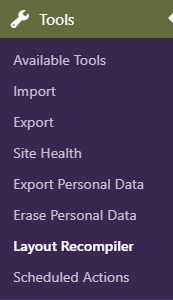
- In your WordPress Admin sidebar, select Tools > Layout Recompiler
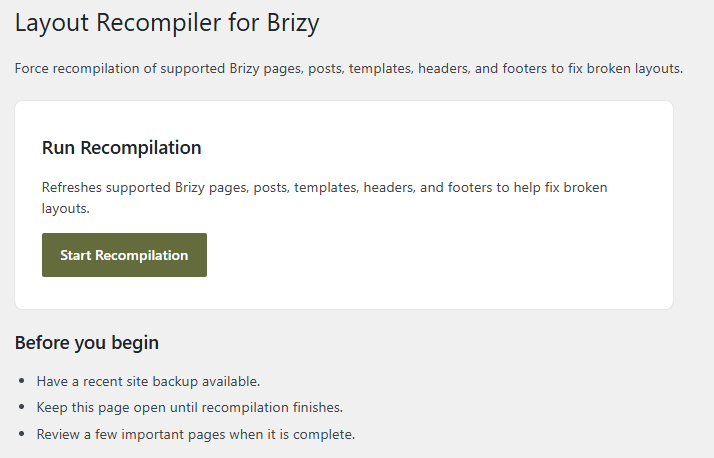
- Click the "Start Recompilation" button, wait for the compilation process to complete, and then verify if all English pages work properly in the website's frontend.
0 - Install and activate the plugin Layout Recompiler for Brizy
Please sign in to leave a comment.
Comments
1 comment