Brizy Pages Not Loading Correctly After Update

Hello, I hope you’re doing well.
I need some assistance with a Brizy issue on the following website:
https://www.remadvogados.adv.br/
After updating Brizy, the website pages are no longer loading the theme/layout correctly on the front end. However, when I access the Brizy editor, the pages load normally and the content appears correctly inside the editor.
I also tried making a small change and saving the page again to check whether it was just a temporary bug or an issue with the page data, but the problem persists.
Could you please investigate what might be causing this issue and let me know how we can fix it?
Thank you for your assistance.
-

Hi,
Please ensure you’re using Brizy version 2.8.21 and Brizy Pro version 2.8.12, then check whether this resolves the issue.
If the problem persists, please install and activate the Layout Recompiler plugin.
https://wordpress.org/plugins/layout-recompiler-for-brizy/Once activated, go to Tools > Layout Recompiler and click Start Recompilation. Allow the recompilation process to complete and check if the website looks good in the frontend.
Please let us know if the issue continues.
Best regards,
Ariel H.0 -
Hello, thank you for your response.
I checked the current version of the Brizy plugin and also installed and ran the Layout Recompiler plugin as recommended. Unfortunately, the issue is still occurring.
The pages are still not loading the theme/layout correctly on the front end, even though they continue to load normally in the Brizy editor.
Could you please take another look and let me know if there are any additional steps we can try to resolve this issue?
Thank you for your assistance.
0 -
Hi,
Could you please provide temporary administrator access to your WordPress dashboard so we can take a closer look at the issue?
Kindly send the following details to communitysupport@brizy.io:
Community post link: https://support.brizy.io/hc/en-us/community/posts/37897809280658
WordPress Admin URL:
Username:
Password:We’ll be glad to assist as soon as we have access.
Best regards,
Ariel H.0 -

I have also this exact issue and have tried Layout Recompiler and all plugins updated and I have also tried deactivating all plugins except Brizy and Briny pro. Can I send you my login details?
0 -
Hi Christian, please send in your site's login details so I can help you fix it.
0 -
Sure, I will send it.
There is just one additional observation I would like to share.
After investigating the issue more thoroughly, I noticed that some 404 (Page Not Found) errors started occurring after the latest Brizy update.
This website — https://www.remadvogados.adv.br/ — has WordPress installed inside a
/sitesubdirectory rather than in the root directory. It appears that, after the latest Brizy update, Brizy may be trying to load some of its resources or content directly from the domain root instead of from the/sitedirectory where the WordPress installation is actually located.As a temporary workaround, and to prevent the client’s website from remaining offline, I duplicated the
wp-contentfolder in the domain root. This allows Brizy to find the required resources and the website to work correctly for now.However, we do not consider this a suitable permanent solution, as having a duplicated
wp-contentfolder could potentially cause conflicts, synchronization issues, or other problems in the future.Could you please investigate this behavior and let us know whether this is related to the latest Brizy update? If so, we would appreciate a safer and more appropriate solution, potentially taking into account the fact that WordPress is installed in a subdirectory (
/site).We would prefer not to keep the duplicated
wp-contentfolder in the root as a permanent workaround.Thank you for your help.
0 -
Hi Pamela,
We’re currently getting a 403 Forbidden error when trying to access your website’s login URL.
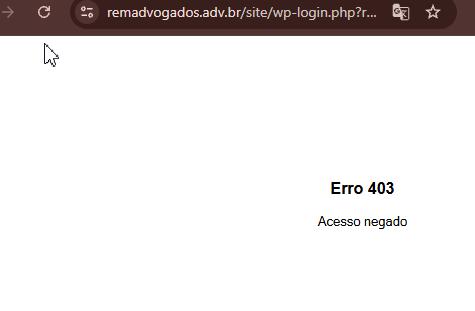
Could you please temporarily disable any security plugin that may be blocking access? Alternatively, you can whitelist my IP address:
153.75.231.57
Once this is done, please let me know so I can try accessing the website again.
Best regards,
Ariel H.0 -
Hi Christian,
We’ve temporarily fixed the issue by updating the Layout Recompiler plugin to correct the affected URLs. As long as the plugin remains active, the website should work as expected.
The issue appears to affect websites where the WordPress Address (URL) uses the
/sitesubdirectory while the Site Address (URL) points to the root directory (/).We’ll investigate this further and may need to escalate it to our senior support team when the office resumes tomorrow.
Best regards,
Ariel H.0 -
Hello Ariel H.
Okay, I’ve deactivated the plugin, could you please try accessing it again?0 -
Hi Pamela,
We’re still unable to access your WordPress admin dashboard. However, we were able to replicate the issue on our staging site, so we have escalated this to our developers so it can be fixed in the next update.
In the meantime, you can either keep the duplicated "wp-content" directory, or install Layout Recompiler for Brizy version 1.5.9 to temporarily address the issue:
https://wordpress.org/plugins/layout-recompiler-for-brizy/
You don’t need to run the recompiler, simply having the plugin installed should normalize the WordPress Address (URL) and Site Address (URL).
We apologize for the inconvenience and appreciate your patience while we work on getting this resolved.
Best regards,
Ariel H.0 -
Hello, thank you for your response.
I have now enabled international access to the website through the
.htaccessfile. Could you please try accessing the website again and check if you are able to access it now? I hadn’t considered this possibility before.If you are still unable to access the website, please proceed with the investigation in the test environment as previously mentioned.
Thank you in advance for your help and cooperation.
0 -
Hi Pamela,
We’re still receiving a 403 error. However, there’s no need to worry, we’ve confirmed that this is a glitch on our end.
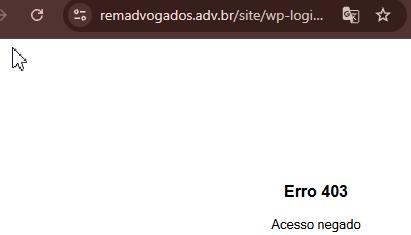
The issue has already been reported to our developers, and they will work on fixing it in an upcoming update. No further action is required from your side for now.
Thank you for your patience and understanding.
Best regards,
Ariel H.0
Please sign in to leave a comment.
Comments
12 comments