Asigning a user to a specific project

I have an account with several sites on it. My license is from the AppSumo deal.
Can I assign a user to a specific project (so they can edit only that project)?
-

Hello Joe,
Yes, you can grant access to a single project under your account. Let me explain how.
In Brizy Cloud, you invite your Team Members to "workspaces" rather than projects. Please follow these steps if you only want to offer access to a single project.
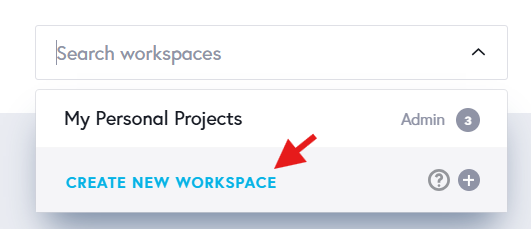
- Add a new workspace by selecting the "Create New Workspace" option in your dashboard and give it a name.
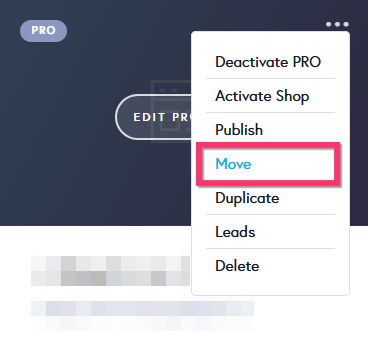
- Transfer the project you wish to provide access to, from the "My Personal Projects" workspace to the newly added workspace by selecting the "Move" option in the project thumbnail.
- There will now be only a single project in your newly created workspace. You can now invite a Team Member to this workspace.
0 - Add a new workspace by selecting the "Create New Workspace" option in your dashboard and give it a name.
-
Thank you for that. Does the user (guest) need a paid account as well?
0 -
Hello Joe,
No, your Team Member does not have to be a paying user to access your workspace. To guarantee that your Team Member has a smooth experience when joining the workspace, please follow the steps below in the given sequence.
- Your Team Member signs up with Brizy Cloud at https://www.brizy.io/account/signup
- They accesses Brizy Cloud once by clicking on the "Start Free Trial Cloud" button
- You send them an invitation to your "Workspace"
- They click on the "Get Started" link in your invitation email to gain access to your Workspace.
Key points to remember
- Do not send them an invitation before they have signed up with Brizy Cloud.
- If your Team Member does not access Brizy Cloud once, Team Invitation would not work.
0
Please sign in to leave a comment.
Comments
3 comments