Update has broken menu

Hi there,
Latest update has broken the main menu, see https://www.lowthwaiteullswater.com/
And see screenshot below. I edited the page in Brizy and it looked fine.

-

Hi Darren,
Thank you for reaching out.
This is a known issue and a patch is currently on the way.
In the meantime, you can use the following CSS to fix it:
.brz-menu__item {
    list-style: none !important;
}
Let me know if you run into any other issues.
0 -
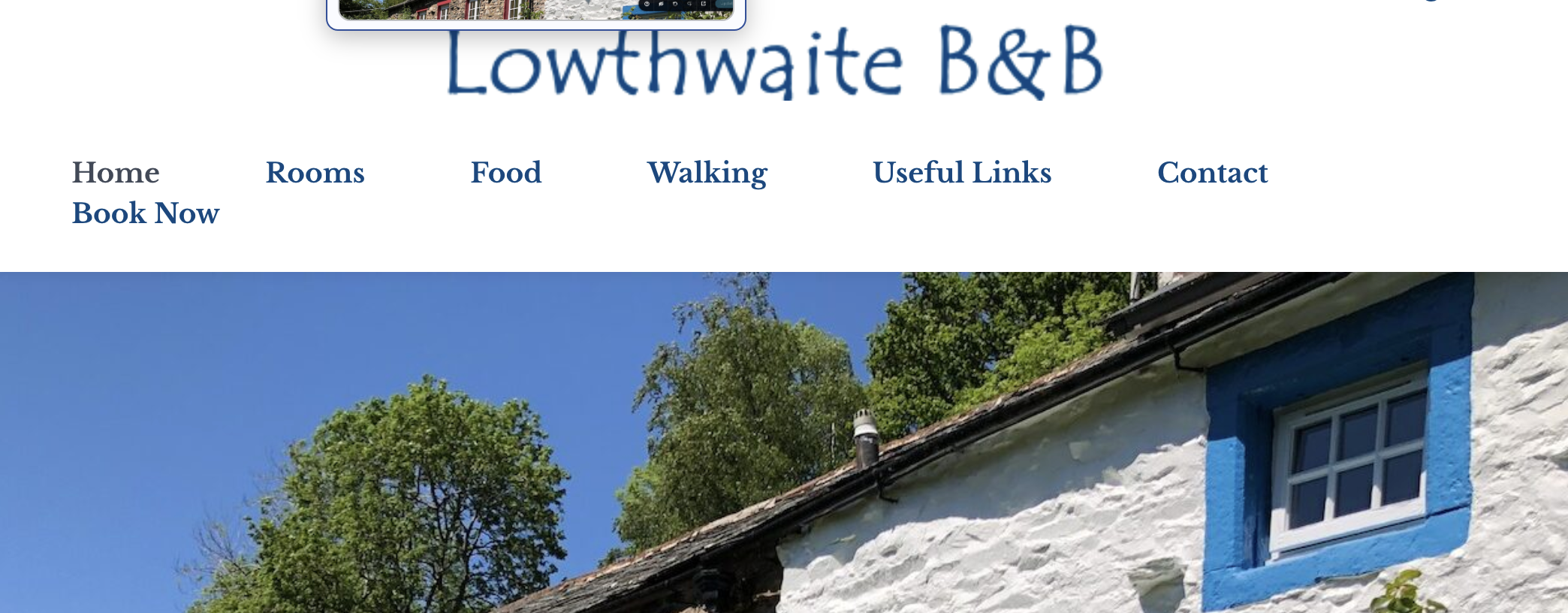
hi this fixes it but it now looks like this (see screenshot) no matter what I do with the padding.
Andthebuttonhasdisappeared.
 0
0 -
Hi Darren,
Could you please send your site credentials to communitysupport@brizy.io so we can inspect the CSS issue.
Please include reference number 37478108737042 in the subject line.
Best regards,
Ariel H.0 -
Hi Darren,
We have fixed the issues you reported.
Please download and install the latest versions of Brizy and Brizy Pro from the shared Google Drive folder:
https://drive.google.com/drive/folders/1lVdL3p9TSaUIBQQCgVDq7Rxd4x9qtizI?usp=drive_link
The updated free version of Brizy has already been uploaded to the WordPress repository, but it may take up to 24 hours for the update to become available.
Once installed, please check the site and let us know if you have any further questions.
Best regards,
Ariel H.0 -
Hi Ariel,
Thank you. So the update has worked other than the Book Now link was a button and is a button in the back end, but not showing as such on the front end?
Does that seem right to you?
Thanks,
Eilidh
0 -
Hi Eilidh,
We noticed that there are two "Book Now" links/buttons on the page. Could you please confirm which one you are referring to?
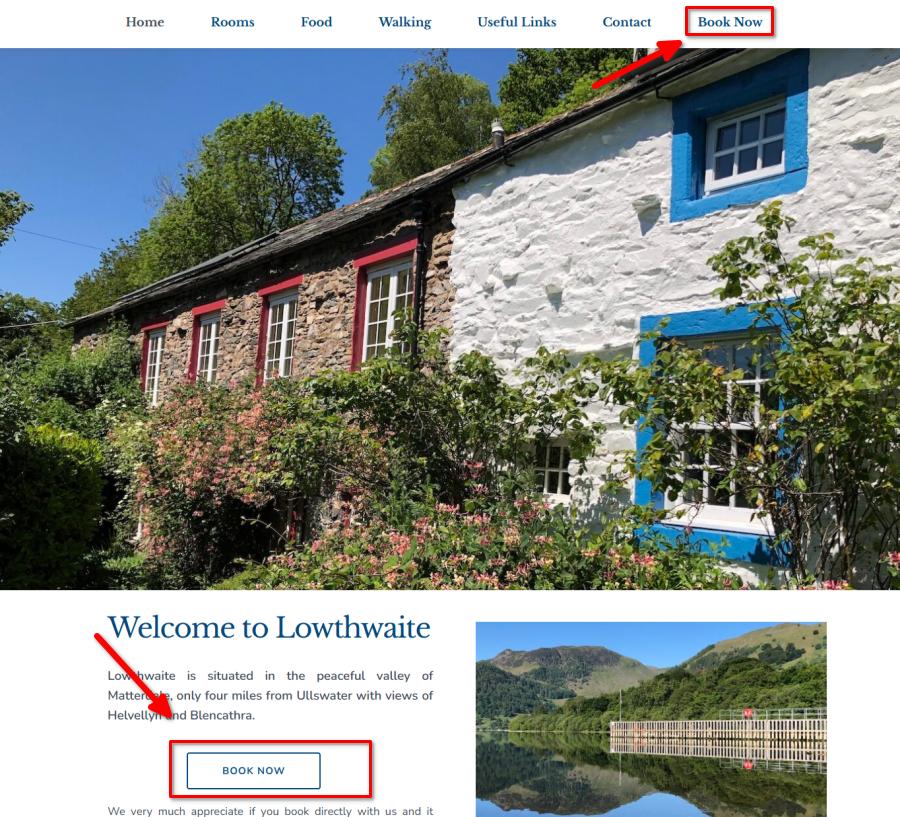
If possible, please send us a screenshot so we can better understand the issue.
Best regards,
Ariel H.0 -
Hi,
It's the one in the header. As you can see this is how it looks in the back end, and also how it looked until the most recent Brizy update.
Thanks,
Eilidh
 0
0 -
Hi Eilidh,
Could you please install and run the Layout Recompiler for Brizy plugin to see if it resolves the issue?
You can download it here:
https://wordpress.org/plugins/layout-recompiler-for-brizy/Once installed:
1. Activate the plugin.
2. Go to Tools > Layout Recompiler in your WordPress dashboard.
3. Click Start Recompilation.
4. Wait until the process reaches 100%.
5. Clear any website, server, and browser caches, then check the page again.Please let us know if this makes any difference.
Best regards,
Ariel H.0 -
This doesn't seem to have changed anything. Sorry. To be honest I'll just leave it as it is as this is becoming time consuming for little benefit.
I appreciate your time on this but at some point Brizy does have to take responsibility for not fully testing plugin updates before they are released. It is a recurring issue and sadly impact our trust in the product itself.
Thanks,
Eilidh
0 -
Hi Eilidh,
Thank you for the update.
Could you please send your website credentials to communitysupport@brizy.io so we can inspect the issue?
Please include reference number 37478108737042 in the subject line of your email.
Best regards,
Ariel H.0 -
Hi Eilidh,
I just wanted to follow up regarding the temporary WordPress Admin access we requested so we can check the issue mentioned in your community post.
Best regards,
Ariel H.0 -
Hi Ariel,
Apologies for the delay. I have sent that now.
Thanks,
Eilidh
0 -
Hi Eilidh,
Thank you for the update.The "Book Now" menu item background was controlled by custom CSS that was not applying correctly on the frontend. We’ve updated the CSS, and the issue is now fixed.
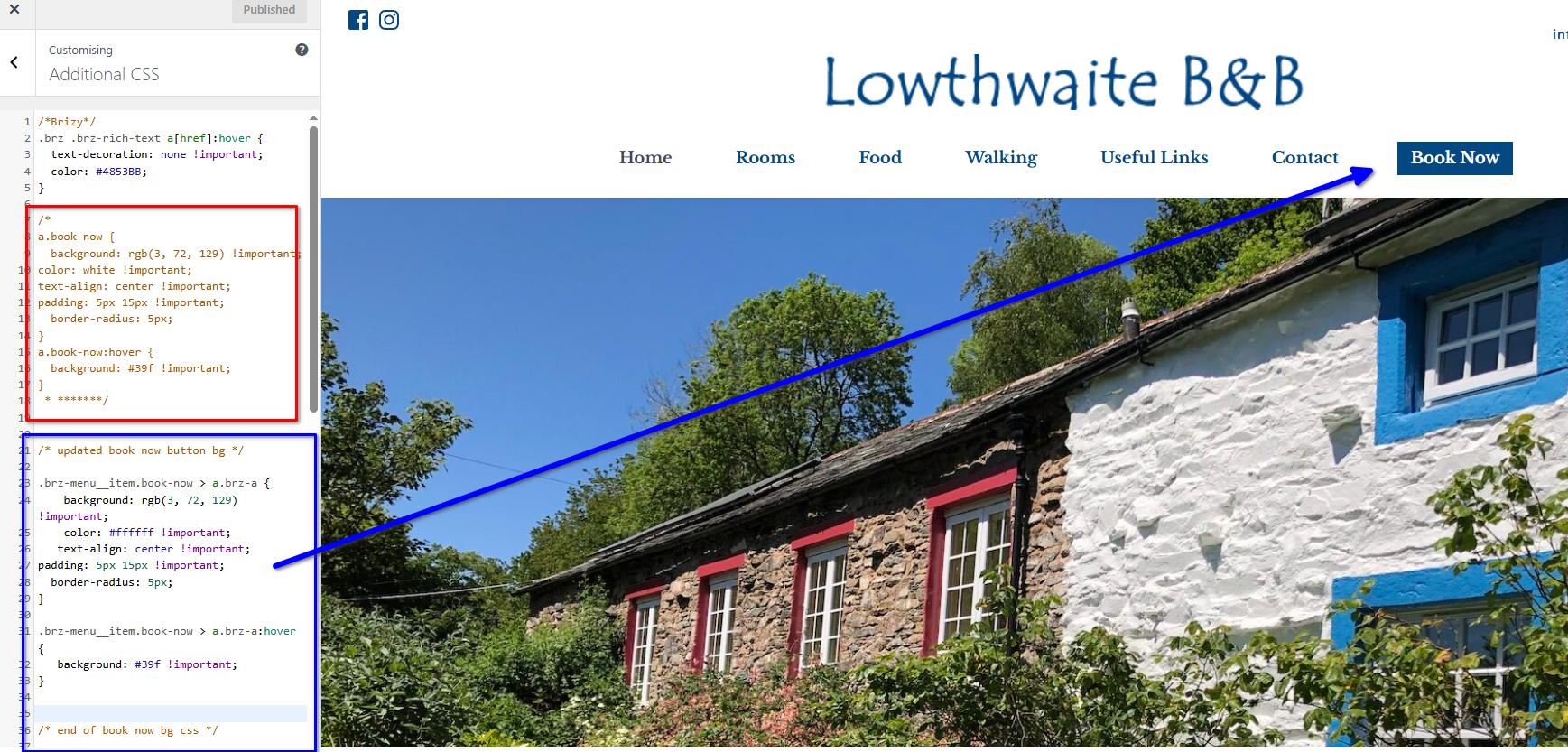
Please check your website and let us know if you notice anything else unusual.
Best regards,
Ariel H.0 -
Thank you for this. I really appreciate it.
0
Please sign in to leave a comment.
Comments
14 comments