Clickable Phone Number

Hello Brizy, is there a special code to make a link of a phone number clickable? In other words when the user clicks on the phone number it makes the cell phone make a call? Specific to mobile. Thank you. James B.
-

Hi James,
Thank you for reaching out.
You can use either the Icon Box element or the Text element to display the phone number, then add the following link:
tel:+6327958124
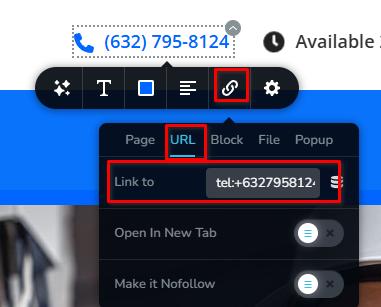
Replace the example number with your actual phone number, including the country code. When visitors tap the number on a mobile device, it will open their phone’s dialer.
Best regards,
Ariel H.0 -
Hi Ariel, thank you for the fast reply, I am going to tried it.
0 -
Hi Ariel, I got it working, thank you again, one question, on the contact form, we are using Jotform to generate the form and embed the code, there is an image next to it:
https://havanaenclave.com/contact/
When it goes mobile, the image covers part of the filds of the form, is there anyway to place a contact form specific for mobile? I can generate another form in Jotform, specific for mobile with on image so there is no problem seeing the fields.
Let me know and thank you.
0 -
Hi James,
Could you please provide us with temporary access to your WordPress admin dashboard so we can inspect the page? We may need to apply some custom CSS to adjust the image position.
Kindly send the following details to communitysupport@brizy.io:
Community Post: https://support.brizy.io/hc/en-us/community/posts/37474616016402
WordPress Admin URL:
Username:
Password:We’ll review it as soon as we receive the access.
Best regards,
Ariel H.0 -
Hi James,
Upon checking, the image is included inside the embedded Jotform code, which loads the form within an iframe. Because the image is hosted inside Jotform’s iframe, CSS added to the Brizy page cannot directly target or control it.
The best approach would be to remove the image from the Jotform form designer, then redesign the Brizy page using a two-column layout. You can place the embedded form in the first column and add the image using Brizy’s Image element in the second column.
This will give you full control over the image’s size, position, and visibility on desktop, tablet, and mobile.
Best regards,
Ariel H.0
Please sign in to leave a comment.
Comments
5 comments