Performance Bottleneck: main.base.min.css blocking render on WordPress / Brizy Pro

Hi Brizy Team,
I'm currently optimizing my WordPress website (built with Brizy Pro) for mobile performance using Google PageSpeed Insights, and I'm hitting a hard architectural bottleneck regarding the core stylesheet.
The Issue: The global stylesheet main.base.min.css is loaded universally on the page and causes a massive render-blocking delay (costing ~6.5 seconds on mobile simulation). Whenever I attempt to optimize this via standard caching/minification plugins (like Autoptimize) by inlining the CSS or grouping files to bypass the render-blocking, it breaks the layout structures and custom typography classes generated by Brizy.
My Setup:
-
CMS: WordPress
-
Page Builder: Brizy & Brizy Pro
Questions / Feature Request:
-
Are there recommended best practices or specific plugin configurations to handle
main.base.min.csswithout breaking the layout? -
Is there any ongoing effort or roadmap item to introduce per-page CSS generation or critical CSS splitting to reduce this heavy render-blocking payload on WordPress?
Thanks for your help and insights! Best regards, Noah
-

Hi Noah,
Thank you for contacting us.
Could you please provide your website URL so we can inspect your site?
In the meantime, we recommend the following safe configuration:
- Do not combine, reorder, load asynchronously, or automatically remove main.base.min.css.
- Exclude Brizy and Brizy Pro CSS files from Autoptimize’s aggregation and removal features.
- Avoid enabling CSS Combine in caching or optimization plugins, as combining or reordering CSS can break Brizy layouts and mobile navigation.
- Use safer performance optimizations such as page caching, gzip or Brotli compression, long browser caching for static assets, HTTP/2 or HTTP/3, and a CDN.
- When using generated critical CSS, carefully test every breakpoint, global block, popup, menu, and typography variation before deploying it.
- Purge all caches and recompile the Brizy layouts after updating Brizy or Brizy Pro.
https://wordpress.org/plugins/layout-recompiler-for-brizy/Currently, we cannot confirm a roadmap or estimated release date for further per-page splitting of the shared base stylesheet.
Best regards,
Ariel H.0 -
Hi Ariel,
Thanks for the transparent reply and the configuration guidelines.
Here is the URL to the site: https://beventive.de/
I have strictly followed your recommendations: All CSS aggregations, combinations, and asynchronous loadings are disabled for Brizy assets. Browser caching and image optimizations are fully active.
However, as you can see if you run the URL through PageSpeed Insights, the
main.base.min.cssis still causing a massive 6.5-second render-blocking delay on mobile. While I understand there is no immediate roadmap for CSS splitting, is there any internal snippet or workaround (e.g., viafunctions.php) to at least preload this specific file safely without breaking the custom layouts?Since page speed and a flawless UX are critical metrics for our agency projects and SEO, hitting a hard architectural ceiling like this makes it very challenging to rely on Brizy for performance-sensitive websites moving forward.
That being said, if you spot any other optimization opportunities, tweaks, or alternative approaches while inspecting our site, we would be absolutely thrilled to hear your suggestions. We highly appreciate your time and expertise!
Best regards, Noah
0 -
Hi Noah,
Thank you for the update.
We ran PageSpeed Insights and while the report highlights main.base.min.css due to its size, the delay is actually a cumulative result of a few server-level bottlenecks. In the screenshot below, main.base.min.css is only 132 KB, but it is uncompressed.
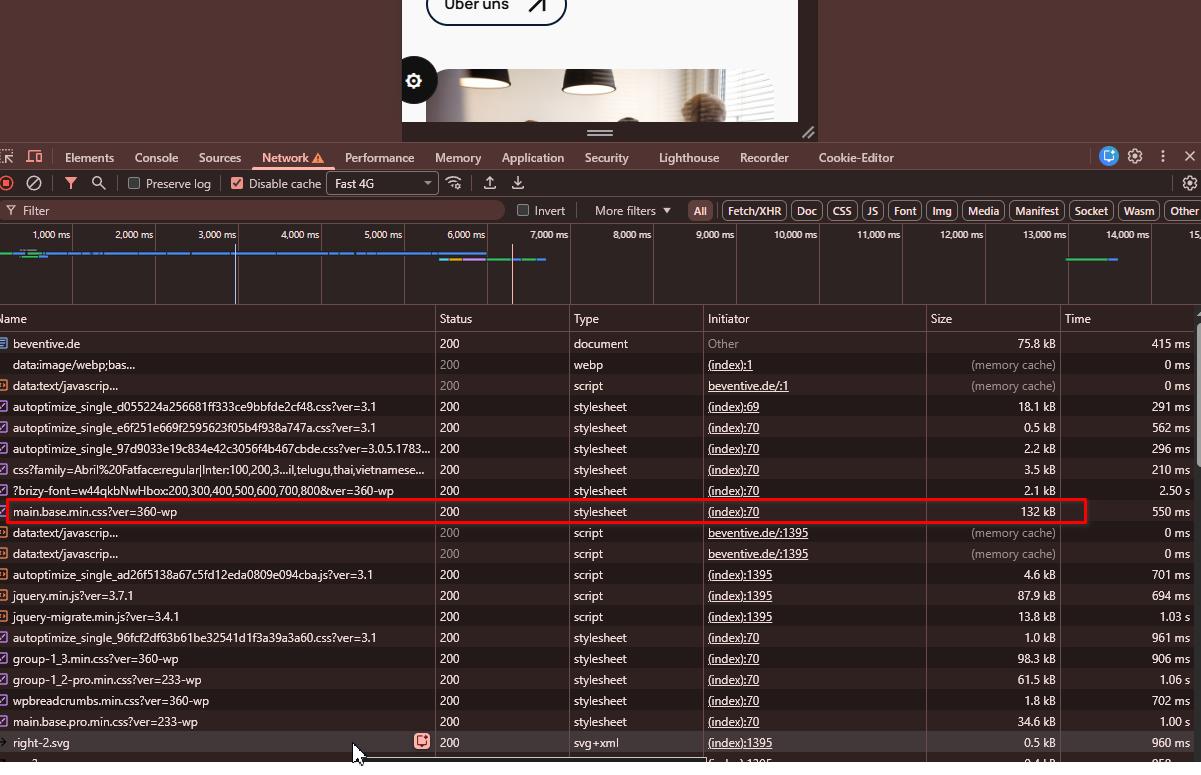
We recommend asking your hosting provider to enable Gzip or Brotli compression for static .css and .js files. Doing this will shrink the file sizes by up to 80%, eliminating the render-blocking download time.
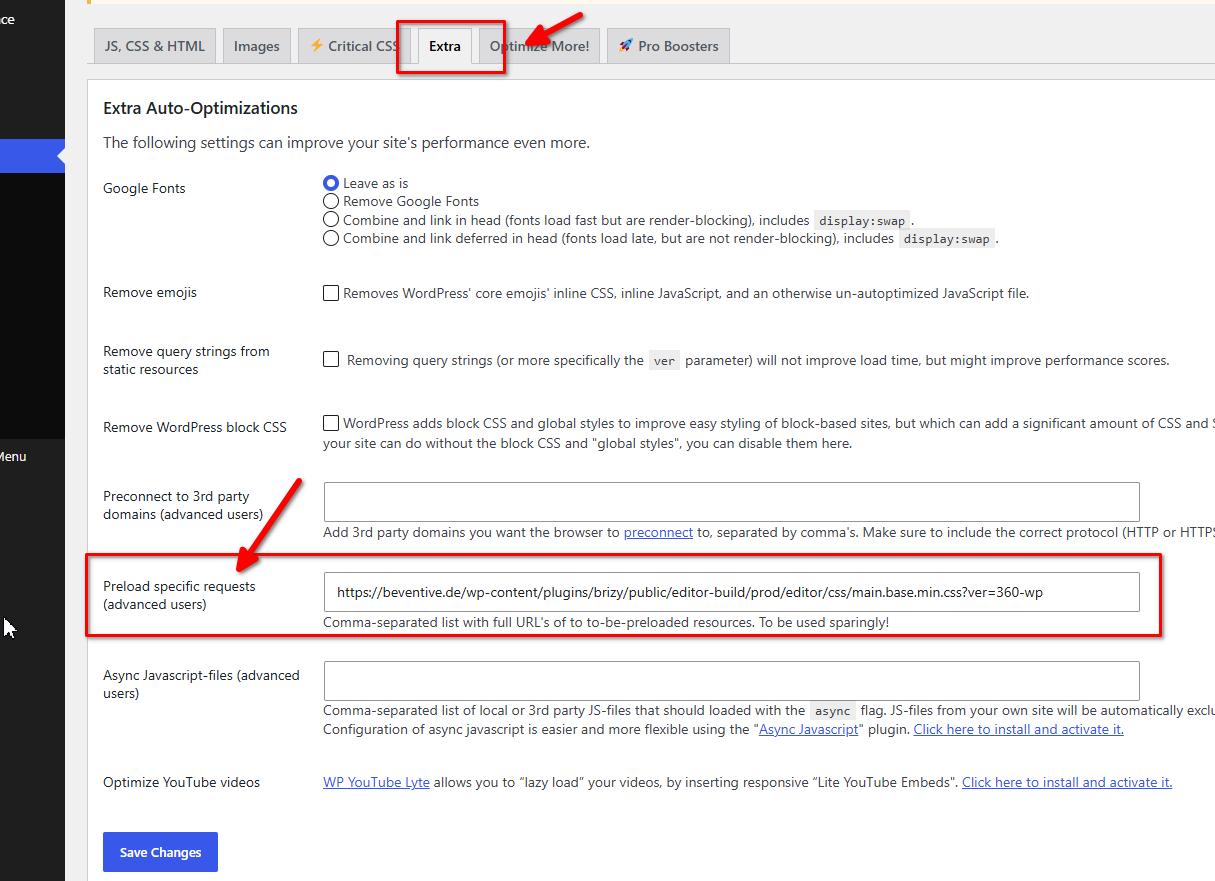
Also, you can preload main.base.min.css in Autoptimize:
- Go to your WordPress Dashboard and navigate to Settings > Autoptimize.
- Click on the Extra tab at the top.
- Scroll to "Preload specific requests" and paste this exact URL (including the version query at the end):https://beventive.de/wp-content/plugins/brizy/public/editor-build/prod/editor/css/main.base.min.css?ver=360-wp
Finally, we recommend enabling CDN caching at the hosting level and ensuring that query strings containing brizy-font are cached.
I hope this helps.
Best regards,
Ariel H.0
Please sign in to leave a comment.
Comments
3 comments