Brizy Cloud Translation Problem Version 2026

I have just tried to implement the translation feature for my website, which has already been online for several years. The original website is in German. The translation I just added is in English. On the one hand, several parts of the website were translated quickly and easily, but about half of my homepage has not been translated and still shows the original German text. This is astounding because, in the translation table, everything has been correctly translated into its English equivalent; however, the online version of the website still shows most of the original German text.
I found a similar request on this forum from a year ago that has obviously not been resolved yet, so I wonder what progress has been made concerning the issue of the translation function not working properly. Is there any way to ensure that the correct translation shown in the translation table is also displayed on the published website?
-

Hello Stephan,
We apologize for the inconvenience. We are currently having a glitch with the Brizy Cloud translations. Our developers are working on a fix. We will notify you once we have made progress toward resolving this bug.
In the interim, please consider removing the language switcher from your project, so that incomplete translations are concealed from public view.
0 -
Hello Stephan,
We have fixed the translation issue. Could you please verify and let us know if the translations are working properly?
0 -
I checked the webpage. The entire thing looks a lot better now, thank you very much.
I currently I find only two more issues to be resolved.
1) Although the main page and most sub-pages are now translated properly from German into English, I found that one sub-page still shows the German original although it has been translated properly into English in the translation table. It is this page and I cannot find a reason why it's still showing the German text even after several times hitting refresh on the browser.
https://www.redner-veraenderung-psychologie.de/en/vortrag-innovation-zukunft-mindset
2) more importantly, there is one thing that should be fixed, and this is my suggestion for improvement: if I switch to the English version of the website and I hit any of the links on the homepage, all the links still are connected to the German version of the respective page. In other words, even after I switched to English, every time I click a link to see a sub-page, I still manually have to readjust it to English again. However, all the links from the English homepage should directly link to the English version of any sub-page.0 -
Hello Stephan,
Please check again if the above two issues are now resolved?
0 -
I checked again. Here is my feedback:
Item one is resolved the page now appears in English translation. That's good.
Item 2 is not resolved. when I use the English version of the homepage, all the links both in the menu and in the footer refer to German language pages. However, from the English homepage, all links should automatically refer to pages in English translation. Thank you.
0 -
Hello Stephan,
When you are on the English version of the website, as you can see in my test at https://jmp.sh/fYAmZOC5, the header menu hyperlinks to English pages. Kindly review the links in the header menu again.
The hyperlinks in the footer are created using the Text element, and are manually added to each text. If you use the Menu element rather than the Text element, the hyperlinks will send visitors to the appropriate language pages.
0 -
Okay, got it.
However, if I replace the text links in the footer with a menu, I first have to create a new menu.
This is currently not possible.
The "Create Menu" link/button does not work.See screenshot: https://share.zight.com/01a09bc6-2ce5-76a4-85ab-4ec9b1c56ce5
0 -
Hello Stephan,
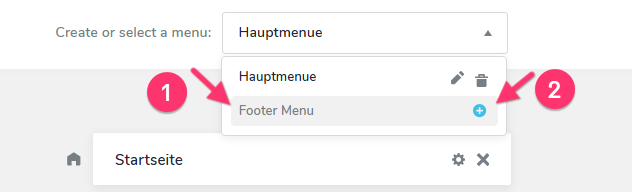
To create a new menu, please follow these two simple steps:
- Enter a name for the new menu. For example, "Footer Menu"
- Click the + icon on the right.
This will create a new menu named "Footer Menu"; you can then add pages to the menu. For a more detailed explanation, have a look at the tutorial: Discover How to Create Menus & Navigation
 0
0 -
OK, I understand.
From a usability perspective, it would have been useful to indicate that you need to name it before the 'plus' button starts working.
My next challenge is pulling the menu symbol into the page. How do I select the correct menu? Currently, I can only pull the already existing menu onto the page. I cannot find a way to change the menu on the page or pull any of the newly added menus onto it. How do I do that?
0 -
Hello Stephan,
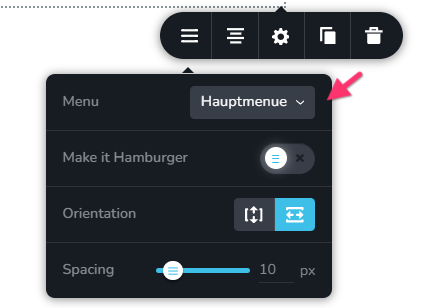
In the Brizy Menu element, simply select the menu you want to display from the dropdown next to the “Menu” field.
 0
0
Please sign in to leave a comment.
Comments
10 comments