Site clone

I have made a clone of a site (I have Brizy WordPress 50 sites license).
How do I assign a new license to the new cloned site?
I am worried that if I deactivate the license from site 2 (the new clone I just made) will deactivate also site 1 (the original site)?
Thanks...I was not ready for this.
-

Hi Daniele,
Thank you for reaching out.
Deactivating the license on the staging site will not deactivate the license on the live site.
You can use the same license for both your live site and its staging site. There's no need to assign a separate license to the staging site. Once it's activated, your account will display the live site, and directly beneath it, you'll see the associated staging site.

Kind regards,
Ariel H.0 -
Hi Ariel, thanks for the prompt response.
The reason why I want to activate the license is because they are both live and in two separate domain. We have cloned one because we needed some basic things to keep in the site structure, we are now changing the text and the images + titles / seo description for the site 2.
So these will be two different sites once the changes apply in full. We will need to do the same one more time for another one too (site 3) as the websites are for three businesses of the same brand but in different location.
So..in short...the new websites have started as a clone of the first one (for our convenience), but they will be customized to reflect the location of the business and the content. Hence, we need each site to have its own license.0 -

Hello Daniele,
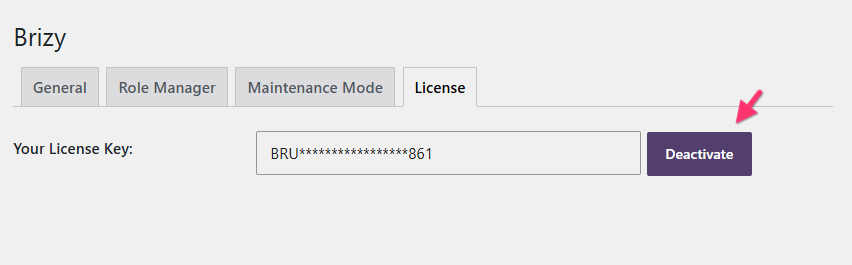
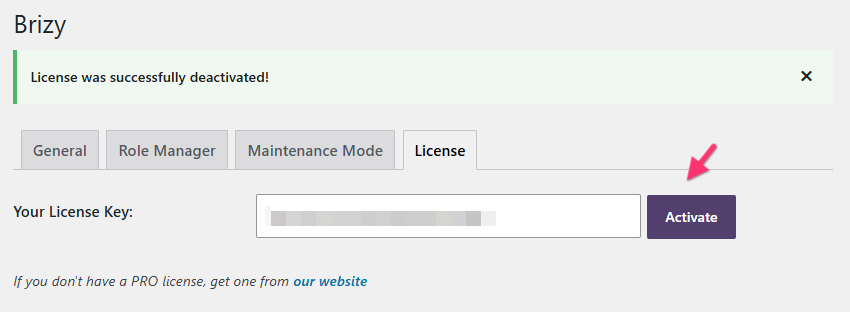
You can assign a new license to the cloned website in two steps
- In your WordPress Dashboard, under Brizy > Settings > License tab, click on the "Deactivate" button
- Paste the new license key and click on the "Activate" button.
0 - In your WordPress Dashboard, under Brizy > Settings > License tab, click on the "Deactivate" button
-
Hi George,
I just did it as you suggested and...bingo.
I had not realized that I have to generate "new" licenses...I was trying to use the same for both domains and obviously got the warning "....this license is already in use".
Anyway..it's all good now.
Many thanks for the time and patience.0
Please sign in to leave a comment.
Comments
4 comments