Global Header - Cannot remove!

I am not able to remove global header from my site no matter how much I try. The old header is coming along side new header with recent updates.
I don't understand how do you manage to break things so much!
https://voucher.dinnerisup.com/rarabray
The top global header shouldn't be present. Tried all things I can think of but not working.
Please suggest what to do
-
I had to go to the database, find the global block id from wp_posts(after looking at the html source) and delete that ID to make it work. We can hopefully close this ticket. Hope it doesn't return back.
0 -

Hello Safal,
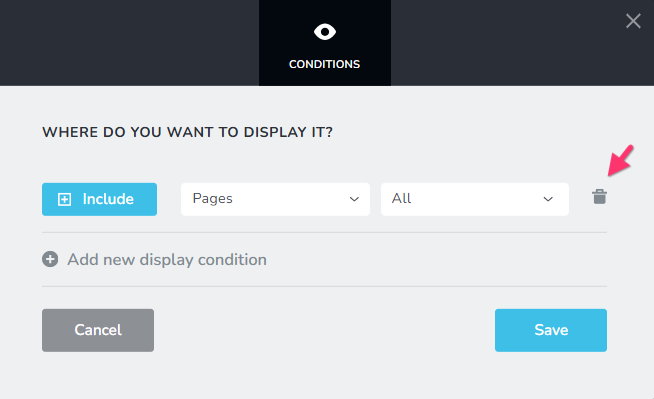
Global blocks are added to pages using "Display Conditions". Global blocks can also be removed from pages by removing the associated Display Conditions. For example, if you remove the "Display Condition" Include - Pages - All from a global header, it will be removed from all pages.
 0
0 -
Hi KC George, that's the first thing I tried. Along with countless others.
Like.1. Opening all the pages and removing at once and saving thinking one of the other affected.
2. Removing global option - saving it. Then deleting the global block.
3. Modifying global block but everything I refresh, I get old global block back.
4. Adding exclude all pages option.
5. Anything you can think of.Issue was serious enough as the old global block had clients old business logo and name. I had to dig through the database and delete underlying global block. Seems resolved for now but if it happens to other sites, I will take a video or pass login details.
This was a multisite WordPress so not sure if anything affected my setup. Other 14 sites just required turning off global and turning back on. While one didn't work, no matter what. I also went through all similar issues here which didn't help for me.
Thanks anyway.
Kind regards,
Safal0 -
Hello Safal,
Thanks for the update. We are glad you could finally fix the issue.
0
Please sign in to leave a comment.
Comments
4 comments