ACF Fields

Hi there,
Just created some ACF fields - Date, Start time and Finish time on this site https://www.fonfestival.org/, when I try to select them (using #fieldname) they don't appear in the fields.
We've also doing something similar (fields) on this site https://www.thefarmernetwork.co.uk/ and they appear just fine as options.
Thanks,
Darren
-

Hello Darren,
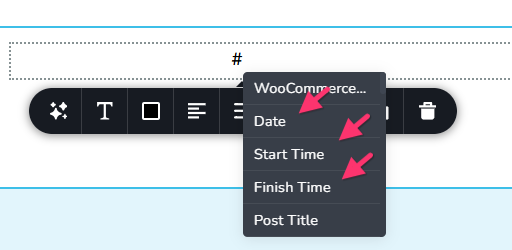
ACF fields should be ideally visible when typing # in the Text element.
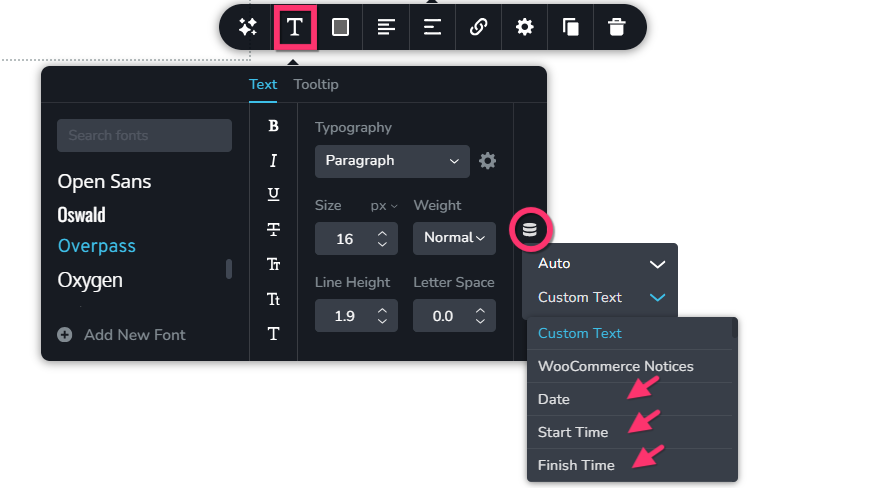
ACF fields should also be visible when using the Typography element, clicking the "Database" icon and selecting "Auto" in the first drop down list
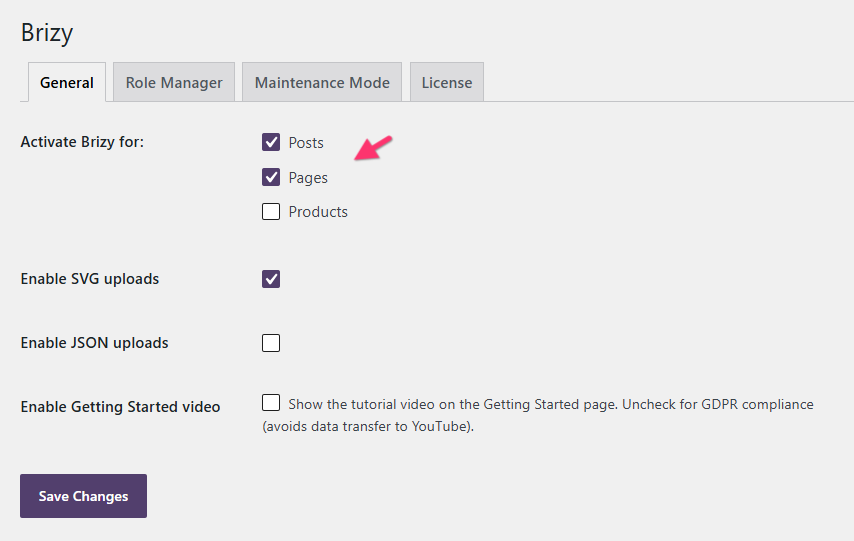
If you do not see these custom fields, please check if you have activated Brizy for the specific custom post type under Brizy > Settings in your WordPress Dashboard.
If you do not have success after making the above change, we will take a look at your WordPress Dashboard to troubleshoot this for you. Please add a new user to your WordPress Dashboard and send the following details to our email: communitysupport@brizy.io
- Support Forum reference: https://support.brizy.io/hc/en-us/community/posts/36671254195090
- WordPress Admin URL:
- Username
- Password
Your email must include a link to this thread's URL, otherwise we will be unable to locate your support ticket. Please notify us in this thread when you send us the email.
0 -
Hi Ariel,
It was the last option. We needed to activate it Brizy > Settings.
Strangely, in the site this was working on it isn't enabled in Brizy > Settings!
But it's working so that's great.
Thanks,
Darren
0
Please sign in to leave a comment.
Comments
2 comments