page refresh problem

Had this problem before:
This page needs a refresh. You've probably updated the page in a different tab or browser"
Pretty sure Modsecurity was not on in Godaddy or they were not able to change it before;
I have turned learning mode on in Wordfence--no change. Please advise.
-
It's also suddenly doing this in Brizy Cloud!
0 -

Hi Diane,
Could you please provide temporary administrator access to your WordPress dashboard so we can take a closer look at the issue?
Kindly send the following details to mailto:communitysupport@brizy.io:
Community post link: https://support.brizy.io/hc/en-us/community/posts/36205312941074
WordPress Admin URL:
Username:
Password:We’ll be glad to assist as soon as we have access.
About the issue with Brizy Cloud, could you please confirm whether it is still occurring? We recently performed scheduled maintenance, so we'd like to verify if the problem persists.
Best regards,
Ariel H.0 -
Sent the info. Just wanted to add that at 1:00 am I created a new page, redid the whole homepage and after about an hour of work, started getting the refresh error again. It was working and saving okay for one hour. I did manage to make it look okay on the front end for my client's business's sake, but still have more work to do on the page which can't be done now.
0 -
Hi Diane,
Thank you for your cooperation.
Since you were able to create a new page, rebuild the homepage, and save changes successfully for about an hour before the refresh error returned suggests that the issue is likely related to the size of the page. As more content is added, the amount of data sent to the server during each save increases. If the server has request size limits or security restrictions in place, it may eventually block the save request and trigger the refresh message.
We've seen similar cases before where the issue was resolved after the hosting provider increased the server limits and adjusted the ModSecurity settings:
https://support.brizy.io/hc/en-us/community/posts/27240442687378You may wish to share this support thread with your hosting provider and ask them to review the server configuration against the recommendations outlined there.
Kind regards,
Ariel H.0 -
There is no modsecurity and i've upped limits where I can. Frankly as far as I'm concerned this is a Brizy problem. Any problem I have lately is exclusively caused by Brizy. And what happened to you guys going in and looking at the site? I sent all the info requested for login
0 -
Hi Diane,
Thank you for your reply. We understand your frustration, and we appreciate that you've already reviewed the server limits on your end.
We did log in to the website and spent time troubleshooting the issue. Unfortunately, we were not able to restore the homepage because the website is currently unable to save updates. However, we were able to save the entire homepage layout in Saved Layouts so that the content is preserved.
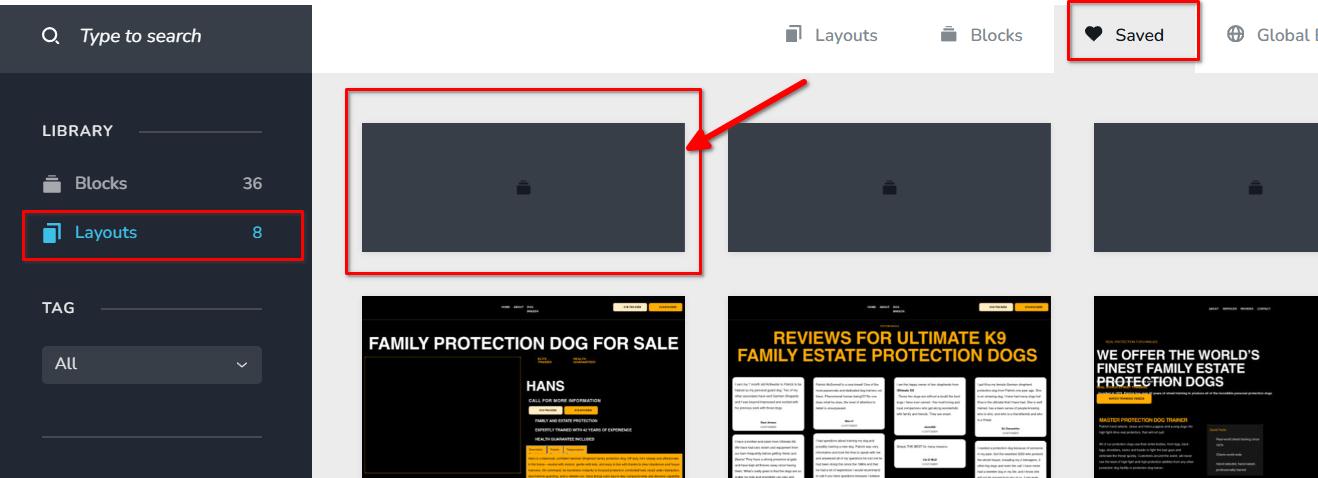
To further investigate, we created a clone of your website at:
https://ultimatek9.sitecheck.space
During our testing, we found that the cloned site is able to save page updates successfully, even with the full layout in place. This indicates that the issue is not related to Brizy itself, as the exact same website functions correctly in a different environment.
You are welcome to log in to the staging site using your credentials and compare the behavior yourself. We also recommend providing access to your hosting provider so they can inspect both environments side by side. Since the cloned site works correctly while the live site does not, this comparison may help them identify what is preventing save requests from completing on the live server.
We understand that you've already increased the limits available to you, but there may still be server-level restrictions, firewall rules, web application filters, or hosting-specific configurations that are not exposed through the hosting control panel.
Please let us know if you have any questions or if there is anything else we can do to assist.
Kind regards,
Ariel H.0 -
Whatever you did, the front-facing site is now a white screen:
 0
0 -
Hi Diane,
Thank you for the update.
While troubleshooting the issue, we unfortunately lost the homepage. We saved the layout and import it successfully, however, we're currently unable to save the changes due to the existing server-side issue affecting the website.
Since the page cannot be saved at the moment, we recommend contacting your hosting provider and asking them to investigate the save issue as a priority. Once the server issue has been resolved, we should be able to restore the homepage properly.
We understand the urgency of this situation and will be happy to continue assisting once the hosting-related issue has been addressed.
Kind regards,
Ariel H.0 -
I understand that hosting resources are part of the issue, but I do not believe this can be dismissed as only a hosting problem.
The behavior points to a Brizy-specific save/layout problem as well:
-
A full Brizy saved Layout immediately triggered the save error.
-
Rebuilding the same page block by block initially saved successfully.
-
Later, the rebuilt page also failed to save.
-
The browser console showed:
API Client Update Screenshots: Error: Failed to update Screenshot. -
The browser also showed
admin-ajax.phpfailing / losing connection during the save process. -
Raw access logs showed Brizy’s save request returning 404:
POST /wp-admin/admin-ajax.php?action=brizy_update_item -
The plain WordPress AJAX endpoint works and returns
0, soadmin-ajax.phpitself is not missing. -
Hosting resource usage does show CPU, physical memory, process, and I/O limits being reached, so yes, hosting is part of the problem.
However, the Brizy saved Layout causing the error immediately, the screenshot update failure, and the
brizy_update_itemAJAX failure all point to Brizy’s save/layout/screenshot process being involved.I need help determining whether this is related to saved layouts, Brizy screenshot generation, Brizy Free/Pro version compatibility, or a known issue with
brizy_update_item.I also want to be clear: I have used Brizy long enough to notice that recent updates and saving reliability have become more problematic. I’m willing to accept that hosting contributes to the issue, but I do not accept that this is only a hosting problem.
0 -
-
Hi,
Thank you for the additional details.
We agree that Brizy is involved in the save process, as the brizy_update_item request and screenshot generation are both part of how Brizy saves pages. However, during troubleshooting we also also observed intermittent Error 413 responses, which indicate that the server is rejecting the request due to its size.
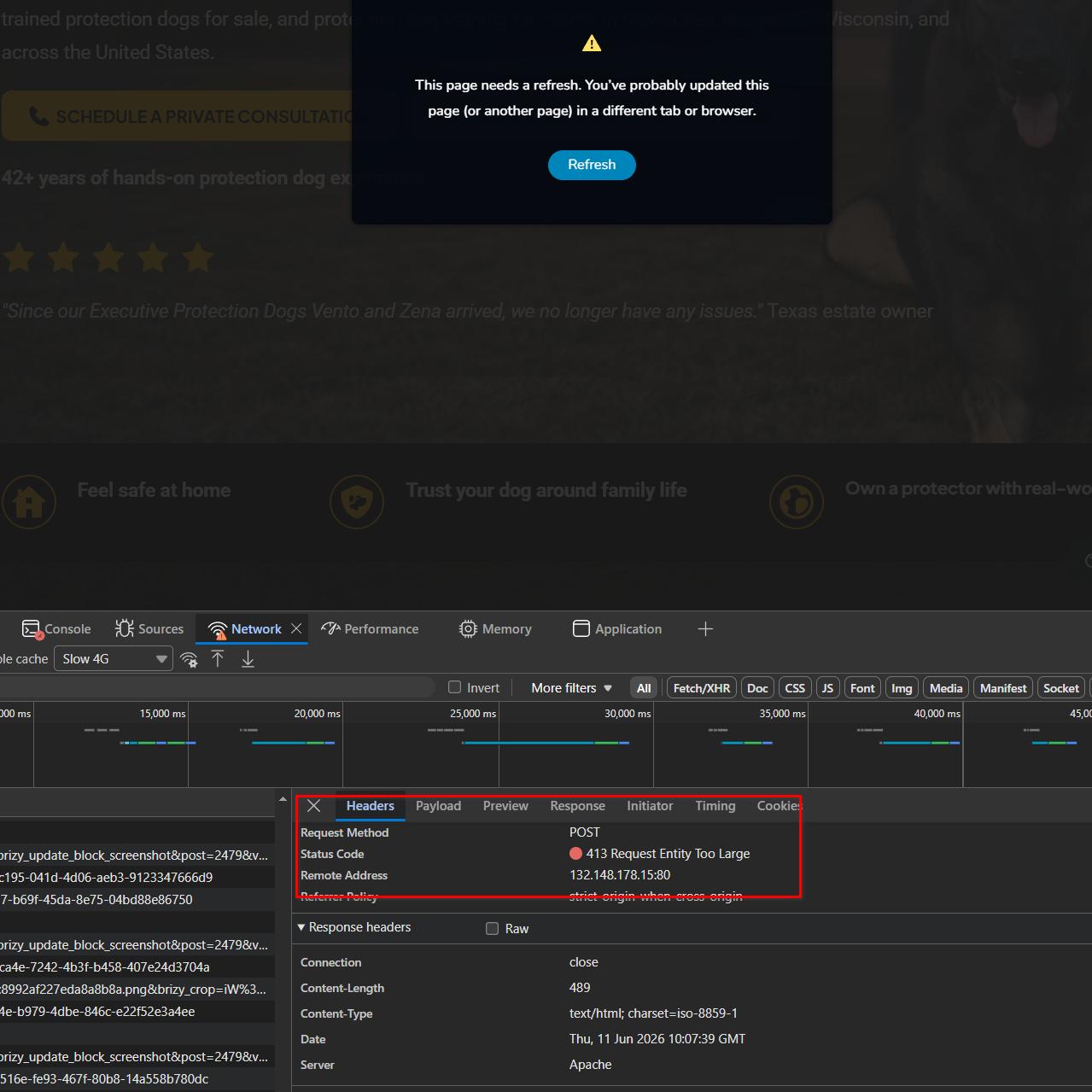
At this time, we are not aware of any known issues with saved layouts, screenshot generation, or Brizy Free/Pro compatibility that would specifically cause this behavior. We recommend asking your hosting provider to review the server error logs and request size limits, as these should provide more insight into why the save request is being interrupted.
Kind regards,
Ariel H.0 -
Found a saved block that kept spinning and spinning. Managed to delete while everything was loading. No more trouble. So yeah, Brizy's fault. That block must have been hogging resources.
0 -
In addition, that block was NOT on the actual page, just in the saved block area.
0 -
Hi,
Thank you for the update and for sharing your findings.
It's certainly possible that the saved block contributed to the issue. As a further test, could you try gradually adding more content or blocks back to the page and see whether the save issue returns? This would help us better understand whether the problem was related to the saved block itself or to the amount of data being processed during the save operation.
Please let us know what you find.
Kind regards,
Ariel H.0 -
Already recreated the whole page and no problems. Again that saved block was never on the page to begin with, it was just in the saved block area/library.
0 -
Hi Diane
Thank you for the clarification.
Regarding the saved block, we understand that it was not actually used on the page and was only present in the Saved Blocks library. It's certainly possible that it was related to the behavior you observed. However, since we were unable to reproduce the issue on the cloned site using the original layout, it's difficult for us to conclusively identify the saved block as the root cause.
Additionally, the original homepage and the recreated homepage are no longer identical, so there may have been other factors involved that changed during the rebuild process.
For reference, we also created a screencast demonstrating that the original layout works normally on the cloned site: https://youtu.be/X8auCdIV4ws
We appreciate you sharing your findings with us. We'll keep this information in mind and pass it along to our developers for reference should we encounter similar reports in the future.
Kind regards,
Ariel H.0 -
Still can't save. I have figured out that it only occurs on the home page. If you create a new page, any size, and assign it as the home page, it starts having the saving problem. Also now the global sections, header and footer, the black color in the background keeps disappearing; I keep fixing it but it keeps coming unfixed. This is the first time I have been unable to fix a site issue within a couple of days. There are a couple of changes I need to make on the home page soon.
0 -
Hi Diane,
We've seen similar behavior quite often on websites hosted with GoDaddy, especially on larger pages such as homepages that contain a lot of content.
Unfortunately, there is very little we can do from our side. Given the amount of time already spent troubleshooting, we would strongly recommend considering moving your website to another hosting provider.
https://www.brizy.io/top-5-best-wordpress-hosting-for-beginners
As a comparison, the staging site we previously set up for you is still working properly and has not shown the same saving issues, which further suggests that the problem is related to the hosting environment.
If you decide to migrate, we'd be happy to assist with the process and help verify that everything is working correctly in the new hosting environment.
Kind regards,
Ariel H.0 -
Everything was fine before your update. Now I'm supposed to go to my client and say," Hey, a plugin broke your site but you're going to have to shell out more money for different hosting." I don't think so. I'm well aware of Godaddy's problems but 1) the client already had it, 2) this is not on the cheapest hosting, and 3) I've always been able to fix things before. Your so-called troubleshooting broke the site further which I had to fix but suddenly I'm taking up too much of your precious time? I don't care about your staging site; it's meaningless. Really poor customer service!
0 -

Hello Diane,
We apologize for the inconvenience these issues have caused you.
Could you please tell us which GoDaddy plan your client is subscribed to? We may be able to recommend a hosting plan with more server resources but at a comparable or lesser cost.
0
Please sign in to leave a comment.
Comments
19 comments