Tools - Replace URL

Sorry, I cant find any documentation on Brizy. I have built a site as test.mydomain.com. I know what to make it just mydomain.com (remove the test).
Can I just do that in that tool you have? Or, is there more to it. Sorry, I am very new to web page development so a detailed explanation would be appreciated.
-

Hi Lisa,
Thank you for reaching out.
You can use the URL Replace Tool for this. Since your site was built on test.mydomain.com and you want it to be mydomain.com, you’ll just need to enter:
Old URL: test.mydomain.com
New URL: mydomain.comThen click the Replace URL button.
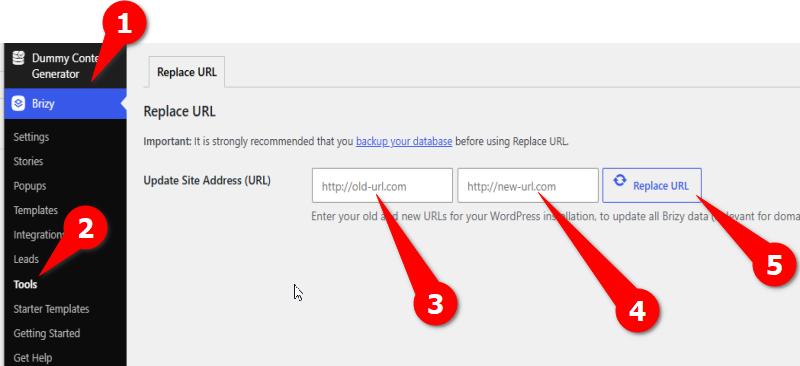
After that, please reset your permalinks:
1. Go to Settings > Permalinks.
2. Select Post name.
3. Click Save Changes.This will help WordPress refresh the site links using the new domain.
0
Please sign in to leave a comment.
Comments
1 comment