503 error

Hi there, my site`s been experiencing "Service Unavailable" errors constantly for the past few days. I didn't do an changes, only few automatic updates during this time. Sometimes the site works at normal speed but mostly its very slow and gives the 503 error even wen trying to login to the dashboard. Is there a was for someone from your team figure out what's going on and guide me to sort this out? Thank you.
-

Hi,
Thank you for reaching out.
A 503 Service Unavailable error usually means the server is temporarily unable to process the request. Since the site is also loading very slowly and the dashboard is affected, this is most likely related to the hosting/server environment, resource limits, or a plugin/theme conflict after an automatic update.
Please try disabling all plugins except Brizy and Brizy Pro. Also, try switching to a default WordPress theme temporarily and check if this makes any difference.
Please try this and let me know how it goes.
Best regards,
Ariel H.0 -
Hi Ariel,
Thank you for your quick reply. At this point logging into the WordPress dashboard is also not possible due to the 503 errors. Even if I manage to login in a rare occasion, it constantly throws "Service Unreachable" errors, when trying to perform the steps you have mentioned. Is there a another way to approach this?
Best regards,
Chinthaka
0 -
Hi Chinthaka,
Thank you for the update.
Since the WordPress dashboard is currently inaccessible due to the 503 errors, we’ll need to take a closer look from the backend.
Kindly send the following details to communitysupport@brizy.io:
Community post link:
https://support.brizy.io/hc/en-us/community/posts/36098470316690Last known working login details for your WP Admin dashboard:
WordPress Admin URL:
Username:
Password:cPanel / hosting console URL:
Username:
Password:We’ll be glad to assist as soon as we have access.
Best regards,
Ariel H.0 -
Hi Chinthaka,
Just following up on my previous email to check if you had a chance to review it. Please let us know when you’re ready to share the details so we can proceed and help you fix the issue.
Kind regards,
Ariel H.0 -
Hi Chinthaka,
Thank you for your cooperation.
We managed to get the website running without the error. This is demonstrated on this screencast - https://youtu.be/hxs8j1zk1b8
Upon checking, we found that several third-party plugins could not be activated because they trigger fatal errors. One example is "Beeketing for WooCommerce". When we attempted to activate the remaining plugins, the site began returning "503 Service Unavailable" errors.
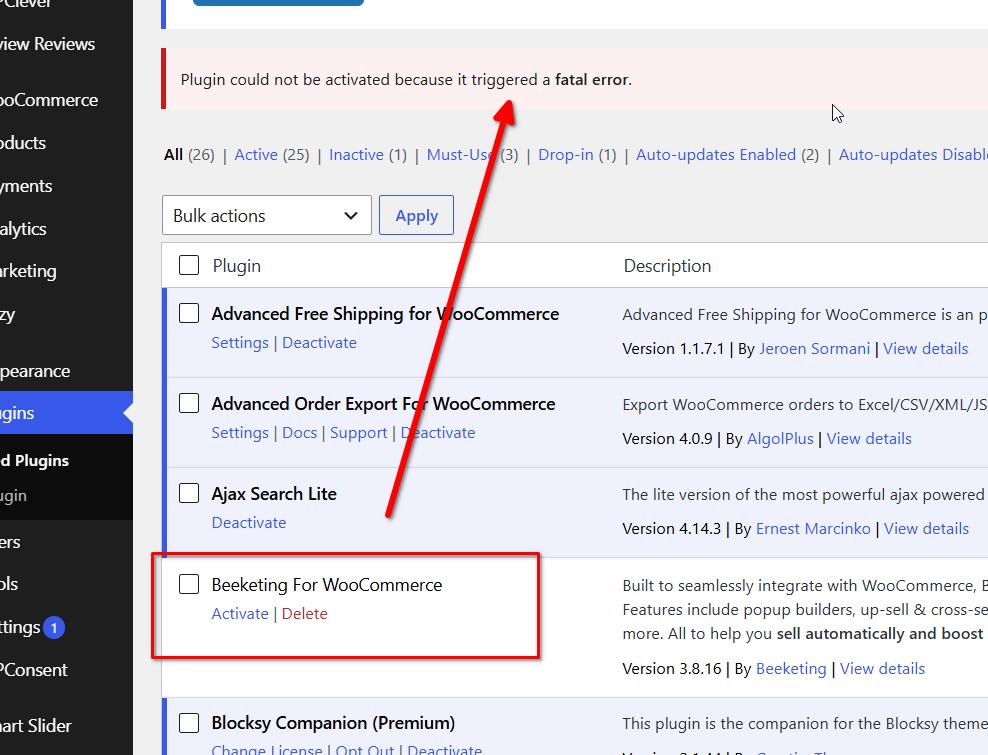
Based on our findings, this issue does not appear to be related to Brizy. Your website is running a large WooCommerce setup with more than 50 active plugins, and it is likely that the server is reaching its available resources when additional plugins are loaded.
We recommend contacting your hosting provider and asking them to review the server error logs for more detailed information about the 503 errors and fatal errors being generated. It may also be worth discussing an upgrade to a hosting plan with more resources, as your current setup may have outgrown the limits of the existing plan.
Kind regards,
Ariel H.0
Please sign in to leave a comment.
Comments
5 comments