How to add Google Tag Manager?

Hello,
i'm trying to understand how can i add my tag of GTM,
but from what i read on this forum is not possible if i don't have the wordpress integration?
is it correct?
There is no other way to do it?
Because i tried to copy the first part of code in the head section, as suggested in another post, but it just doesn't work.
Can you please help me?
Thanks
-

Hi,
Do you try to add the Google Tag Manager in the Brizy Cloud project? If so, then you have to copy the script and place in the Settings -> Code Injection -> Header. See here. What problem did you encounter? Why do you say that it doesn't work? Do you see this view https://jmp.sh/Y06EUPD when accessing the Code Injection? If so, could you please click on the "Send validation email"? After this check the email you created the Brizy account. There you have to receive a validation email from us. You have to open it and click on the "Validate" button. After you validate your account, please go back to the Brizy Cloud project and make a refresh and try again to add the script.
Best regards,
Sandra0 -

Hi,
I have the same problem. I don't use Brizy Cloud but I've created Brizy pages within Wordpress. My GTM code is still in header.php, however the code is not visible anymore. How can I track my data?
Regards,
Merel
0 -

Hi Merel,
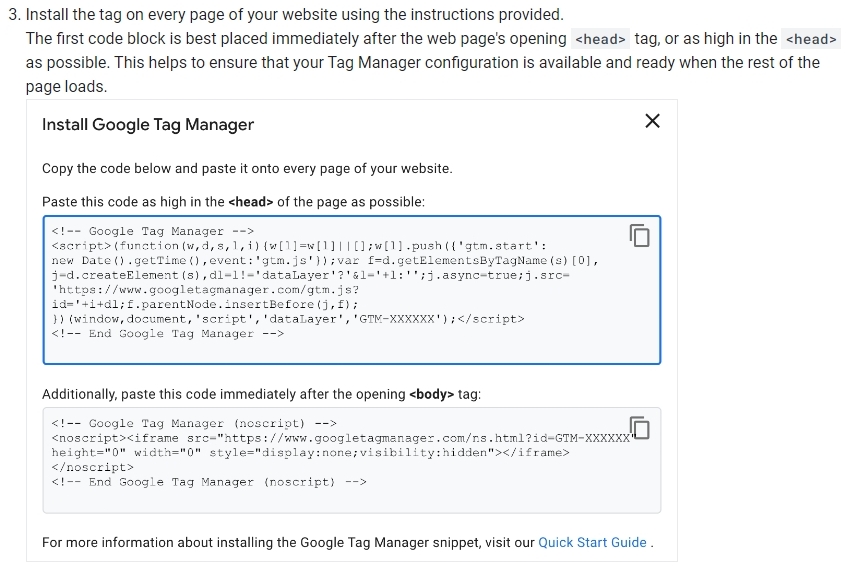
You must perform the following as per the instructions at https://developers.google.com/tag-platform/tag-manager/web
- Put the first code in the page's head section.
- Insert the second code into the pages' body
The header.php file is replaced when your theme is updated, and any code you have added may be lost. Hence adding code directly into the header.php is not recommended. Use a plugin instead to add the code to the header. Please consider the plugin Header Footer Code Manager
Drag & drop the Embed element into your global header and paste the second code there to embed it on all Brizy pages.
 0
0 -

I'm using brizzy cloud and want to implement google tag
IN the google tag manager instruction above, inserting the "head" code is easy
But how do we insert the "body" code?
0 -
Hi Bertrand,
The code that must be pasted immediately after the opening <body> tag must be added to the top of the page design. If you have a global header, you can place the code above the header. Drag the Brizy Embed element to the top of the header and paste the code. Have a look at this screen recording https://jmp.sh/oDyz1RyG
0
Please sign in to leave a comment.
Comments
5 comments