Text loses formatting

I set up a partial site as part of a sales effort. I formatted text on the desktop version as H1, H2, subtitle, etc. The tablet and mobile versions had it as paragraph format. I had to go into each display version and edit all examples of non-paragraph text. That feels like a new problem.
Here's the site, with the formatting fixed manually. https://reewritesbooks.brizy.site/
-

Hi,
Yes, this is the right way of working for Styling. Un Brizy is provided by default some Styles and you can choose one of them. If you want to create your own style, you can select one existent style and "re-make it" based on your need and design. I'm sorry if this created you some inconveniences!
Best regards,
Sandra0 -
First, I am pretty sure that this is NOT the normal way for Brizy to work. Most of what I have been doing has been in WP rather than Cloud, and this is new behavior.
Second, the normal procedure that I have experienced is that I set a page up on desktop. I can then go to tablet and mobile and have the same setup with automatic modifications in place to make left-right setups become up-down, for example. I can then adjust padding and margins, and text size if necessary. I DO NOT HAVE TO RECREATE HEADINGS AS HEADINGS BECAUSE THEY BECAME PARAGRAPHS.
Let me be clear about what I experienced. I created a page. It had text formatted as H1, H2, sub-title, and paragraph. It had multiple sections with multiple text formats. In tablet and mobile, all text was paragraphs and I had to go through the entire page resetting the format tags. That is not reasonable, acceptable, or expected behavior. I am NOT talking about styles in the sense of "Oh, the H2 text was too large in tablet", I am talking about the "H2 text was not H2 text anymore!".
0 -
Hi,
I'm sorry, I misunderstood your post and case. I think you told us about the styling of the text on the tablet and mobile. Therefore, I tried to reproduce your case but all seems to work fine. See here. Could you please send us a video or some screenshot of what happens on your site? Is it a project with a Blog feature or a project without the Blog feature?
Thanks!
Best regards,
Sandra0 -
Hi Sandra,
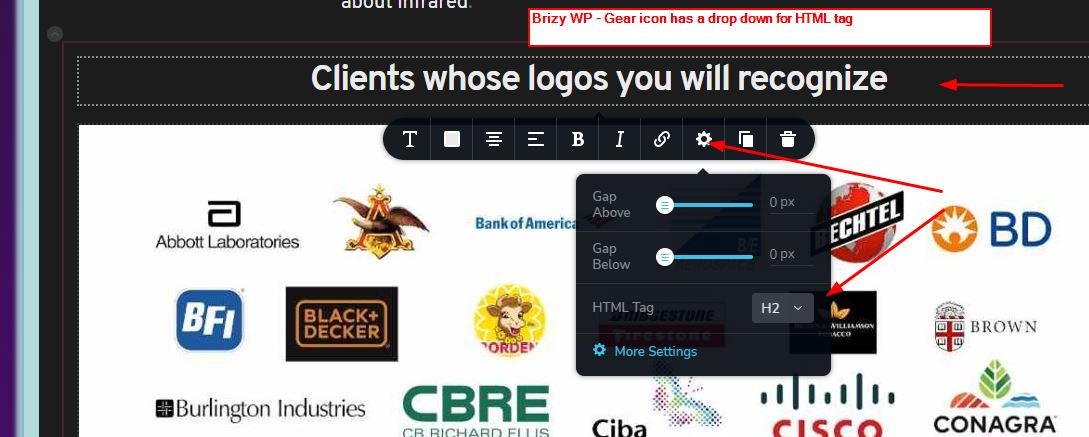
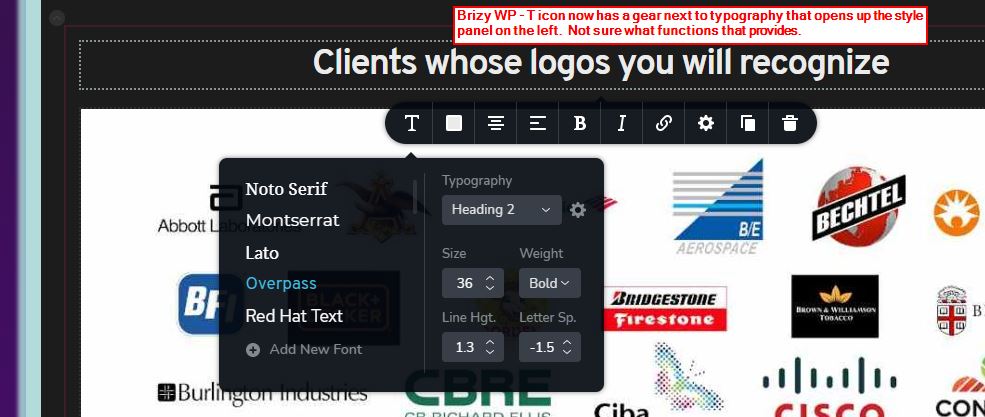
I'm not sure whether the problem is in what I did and understood I was doing. Quite a while ago I complained about the fact that the T icon led to a place to set type appearance, but the Gear icon led to setting the H tags. It was explained to me that they should be different settings, which I later realized was correct, but still felt that they should be on the same icon. All of that was primarily in Brizy WP, not Cloud.
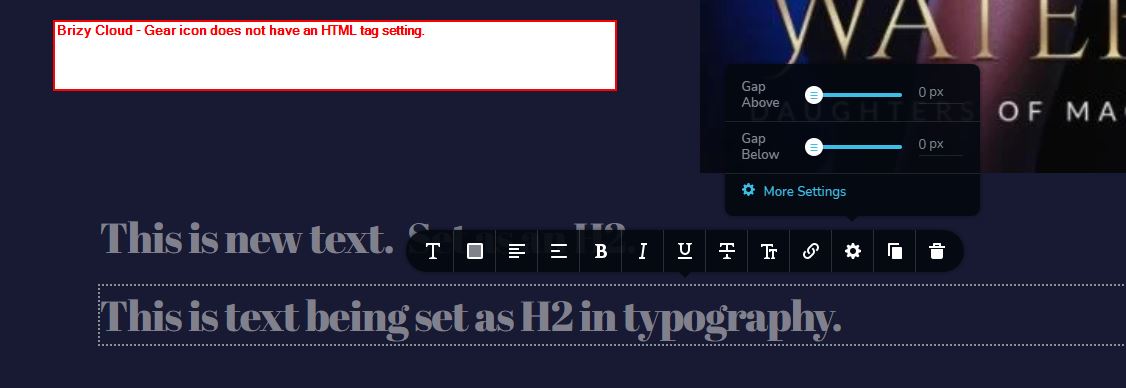
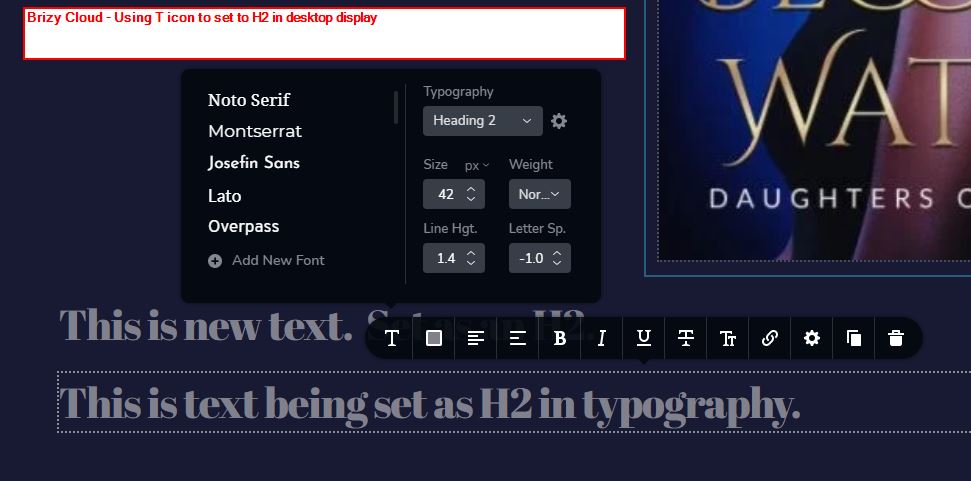
In WP, this is still the way it is set up - T icon for typography and Gear icon for tags. However, in Cloud the gear icon does not have a drop down for the tags. It seems that in order to set the tag in Cloud, you use the T icon and the gear inside of it next to the typography dropdown. That opens the left panel to the style and I'm guessing you click on the H level you want. If so, that's awful. In WP the same thing happens: T icon> gear next to typography dropdown>get style panel. Not sure why.
I have inserted a bunch of screen shots, since this system does not provide for attachments.
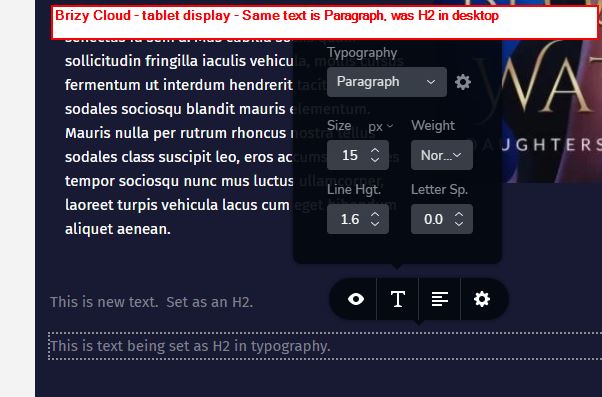
Also, I went into the page in Brizy Cloud. I entered new text and set the typography to H2. In tablet view it is Paragraph, not H2. See screen shots.
Jack
 0
0 -
Hi,
Thank you for reporting this problem. We could reproduce it and already informed our team about this. They will investigate it and will fix it as soon as possible.
In the old Cloud projects and in the WordPress environment, you can see for Text element the "Typography" and the "HTML tag". They are different because the "Typography" is more about the text style and the "HTML tag" is about what tag to attach to this text element. We add this option for SEO reason because many users ask us to add this option. They said they want to use the style for H1 (e.g.) but to have the H2 tag in the code.
Thanks!
Best regards,
Sandra0 -
Thanks, Sandra.
I just want emphasize that I think the heart of the problem is the lack of an HTML tag function in the Gear icon for Cloud, whereas WP has one. Compare the first image I provided with the fourth.
I understand the difference between the typography and HTML tag settings and agree that they should be independent. When I first encountered that, over a year ago, I did not understand. I do think that it would be simpler for the user to have the two tools in the same sub-window, but that's both minor and arguable.
Best,
Jack
0 -
Hi,
Thank you too! I already informed our developers of all these details and differences. They already received this information and are investigating it and the best solution for this problem.
Have a great day!
Best regards,
Sandra0 -
Hi,
I received a notification from the team related to an issue mentioned by you here. The "HTML tag" of the text element was moved to form the Settings on the Advanced settings. See here.
Best regards,
Sandra0 -
Hi Sandra,
Well, I guess the good news is that they did not lose it completely. I had, in fact, looked on the Advanced Settings tab, but did not see it because it's at the bottom.
The bad news is that moving it there is completely at odds with the stated goals of the Brizy UI - make the system need fewer clicks and keep the user's eyes focused on the work. It goes from one extra click (on the gear - as opposed to having it on the "T") to 2-3 extra clicks and moves attention to the sidebar. Formatting and tagging text is something that should be done throughout the page. Paragraph text may not need it, but all other text does. This is a major step in the wrong direction. It's not like there is crowding on the gear's popup!
My strong vote to put it back where it was!
Am I the only one that had this problem? Am I the only one that thinks this was a mistake?
I'll point out that you had to hear from the team about where it was now hiding! -- so you should fully agree with me!
Please urge the team to at least put it back in the gear popup.
Also, is it now different between Cloud and WP? If so, that's another disaster! The screenshots I sent indicate that it is.
Jack
0 -
Hi,
Thank you for your feedback and message. I will send it and inform the team regarding your opinion on this topic.
I also want to add that we are still working on the first issue you reported about the text element that loses the seated typography on the tablet and mobile mode.
Thank you!
Best regards,
Sandra0 -
Hi,
I see that Brizy Cloud still has the HTML tag setting in the More Settings side panel, rather than right there in the gear icon window.
I hope that is not a deliberate decision to leave it there. It would be inconsistent with the general UI approach, would introduce a disjoint between WP and Cloud, would continue to make the user's work more difficult.
Please put it back in the gear icon window, where it belongs! I can't believe that's a hard thing to do.
Jack
0
Please sign in to leave a comment.
Comments
11 comments