Table element: Text alignment issue

Hi,
I'm using the table element in Brizy. I noticed, that text in the sidebar sometimes is aligned to the left and sometimes it is centered:
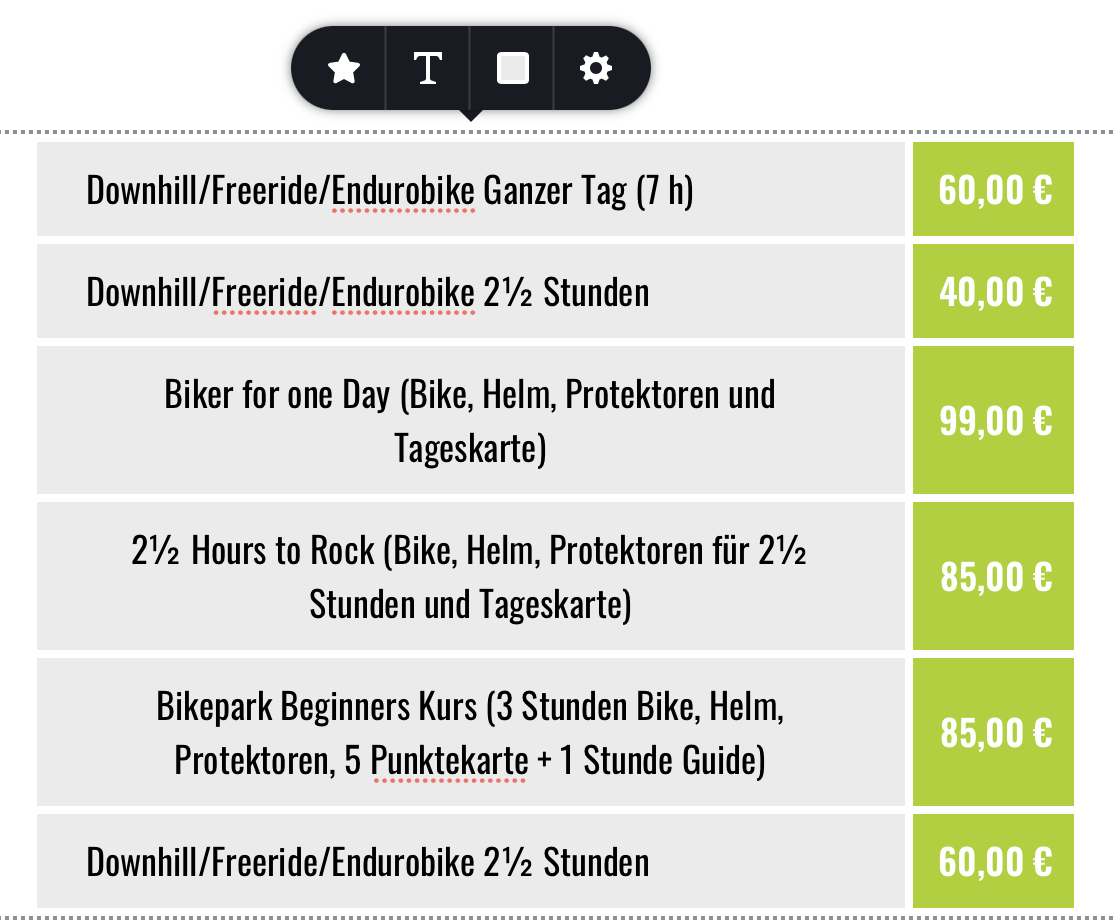
I can't find any setting to control text alignment in the sidebar. I want text in all cells to be aligned to the left. How can I achieve this?
Uli
-

Hi Uli,
By default, they are left-aligned. Can you please confirm you have this issue with the latest Brizy versions - Free 2.2.8. and PRO 2.2.5? Also, please send the link to your page so we can see the issue. Thanks.
0 -
Hi Alex,
I have the latest Brizy versions installed. I'm not using the table element any more, since there were too many restrictions for my use case.
But this erratic behavior also appears in Brizy cloud. You can check this:
https://apricot5223851.brizy.site
I noticed, that text is center aligned as soon as the content extends over more than one line.
Uli
0 -
Hi,
In Brizy Cloud the editor version is a bit older than the editor version in WordPress(because updates are made at a time difference) so we can't compare this. In Cloud I saw that it is centered but I can't reproduce this in WordPress.
0 -
Hi Alex,
I've just tried it again in Brizy Word Press:

I'm using Brizy 2.2.8 and Brizy Pro 2.2.5. I work on a Mac with Safari. Also tried different browsers, same problem.
By the way: This issue only occurs in the sidebar of a table.
Uli
0 -
Hi,
This comment was helpful. It seems to happen in Safari. In Chrome it works: https://jmp.sh/Guw1a5B Thanks for this hint. I have already created an internal issue.
0
Please sign in to leave a comment.
Comments
5 comments