2 projects have halted due to Global layouts and blocks not syncing.. my staff shacking legs

Hello team,
I have 2 projects halted for past 4 working days: Hinjawadi.in & WordPressRaja.in.
For both projects we moved from Brizy cloud to wordpress and now we are in the process of syncing pages as layouts and blocks. However, the layouts continued to appear till about 5 days ago and suddenly are not visible. A simiar ticket is raised by my staff but i am worried now as both projects are not moving and waiting for fix / issue resolve from your team.
Really appreciate if you folks can take this on priority as paid man power resource is idling now.
Thanks in advance.
regards,
parag
-

Hi,
Yes, we know about this inconvenience. Today, I was informed by the team that this problem will be fixed in the next Brizy plugin updates which we plan to release in this week. I'm sorry for this inconvenience!
Best regards,
Sandra0 -

I want to join here because I feel the same way.
I use a test environment with Brizy to develop the pages for my customers and then transfer the finished version to the customer site via the sync function. A really great feature.
But at the moment I have not been able to finish the pages for several days because the sync function is currently not working.
I urgently wish to take this into account in your update workflows in the future.
Many Thanks. Stefan
1 -
Hi,
Do you have the inconvenience with syncing the layouts and blocks between Brizy Cloud and WordPress environment? Or did you receive an inconvenience with the Server Sync publishing method? If you published the site using the Server Sync and receive some problem, could you please give us more details about this? Because it is a different problem that was reported in this post by the Parag.
How did you publish the site? Did you make some modification on the server after adding the Cloud zip folder (it was added SSL certificate, or it was added a redirection option from non-www to www or any other actions with this folder)?The server sync "Golden Rule" is: Server Sync option is the last step in publishing a Brizy Cloud project. The entire server environment needs to be prepared before uploading the Brizy folder.
Now, once the SSL or redirect changes have already been made, you need to delete the project folder from server and re-upload it again.
If you still find that the modification you make in the Cloud doesn't appear live on the site, could you please remove the cache folder?
Thanks!
Best regards,
Sandra0 -
Hello Sandra,
sorry if I didn't express myself precisely enough. It's about the synchronization of the layouts and blocks between Brizy Cloud and WordPress environment (see attached screenshot).
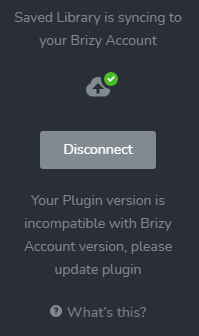
I very much hope that Brizy Cloud will be updated as soon as possible so that I can continue working on my projects.
Greetings, Stefan
0 -
Hi,
Thank you for updating us. Yes, we know about this inconvenience. At this time, it happens because we released a big and important update to the Brizy Cloud and therefore the Brizy Cloud version now is higher than the Brizy WordPress plugins. This inconvenience will be solved when will be released the next update for Brizy WordPress plugin that we plan to release it soon.
Thanks!Best regards,
Sandra0 -

Hi Sandra,
any news for this problem? When can we use the sync-feature again?
I've two projects that I can noch finish, because of the non-working sync.
Best regards,Chris
0 -
Hi,
Unfortunately, at the moment we didn't release the update for Brizy Pro plugin and therefore wasn't solved this inconvenience yet. We plan to launch this update in the next days because we need to make some additional test to make sure that all is working fine.
Thank you!
Best regards,
Sandra0
Please sign in to leave a comment.
Comments
7 comments