Unwanted spaces between text on articles page and category link error

Hi,
My website is showing random spaces in the text after the recent update, i have checked my template and everything but it isn't helping. Please see the image attached.
Also, one of the category page on my website, isn't opening the required article, it is happening only on 1 out of the three categories i have on my website and that too after the latest Brizy update, check this link HEALTH – Sorelle Spinelli
The articles aren't loading for this category. They work fine for rest.
Can you please raise a ticket and get me in contact with a tech person who can help me solve these issues as i am tired of the repeated problems after each update.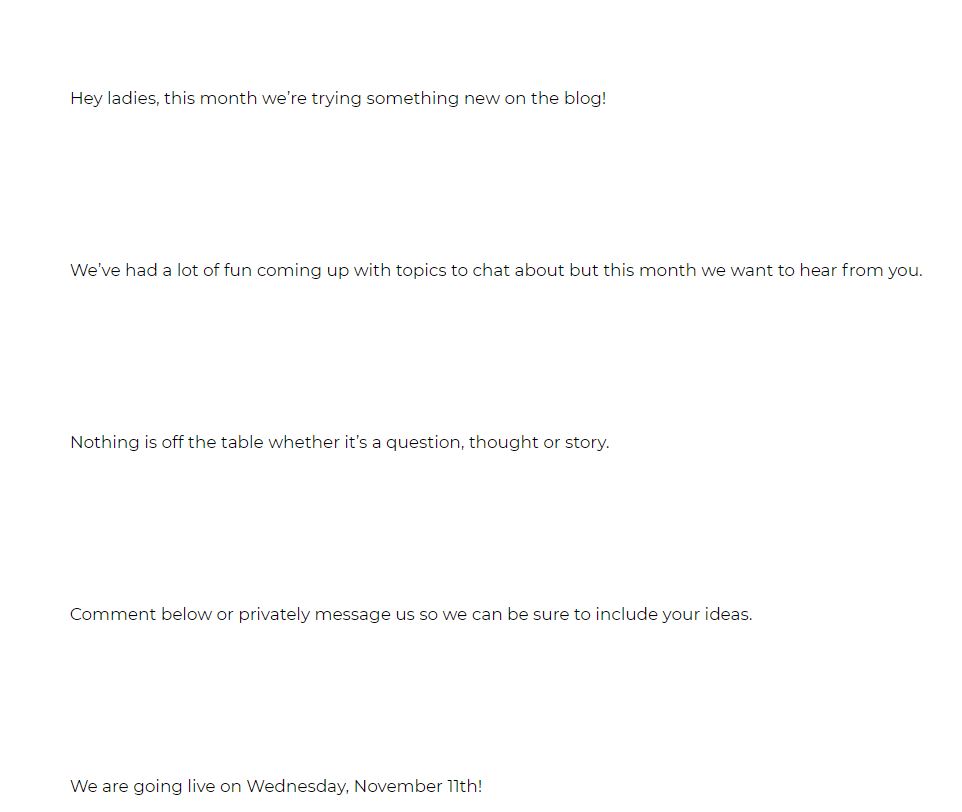
-

Hi,
Could you please check if you have the latest Brizy Free 2.2.7 and Brizy Pro 2.2.4 version? I read that you have the latest versions but I want to concretise if you have these versions. Also, could you please check what element did you use for displaying the Post Content? Did you use the "#Post Content" tag or the Post Content element? We are recommending using the Post Content element because it is the improved version of the #Post Content tag and this problem with spacing is already solved.
Category page - just now I opened this page and all seems to display fine with all posts. See here https://jmp.sh/977P8Wp. Could you please check again?
Thanks!
Best regards,
Sandra0 -
Hello Sandra,
Thank you for your response.
I have checked the video you have attached and also searched the forum, but couldn't find anything helpful.
Here is the link where i have explained my issue in detail, it would be great if you could check this out and get back to me - https://drive.google.com/drive/folders/1ojvqa-rvLm3G_tX5EenJdZcsYQz_v40D?usp=sharing
Thank you so much for this awesome builder and great help support.
Regards,
Harshit :)
0 -
Hi,
Thank you for the videos!
Regarding the first issue with the big space - could you please try to remove the existing element for displaying the content and re-add the Post Content element? If you will still have some big spaces, could you please check how was saved the post inside the WP Post? Also, could you please temporary deactivate all external plugins (except Brizy Free and Brizy Pro) and activate a WordPress default theme? Do you receive the same inconvenience?
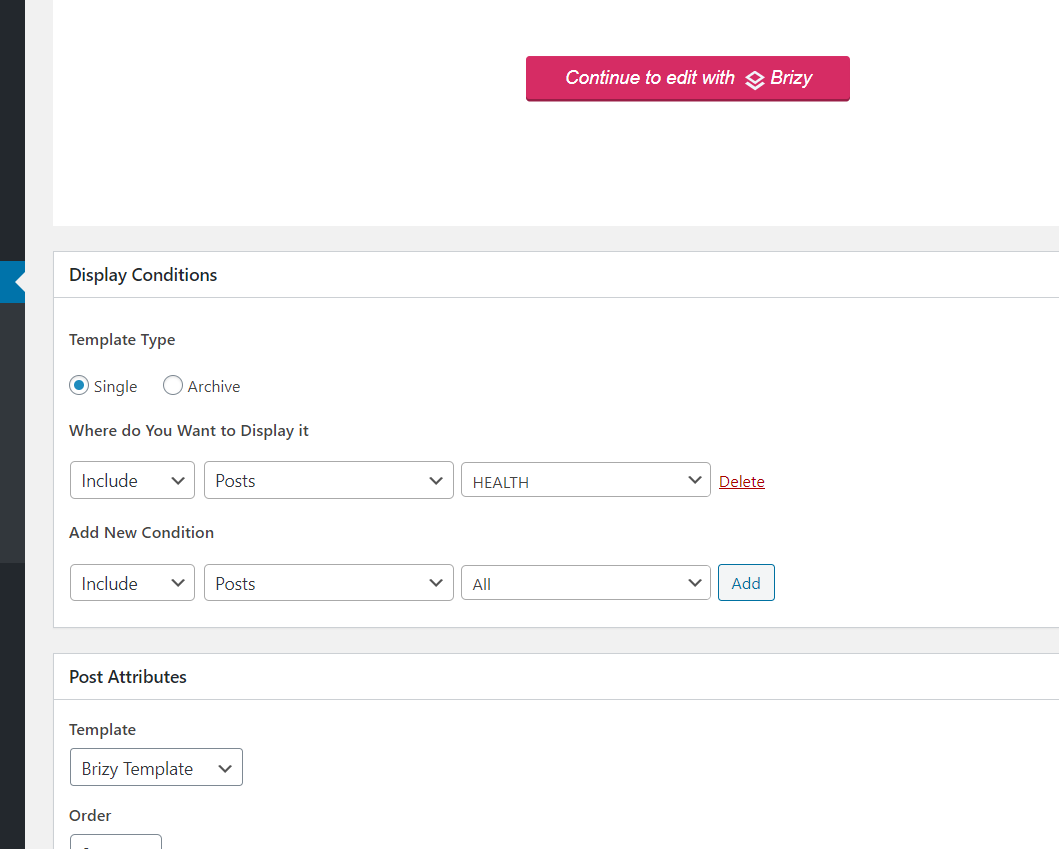
Regarding the second issue with the individual post - did you create a template for single posts? Could you please send us a screenshot with the display conditions you set for the single posts from this category? I suppose that you created a template where you set display condition to "Include -> category -> All" and also the "Include - Posts - Health". Therefore, the template you attached for the categories pages was attached to the single posts too which isn't correct. You have to create a separate template only with "Include - Posts - Health" or "Include - Posts - All" and there design how do you want to display the single post pages.
Best regards,
Sandra0 -
Hi Sandra, Thank you for your response.
The first issue got sorted out after i disable Gutenberg and very thanks for that.
For the second issue, the solution isn't helping me much with this, i already have the condition as Include- Posts - Health for the particular template i have made for the health page, it was working fine before the 2.2.6 update for me. Here is the attached screenshot of the same.
Can you please help me out sort this thing. Thank you :)
0 -
Also, the archive page for this particular template doesn't work, you can click the second page button at the bottom on this link HEALTH – Sorelle Spinelli and the website theme pops up instead of the template but it is not the case in the other two categories i have.
Please look into this as well.
Thank you
0 -
Hi,
Did you make some other modifications? Some days before the Archive page for Categories worked fine but now seems that on these pages was deleted the template or the display condition.
To summarise - you should have 2 templates. In general words, one with this display condition "Archive: Include -> Category - All" and the other one with this display condition "Single: Include - Posts - All". Further, if you want to create specific templates for specific categories or posts from specific categories, you have to delete this condition "Include - category - all" and/or "Include - posts - all", create other new templates and add the "Include - category -[name of the category]" (for the archive page of the category) and the "Include - posts - [category]" (for the single posts from a specific category).
For example, if you have 3 categories and for all these 3 categories, you want 3 different ways of displaying, therefore, you have to 3 templates. One with this display condition "Archive: Include - category - category 1", the second one with "Archive: Include - category - category 1" and the last one with "Archive: Include - category - category 3". No more display conditions to these templates. (this is for Archive category)
Then if you want to create 3 different templates for posts from these 3 categories, you have to create other 3 templates. One with this display condition "Single: Include - posts - category 1", the second one with "Single: Include - posts - category 2" and the last one with "Single: Include - posts - category 3". (this is for single posts)
Inside the template for Archive category, you have to add the Archive element. Inside the template for Single posts, you have to add Post title, Post Content, Image (and select to display the featured image), Post Info and other elements you want to display on the Single post.
Let us know if you can help you with something else.
Best regards,
Sandra0 -
Hi Sandra,
Thank you for your response.
I have not made any changes to my website, this issue popped up right after the update.My doubt is, that my website www.sorellespinelli.com follows the same format for the three categories i have namely, health, wealth and relationships.
I have only a single page for all of them and it works absolutely fine for the wealth and relationships. The links open really well and the archive section is working fine too.It is only restricted to the Health category and i am pretty sure it is something to do with the page builder itself.
My client has been really pissed as the issue has been outstanding now for so many days, can you guys take a look at this problem from your end? I would be more than happy to have a call or any other means to get this sorted asap.
Thank you
0 -
Hi,
Thank you for all these details!
I have created a private ticket on this request. You had to receive a notification regarding this on email. Could you send us in that private message the WP credentials to this site?Thanks!
Best regards,
Sandra0 -
Hi Sandra,
I have sent the credentials on as a reply on the Request Received email i got from your end.
Thanks :)0 -
Thank you! I already send you a reply to the private ticket. Also, I will add there the main idea for users who will find the same inconvenience and will want the solution.
In the dashboard, was created only templates for Single posts and wasn't created the templates for Archive - Category pages. Therefore, to solve this inconvenience, you have to create the template for Archive category post. In one of my previews comments from this post, I shared the full information about this.
Best regards,
Sandra0
Please sign in to leave a comment.
Comments
10 comments