Blocksy Startersite doens't use Brizy layouts

Hi!
I just did a fresh Wordpress installation and tried to make a simple webshop with the Blocksy "Modern Shop" startersite in combination with Brizy. The Blocksy pages seem to be unable to use the Brizy layouts, with this mess as a result: 
How can I solve this? I have automatically installed the WooCommerce and Brizy plugins by using the Blocksy Startersite setup. I also installed Brizy Pro since I have the lifetime lincense.
Thanks in advance.
-

Hi,
Unfortunately, with Brizy isn't possible to edit or customize pages that are already created and edited with the theme or another page builder. You can create new pages and edit them with Brizy. If you tried to edit a Blocksy page with Brizy and you receive the view from the screenshot, then it is normal behaviour and I would recommend not editing with Brizy the Blocksy pages.
Best regards,
Sandra0 -

I can not understand how to build a header and footer using the blocksy free starter pages. I watched a video by JP, but he was too fast to understand. how to do this, and I can't find the video to watch again. I only wish to build a header and footer, and a text-only tutorial might be better to understand!
Is there such a tutorial available?
Kind regards,
Mike
0 -

Hi Mike
Blocksy starter sites come with a Blocksy header and a Blocksy footer. You have broadly two options to design the header and footer for your website.
- Modify the header and footer design using Blocksy. You can modify the current Blocksy header design using the Blocksy Header Builder following this procedure How to Use the Header Builder Similarly you can modify the current footer design using the Blocksy Footer Builder. Please have a look at Exploring the Footer Builder for the procedure.
- Redesign the header and footer using Brizy. You can also remove the Blocksy header and footer and recreate the header and footer in Brizy. To remove the Blocksy header and footer, open any page in the Brizy Editor, on the left sidebar, select the 'Page' icon and under the Page Template, select Brizy Template. The page will refresh without the Blocksy header and the footer. You can now add your Brizy header and a Brizy footer.
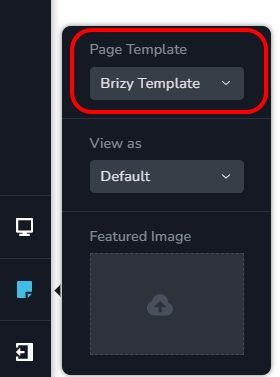
Please watch this video for more detailed instructions. https://jmp.sh/jNcqOajn
0 -
Hello,
Thanks for your reply. The way I understood this having seen JP's video was that I use Blocksy to edit and style the header and footer on a Blocksy starter site, then switch to the Brizy template and continue to work on the Blocksy blocks with the Brizy builder!
That's not so is it?
Having said that, is it possible to edit a Blocksy starter site with Brizy using a brizy header?
Maybe if Brizy could offer a similar header as Blocksy then there would be no need to use other builders- what do you think?Kind regards,
Mike Commins0 -
Hi Mike,
The way I understood this having seen JP's video was that I use Blocksy to edit and style the header and footer on a Blocksy starter site, then switch to the Brizy template and continue to work on the Blocksy blocks with the Brizy builder!
As I have mentioned above, you have broadly two options to design the website header and footer when starting with a Blocksy starter site. If you follow the approach of modifying the header and footer design using Blocksy, you use the 'Default' Page Template and not the 'Brizy Template' In this approach, you do not switch to the Brizy Template.
Having said that, is it possible to edit a Blocksy starter site with Brizy using a brizy header?
Maybe if Brizy could offer a similar header as Blocksy then there would be no need to use other builders- what do you think?Yes; it is possible to add a Brizy header and footer in place the Blocksy header and footer. This is the second option I have discussed in my previous response: "Redesign the header and footer using Brizy". If you watch the video I have linked above, you will get a rough idea on how to do this.
0
Please sign in to leave a comment.
Comments
5 comments