Blog/Posts setting isn't working

Hello,
I wanted to create a blog archive page but the site still doesn't show the template I have created at all and still showing the theme's template even after I set all these options. Could I please get help with this?
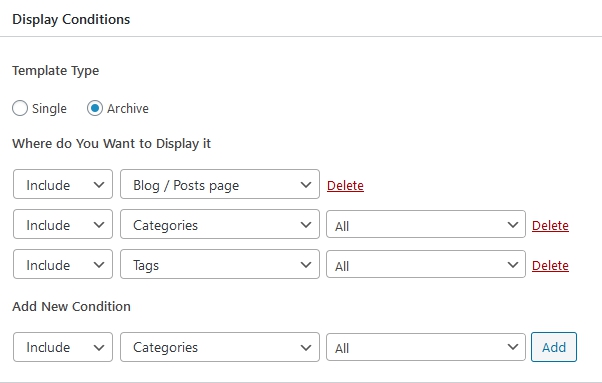
-

Hi,
Could you please check if you followed all these steps and recommendation for editing the Blog page with Brizy?
1 - Create a new page and name it "Blog" for example;
2 - Go to the Settings -> Reading and select this page ("Blog" page) for the Posts page https://jmp.sh/qdf311o;
3 - Go to the Brizy -> Templates -> Add new and create a new template;
4 - For this newly created template add a specific name and set the right display condition. For the Blog page, the right condition is - template type Archive and the condition "Blog/Posts page". See here https://jmp.sh/0XSdZXR;
5 - Publish the template;
6 - Inside the template, you can add the elements and blocks you need to display.An important detail is to check if on the Blog page from the "Pages" if there isn't activated the Brizy editor. If you see in the Pages this https://jmp.sh/Rw4Cw3k, you have to deactivate the Brizy editor for this page in such a way https://jmp.sh/ma1flFo.
Thanks!
Best regards,
Sandra0
Please sign in to leave a comment.
Comments
1 comment