Conditional block conditions in template not working

Hi
We have created a template for a custom post type created with Toolset.
The template is working, except for the fact that we can't get the block conditions to work.
In Toolset we have created a taxonomy that is basically just "yes/no". In the template we have added the following global block display conditions: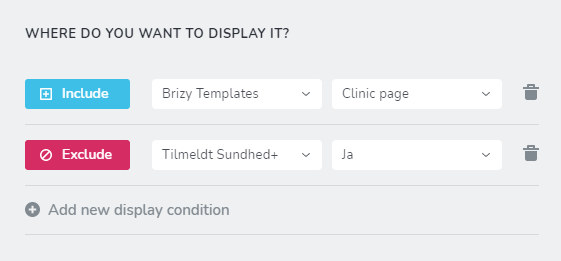
So the block is set to be displayed in the template, except in the cases where the taxonomy is set to yes ("ja" in Danish).
In reality the block is displayed on all pages using the template, no matter if yes or no i selected in the taxonomy.
We have tried to use a category in the display conditions instead of the taxonomy, but that doesn't work either.
Is this a bug, or is there anything that we are not seeing?
Kind regards
-

Hi,
From your screenshot, I find that this block is set-up to display for posts/pages where is included the "Clinic page" template and to exclude it from "ja" custom taxonomy "Tilmeldt Sundhed+" Archive page. When you added that exclude condition, you didn't exclude this block from the pages that have the "ja" taxonomy but exclude from the "Ja" archive page. Unfortunately, at the moment isn't possible to exclude a block from some pages that have a certain category or custom taxonomy.
Let us know if we can help you with something else.
Best regards,
Sandra0 -
Hi Sandra
Thanks for your swift reply.
So what you are saying is that we cannot exclude a block based on any of the page's actual content?
In that case, do you have any ideas to an easy workaround for this? Maybe a third party plugin that can be used instead?
Kind regards,
Mathias0 -
Hi,
Yes, you can add Exclude condition to the global block but for this, you have manually selected on what pages or posts do you not want to display that block. Therefore, you have to add "Exclude - Pages - [name of the page]" or on your case (because you want to exclude the block from the custom post type) "Exclude - [name of custom post type] - [post name] " and in such a way for all pages or posts, you want to exclude that block.
Unfortunately, it isn't another way to exclude the global block from a page or post.
Best regards,
Sandra0
Please sign in to leave a comment.
Comments
3 comments