Brizy WP Popup Conditions not showing pages

Good evening,
I have a site with several pages. I created a popup with the trigger 'On page load'. The popup works, however I want it to be displaying only on some pages.
I created the condition 'Pagina's' (Pages in Dutch), but it only allows me to select All pages. In the Past I was able to select specific pages
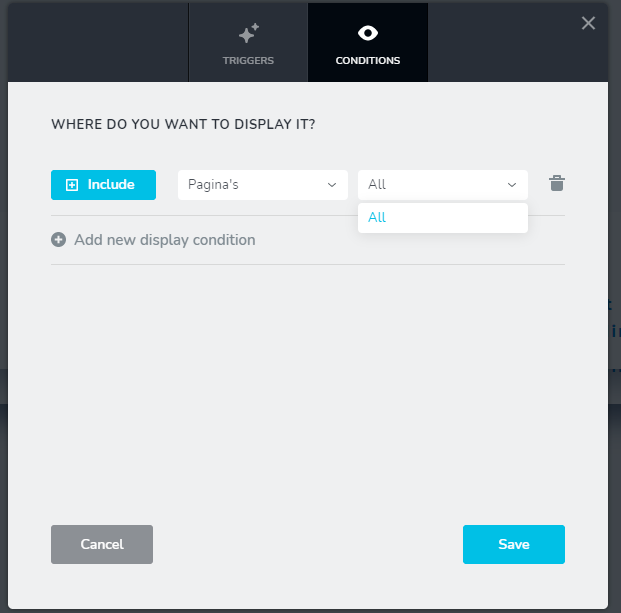
I am using Brizy Pro 2.2.3 and Brizy 2.2.7 with WP5.6 Dutch and Blocksy.
Did I hit a bug?
Kind regards,
Dennis
-

Hi,
Unfortunately, I can't reproduce the problem you encounter https://jmp.sh/hKdeWWL. Could you please temporary deactivate all external plugins (except Brizy Free and Brizy Pro) and activate a WordPress default theme? Do you receive the same problem? What were your previous actions before this problem happen (except updating the Brizy Free and Pro)?
Thanks!Best regards,
Sandra0 -
Hi Sandra,
Thank you for getting back to me.
I did disable all the plugins, but the Brizy ones and then changed my Theme to Twenty Twenty One. I then received the same problem.
I then changed the WP language to English from Dutch and it worked:
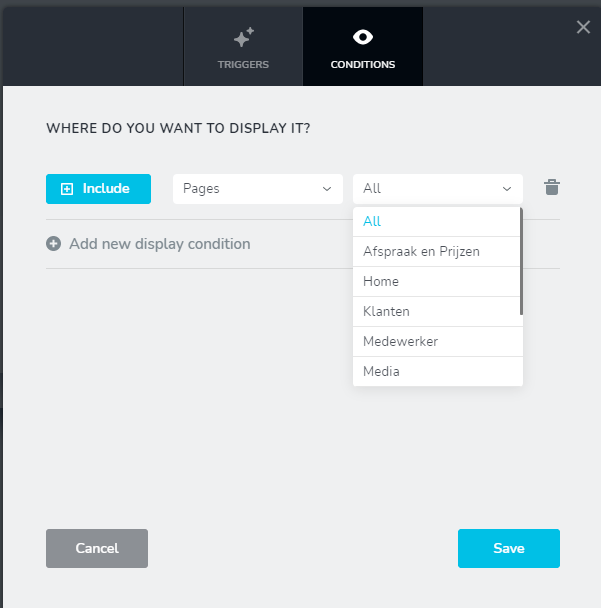
I then tested this on the blocksy Theme and it still worked.
I then switched the WP language back to Dutch and I hit the same issue.
Hope this helps.
Kind regards,
Dennis
0 -
Hi,
Could you please inform us what dialect of Deutsch did you have set-up the WordPress? I tried to use the Deutsch language for the WordPress but the pages were translated as Seiten and all seemed to work fine. See here.
Best regards,
Sandra0 -
Hi Sandra,
I used Dutch (The Netherlands, or Nederlands in Dutch), rather than Deutsch (Germany). ;-)
Hope this clarifies.
Kind regards,
Dennis
0 -
Hi,
Ohh :) Thank you and sorry for my mistake! We could encounter and reproduce this inconvenience. Therefore, we created an internal issue and send it to the developers to investigate and find a solution for it. Thank you for reporting this problem!
Best regards,
Sandra0 -
Hi Sandra,
Thank you for getting back to me. Much appreciated! Please let me know if I have to do some more testing.
Have a great weekend,
Kind regards,
Dennis
0 -
Thank you very much for your cooperation and opening. When we will have an update from the team we will inform you too!
Have a great day!Best regards,
Sandra0 -
Hi Sandra,
Just checking here, is there any update regarding a fix already?
Kind regards,
Dennis
0 -
Hi,
I'm sorry but at the moment we don't have an update or information regarding this problem. The team are super busy with the new update we planned to release. When we will have some news from them, will inform you here.
Thanks!Best regards,
Sandra0 -
Thank you, Sandra,
I managed to get around it, by switching the language to English, make the changes in the popup, save and then switch back. This seems to work.
Kind regards,
Dennis
0 -
Hi,
Thank you for updating us regarding this inconvenience and for sharing with us this workaround!
Have a great day!Best regards,
Sandra0 -

I'm dutch too and have the same problem.
Thank you Dennis for this workaround.0
Please sign in to leave a comment.
Comments
12 comments