Remove styling (text / backgroundcolor / hover etc)

Default scenario;
- Add a new section (default background-color)
- Add text-element
- Change the background-color of the text-element
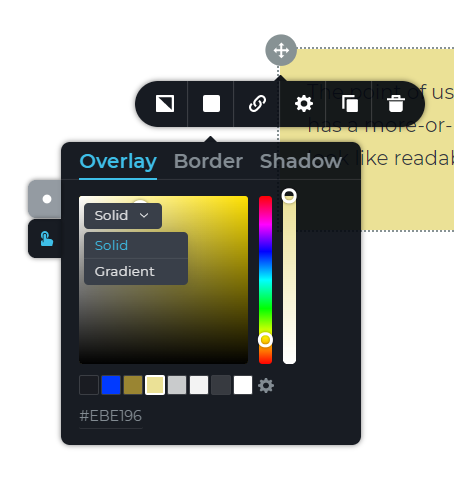
- Can't remove background-color of the row element to match the background-color of the section.
Worse case scenario;
I add a hover effect to an ellement. There is no way right now to remove this hover effect? Only to match it with the default state.
Please just a 'none' or 'remove' option in the color selector popup. This goes for the border/shadow everything.
-

Hi,
If you want to remove the background colour of the text element or if you accidentally added the hover background colour to the text element, you can remove it by set-up the opacity to 0%. In such a way, the background or hover colour will match the colour of the block. See here (the same for the hover overlay colour).
Best regards,
Sandra0 -
Thanks for the video but this is a very hacky solution at best.
If you've ever manually made a site you know this isn't how you'd code it, and you know it. All this does is bloat the css files which is totally unnecessary.
Please consider the reset/none feature for the front-end designers out there.
Kind regards,
Saskia0 -
Hi Maurice,
Thank you for your suggestion, we will take it into considerations!
Let us know if we can help you with something else.Best regards,
Sandra0 -

How can you reset the hover background image?
Let's say I reposition the background image on hover.. There is no way to reset it.. And if i remove the hover BG image, it totally removes it, so if i hover on the page, the image disappears.. The only way to reset it is to match up the settings on the hover settings which is a huge pain in the ass.. We need a simple reset option for settings like this
0 -
Hi,
At the moment, in Brizy isn't an option to reset the hover for the background image. We informed our managers regarding this feature request and they will take it into consideration.
Let us know if we can help you with something else.Best regards,
Sandra0
Please sign in to leave a comment.
Comments
5 comments