Can't edit pages have to click preview first

Hi Brizy Team,
I am using Brizy Pro with Wordpress. When I click edit with Brizy after opening a page I am confronted with a Wordpress template version of the page. I can't access the editor. This happens with every page or post I create. I can only access Brizy Builder by clicking preview in Wordpress.
Any guidance would be very much appreciated.
-

Hi,
Could you please check if you have the latest Brizy Free 2.2.6 and Brizy Pro 2.2.2 version? Also, could you please temporary deactivate all external plugins (except Brizy Free and Brizy Pro) and activate a WordPress default theme? Could you please send us a video with how this problem is manifesting? Could you please check if you created a template for all posts and pages in the Brizy -> Templates? What display conditions did you set? Could you send us screenshots with the display conditions?
Thanks!
Best regards,
Sandra0 -
Hi Sandra,
I have the latest version of Brizy and Brizy Pro installed. All external plugins are deactivated. The wordpress default theme is activated. I have templates for both posts and pages. The display conditions are set for all pages and all posts. The display template appears as Brizy template - there is no way to chose the templates I designed as they do not appear in the drop down box.
I would like to add that if I add the prefix https:// I am able to edit the pages in Brizy as normal.
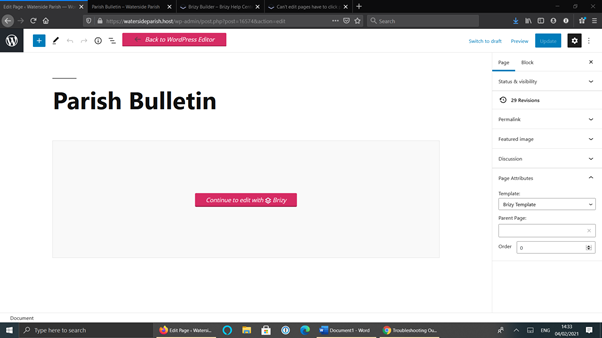
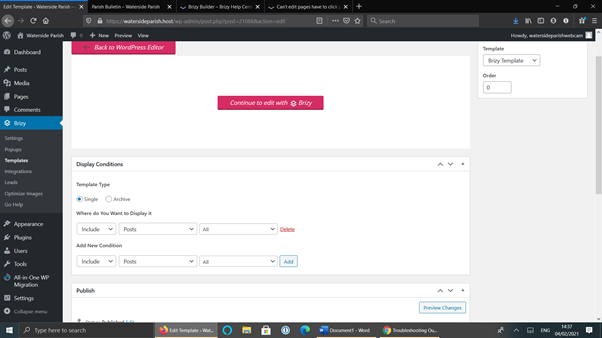
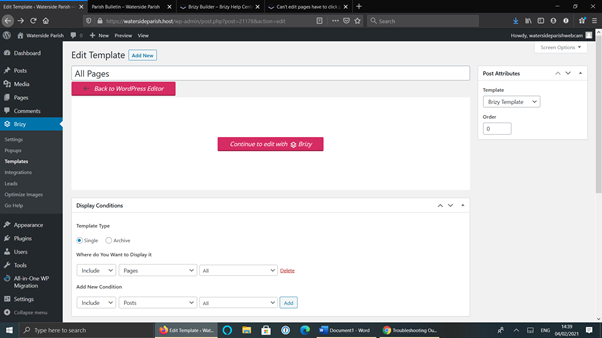
A video of what's happening:
https://1drv.ms/u/s!AjP3uRvUvIqcsFt04JETewhp5w8-
Thank you.0 -
Hi,
It is a big difference between Brizy Template and Page template - Brizy template. The Brizy Template is something like a sketch where you design how you want to look a page, a post or all posts. In templates usually is used the dynamic elements. In the display conditions you indicate where do you want to display this template. The template will apply to the page/post and will display the elements from the template. We don't recommend to create a template for All pages as you show us in the screenshot because in this case, all pages will have the same design and I suppose each page from the site is a bit different. You can create a template for a certain page (Blog page, Archive page, Category archive page, Shop, etc.) or for all posts.
The page template - Brizy template is represented in your first screenshot and is about how to structure the page per total. Belong Brizy template, you may have "Default" template. It designs the page in general words. For example for pages you have set the Page template - Brizy template, you will have only Brizy settings and content. In the pages, you have the Page template - "Default" template, you will have the theme header and footer and a container where you will be able to add Brizy content. Here, you can't find the Brizy template you created in the Brizy Templates because they both are different.
Therefore, to solve this inconvenience and be able to edit the pages inside the Pages with Brizy, I suggest removing the template you created for all Pages. If you want that certain blocks like header and footer be displayed on all Brizy pages, I suggest making them as global and set for all pages. In this video, you will found more details about this feature.
Best regards,
Sandra0 -
Hi Sandra,
I have removed the pages template and I am still having the same problem. I still am unable to edit my pages without previewing first.
Thanks
0 -
I have figured out the solution. The problem began when I added a SSL certificate to the site. However under general settings in Wordpress the site's url must be prefixed with https:// instead of http.
Brizy is now working normally.
I hope this helps someone else facing the same problem.
Best wishes,
Malachy
0 -
Hi,
Thank you for updating us regarding this inconvenience! Great to know that you could find the cause of this problem and already solved it!
Let us know if we can help you with something else!Best regards,
Sandra0
Please sign in to leave a comment.
Comments
6 comments