Help images not load - brizy

Hello,
the images are shown in the editing mode but when i access the website the images are not shown.
Can you please help? We are using the free version.
Thanks,
Adolfo
Notes:
1.Version Free 2.2.6
2.All Plugins external disable.
3.Change the theme do you have the same problem.
-

Hi,
Thank you for all these details!
How did you add the images in the Brizy Pages? Did you add them through WP media library? Could you please go to the Media Library and access a image used in Brizy page too? Try to modify it (rotate or crop it). Did you receive any problem?
When did you encounter this inconvenience? What were your previous actions (migration, plugin update, etc.)?Best regards,
Sandra0 -
¡Hello, thank for answer!
1. ¿Did you add them through WP media library? Yes, no problem.
2. ¿Could you please go to the Media Library and access a image used in Brizy page too? Yes, no problem.
3. ¿Did you receive any problem? Yes, images not loading.
4. ¿When did you encounter this inconvenience? When installing britzy yesterday.All Plugins external disable and change the theme do you have the same problem.
Notes:
Version PHP 7.4
Hosting: Sered.net
Permissions : Uploads: 755 ; Britzy: 755
URL images:
0 -
Hi,
"3. ¿Did you receive any problem? Yes, images not loading." If the images aren't loading when you make some modification on them in the WordPress Media Library, then the problem is in the server. You have to contact them and ask them to enable php-gd or php-imagick.
Thanks!
Best regards,
Sandra0 -
Hello Sandra!
1) php-gd and 2) php-imagick are enabled on the server. Anything else?
Thank you,
Adolfo
Note:
Images do not load in edit mode (Brizy) and do not load in preview0 -
Hi,
Thank you for all these details!
I have created a private ticket on this request. You had to receive a notification regarding this on email. Could you send us in that private message the WP credentials to this site?Thanks!
Best regards,
Sandra0 -

hello, I'm experiencing the same problem with brizy 2.4.4
0 -

Hi Bismark,
Can you please share your website URL so that we can check
0 -
Been having this issue of images loading in the editor but not on the final preview of the page.
like in the case of this page.
The website is: www.quantumoilfield.com
This I've tried:
1. Enabled then Reenabled php-gd or php-imagick.
but this didn't work.
0 -
Hi Bismark,
Except one or few images at https://quantumoilfield.com/index.php/our-services/ all other images appear loading fine in preview. https://jmp.sh/4pCesGA
There could be some issue on this specific page. We will need to take a look at your project to help you further. If you need help with this, please add me as a user to your WordPress Dashboard. My email: kc.george@brizy.io. Please enable the option "Send the new user an email about their account" as in this screenshot https://jmp.sh/sOSGGR3
Once you have sent me an invitation, please let me know here.
0 -
Hi KC,
You should have a notification in your email.
The issue actually included the following:
1. Images not loading
2. Text being bolded on preview.
Don't know if this is a bug in the plugin or a configuration error on server side.
please could you check and get back to me.
0 -
Also Note that, this is not the only affected page.
0 -
Hi Bismark,
Looks like there is a conflict between Slider Revolution and Brizy images added in the front. If you disable the Slider Revolution plugin in your WordPress Dashboard, the images added in the front using different elements will start showing in preview.
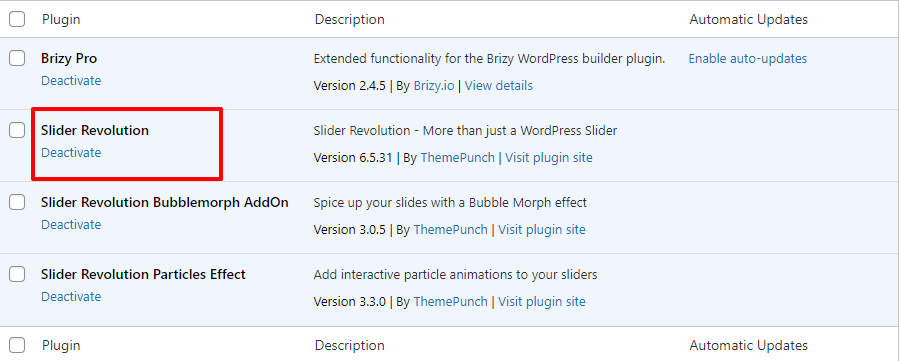
Since particles effect is a prominent aspect of your design, you can't disable Slider Revolution. As a work around, if you use background images instead of forefront images, images will show up in the front end. For example, in the carousel at https://quantumoilfield.com/index.php/our-services/, I have added the images in the background. Now it shows in the front end. You may need to do this for other images which are not showing in preview.
0 -
Hello KC,
Thanks for the update: Adding the images in the background as a workaround to work with slider revolution may not be the solution I'm looking for as I need both brizy and slider revolution to work properly together.
since the image can be "solved" by the method mentioned above, how is the bolded text issue solved?
Keep in mind, that some pages are working well like the homepage but other pages like the our services page are not loading both images and text well (By "Well" I mean the text which is not bolded renders as Bolded in the final preview of the page).
looking forward to your respond.
0 -
Hi Bismark,
If you deactivate Slider Revolution, the text bolding issue also disappears A conflict between Brizy and Slider Revolution could be the cause behind this as well.
I have added a CSS code to your Additional CSS. Please check if that helps display the text in normal style. The CSS will affect all pages. Please also check few pages randomly to see if all text look good.
0 -
Hi KC,
The CSS is working for the bolded text, but the image issue is still unsolved.
What's next?
0 -
Hi Bismark,
Can you eloaborate why the image issue is unresolved? Is it because you cannot add all images to the background or some other reason?
0
Please sign in to leave a comment.
Comments
16 comments