Features request about images, Gumlet etc...

Hi everybody!
I read that other users already asked for similar features, but I want to ask anyway old and new ones.
First:
- I would like that you support Gumlet for image optimization and caching with their CDN, also because they can serve CSS/JS files as well (Shortpixel doesn't do that).
Related to this, if you can disable these functions from Brizy:
- lazy load (using Gumlet we could use their lazy load plugin... that works with all browser, unlike your that works only with Chrome? Buuuuhh!!)
- disable Brizy image optimization or at least change your "strange" way to create optimized images with ugly URLs that are incompatible with Gumlet.
Second:
- some way to reset Brizy cache of images or at least force Brizy to recreate all the optimized images (maybe deleting the useless one)
Third:
- I tried some plugins for reactions, but they all have strange behavior with Brizy (instead of showing the reactions icons where they should, on top or bottom of the posts, they show in the end of the page, after the footer). Do you have some plugin to suggest?
Fourth:
- Links inside of posts are reformatted inside Brizy, losing the underline and color change. I can fix this with a CSS, but I think you should fix this.
Fifth:
- Some way to format the widget that we can insert with the sidebar tool.
I mean, in general Brizy is a lot more easier than other page builders, you can create really wonderful effects. But for some basic functions, you have to be a CSS master. It's a contradiction!
I like a lot Brizy, I want to move all my websites to it, but I would really like that you can make some little improvements to make it the best one!
Everything for now, I will post in future if I encouter other problems.
Thank you, best regards!
Valerio
-

Hi Valerio,
Thank you for your feedback and all your suggestions!
First - Yes, we already have an internal feature request and our team are investigating this option. At the moment, we don't have any updates from them and can't inform you regarding the progress regarding this feature request but I will inform you when will receive it.
Second - We are working on a new image optimization tool and in the future when an image will be deleted from a Brizy page and it isn't used in other Brizy pages, this image and all its variations (for desktop, tablet and mobile) will be deleted automatically from Brizy image folder.
Third - unfortunately, we can't recommend any plugin that makes this action on the Brizy images. We are still investigating this area but could you please inform us what plugin did you test?
Fourth - Yes, we know about this aspect too and our team are working to solve it. At the moment, we don't have any option to customize the links inside the text element and for this reason, isn't possible to set some styles and it inherits the style for the simple paragraph. We are working to improve this aspect.
Fifth - Unfortunately, isn't possible to edit and customize the widget element because it has a different structure. The items from a widget could come from different sources (theme, WP, plugin) and it is hard to know what code will create it to know how to "read" it. The technology of the Sidebar-Widget doesn't allow to customize it. You can see also on other page builders, they also don't allow to customize the content of the Sidebar.
Thank you!
Best regards,
Sandra0 -

Hello, any news about Gumlet compatibility? Or CloudImage? Thank you
0 -

Hi Marek,
You can use Gumlet or another image optimization plugin along with Brizy WP. When you choose image sizes other than "Custom" in the image element, the images can optimized by the plugin. I am pasting a Facebook post we have had sometime ago in the comment below. Please read this for more detailed information.
 0
0 -
We have revamped the way we handle images
In the area of image handling, we have been receiving these feedback.-
"Images uploaded to Brizy builder look blurry on the website. We do not find the exact same image resolution as the image we have uploaded"
-
"Why can't we use an image optimization plugin of our choice?"
To address these concerns, we have introduced a new way of handling images with both Brizy WP with and Brizy Cloud in the latest updates. This revamp provides a solution to the blurry images issue and opens up a wider range of image optimization possibilities for Brizy WP. With the latest updates-
You can now use an image optimization plugin of your choice to optimize images you upload through Brizy WP.
-
You can now show images with the same resolution as the original image with Brizy WP and with the Cloud
CHOOSE YOUR IMAGE SIZEWhenever you upload an image to WordPress Image gallery, 4 image sizes are created automatically for you-
Thumbnail size (150 x 150 pixels)
-
Medium size (maximum 300 x 300 pixels)
-
Large size (maximum 1024 x 1024 pixels)
-
Full size (the original size of the uploaded image)
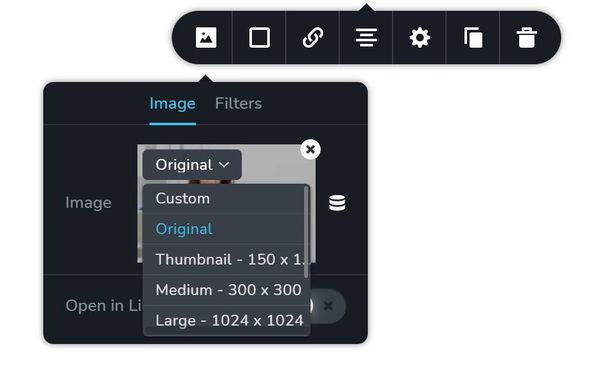
When you add an image to WordPress using Brizy builder, 6 sizes of the image are created: 2 for desktop view, 2 for tablet view and 2 for mobile view. One for each normal and retina displays. When a user accesses that page, the image that is most suited to his device is loaded, thus optimizing the experience and load speed on the page. The resized images are always smaller and of lower resolution compared to the original image.While Brizy WP and Cloud continue to resize images for different devices for better performance, you now have a choice not to resize images and retain its original resolution and size if you want to. In the image element, you can make this choice. (See the first attached image)With Brizy 2.3.19 onwards, you will have multiple image size options to choose from. These options can be categorized into two basic options-
Resize for performance: If you want your images to be resized for performance for different devices, choose the “Custom” option. This option is selected by default for all images.
-
Do not resize for performance: If you would like to retain the original resolution and size of your images on your website, choose “Original”. You can also choose other available image sizes WordPress permits. When you choose either original or any other size, your image will not be resized for different devices.
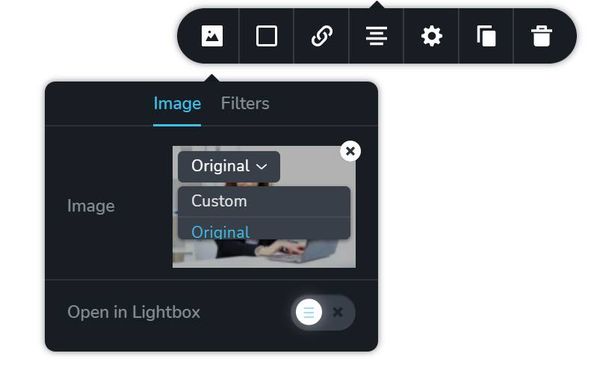
With Brizy Cloud you get two image size options to choose from. (see the second attached image)-
Custom: If you want your images to be resized for performance for different devices, choose “Custom” option
-
Original: If you would like to retain the original resolution and size of your images on your website, choose “Original”
USE AN IMAGE OPTIMIZATION PLUGIN
With previous versions of Brizy WP, the images that you upload using the editor used to be saved in a separate folder from the image folder that WordPress uses. This made the images inaccessible to Image Optimization plugins and the users could only use the Shortpixel Optimization natively integrated with Brizy.With Brizy 2.3.19 onwards, images are no longer saved in a Brizy specific folder, but in the folder WordPress saves it's media files. This opens up the possibility to use any Image Optimization plugin of your choice to optimize images you upload through Brizy WP. Start using an Image Optimization plugin of your choice along with Brizy 2.3.19 and above. Images with the Original and other size attributes will be optimized by the Image Optimization plugin. Images with Custom size will not be optimized by the plugin.The native integration with Shortpixel will not be available from Brizy 2.3.19 onwards.CAN I UPLOAD IMAGES OF ANY SIZE?
If you upload big size images to WordPress or Brizy Cloud your image will get scaled down. The default threshold value for WordPress images is 2560px. If you upload an image with higher width/height than 2560 pixels, the image will get resized to 2560 pixel width/height. However you can modify the threshold values or disable scaling down of images with WordPress.Brizy Cloud allows you to upload images upto 2000px width/height. If you upload an image with higher width/height, images get scaled down.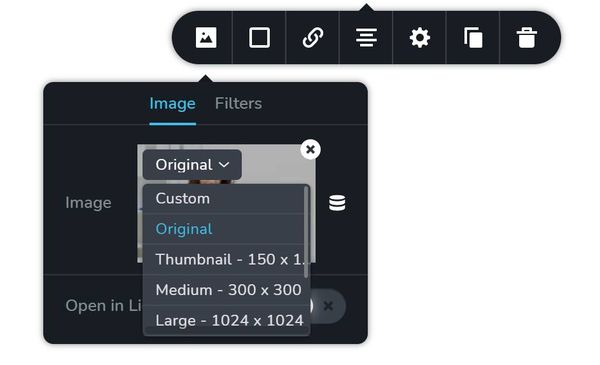
 0
0 -
Please sign in to leave a comment.
Comments
4 comments