All blocks missing from a published page when editing with Brizy builder

Brizy Support/Community,
I have a published page that has numerous blocks and in public view looks good. However, when I attempt to edit the page, the Brizy builder (WP plugin), has no content, i.e. no blocks.
I can edit all other pages, i.e. the Brizy builder opens with all blocks as originally saved.
The main differences between the troublesome page and the other pages are:
- The page with the missing blocks has the dynamic post elements in it, the other pages do not.
- The page with the missing blocks has a WP page type, "category", (see image of main menu structure). Specifying "category" as a page type was based on following the "dynamic post elements" tutorial video.
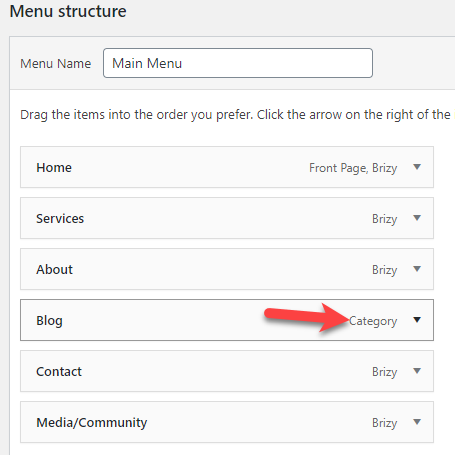
Please advise.
Thanks!
Michael
-

Hi,
If you receive this inconvenience on the "Blog", could you please give us more details about this? Did you go to the page "Blog" and try to edit it?
If you followed the video from YouTube regarding the creating a Blog page, then you should create a template for All Categories and there you added the Archive element. In this case, you haven't go to the Pages and create a new Blog page and add there the Posts elements because you already created the Blog page.
When you click on the Blog from the menu, you are redirected to the site-URL/category/blog, which is your Blog page. If you want to make some modification here, you have to go to the Brizy -> Templates and select the template you created with this display condition "Include -> Category-> All" or "Include -> Category -> Blog".
Let us know if we can help you with something else.
Best regards,
Sandra0 -
Sandra,
I'm sorry for the belated reply.
I see. I need to edit the Blog page from Brizy templates (where I had originally created it), and not on WP page. Got it. Makes sense.
Thanks,
Michael
0 -
Hi,
Thank you for your reply and message! Great to know that all is fine now!
Let us know if we can help you with something else!Best regards,
Sandra0
Please sign in to leave a comment.
Comments
3 comments