Customize Search Results Page When There Are No Results

When there are no search results, instead of having a blank section where the results would normally be how can I can customize this to at least say "No Search Results Were Found"
I know other page builders I use have this functionally built in such as Elementor.
Thanks in advance,
Chad
-

Hi,
Unfortunately, at the moment isn't possible to customize the Search page for the case there is no result and now it isn't displaying any text or other details. I will inform our managers about this and will add an internal feature request on this subject.
Thank you!
Best regards,
Sandra0 -
Ok, thanks. That would be a nice option to have, so you wouldn't have to write code.
0 -
Hi Chad,
Thank you for your suggestion. I already informed our team regarding this feature request and they said that will think and investigate it.
Let us know if we can help you with something else.
Best regards,
Sandra0 -

Hi Brizy team,
Any update on this feature request? It is unprofessional to leave the page blank when there are no results.
Thanks,
Albert
0 -

Hello Albert,
Thank you for contacting us.
Unfortunately, at the moment, we don't have any news on this topic, we don't know when this future it will be released.
Best regards, Nelea.
0 -
Hi Nelea, Thanks for your prompt reply. 1. Please suggest a workaround. We don't mind working with some code until Brizy works on this. So we are not forced to use Elementor or other builders that can handle "No Results". 2. Please tell Dimi that there is no point in working on bells and whistles when basic issues are not addressed 4 years after initial release. My client finds it unacceptable that No Results is blank. Blessings, Albert ᐧ
0 -

Hello Albert,
Thank you for your message!
As for now I do not know any code that you can use but I will try to find something and help you! Second of all, I will tell Dimi about this but please understand us as well. We are trying to improve Brizy everyday and working on new features so you, the users, can work more efficiently with our builder. Thank you for understanding!
With the best of regards,
Doina
1 -
Hey Doina, Thanks for looking for a workaround! Many Brizy users will benefit. Not displaying a blank page when there are no results is not a new feature but a basic feature that has been missed out on by Brizy for years. All professional websites that you visit will say something like, "Sorry, there are no search results. Please try other search terms." I recommended Brizy as a user-friendly tool for the client to update website contents. But the client rightly asks, "Why should visitors see a blank space when there are no results? They will be left wondering. That is unprofessional." Looking forward to the workaround. Thanks. Blessings, Albert ᐧ SPAM"
0 -
Hi Albert,
Due to the fact that Brizy builder doesn't have that option yet, we can suggest you use a search plugin and not use Brizy's search element. In this way, you can customize the search page. Unfortunately, I can't recommend a specific plugin for the search function, because we haven't tested them. Hope this will help.
Best regards, Nelea.
0 -
Hi Nelea, Your response proves my point: Brizy customers need to use a plugin for such a basic function as search results! What's the point of advanced features and a major update when Brizy cannot provide such a basic feature? Blessings, Albert ᐧ SPAM
0 -
Hi Albert,
Advance updates are made to fix many bugs and to add more functions without which the builder cannot work well. We are very sorry for this inconvenience, we are hoping that in the future we will release this option.
P.S please do not reply to the notification email - noreply@brizy.zendesk.com; the emails will be received as spam and they will not be posted here.
Best regards, Nelea.
0 -
Hi Nelea, Perhaps you could help me with another query? Why does the site's url have an "#" on the homepage? https://infinitusnow.site/# I'm using Chrome & Firefox. Thanks. Blessings, Albert ᐧ
-1 -
Hi Nelea, Thank you! You have been most helpful. Blessings, Albert ᐧ
0 -

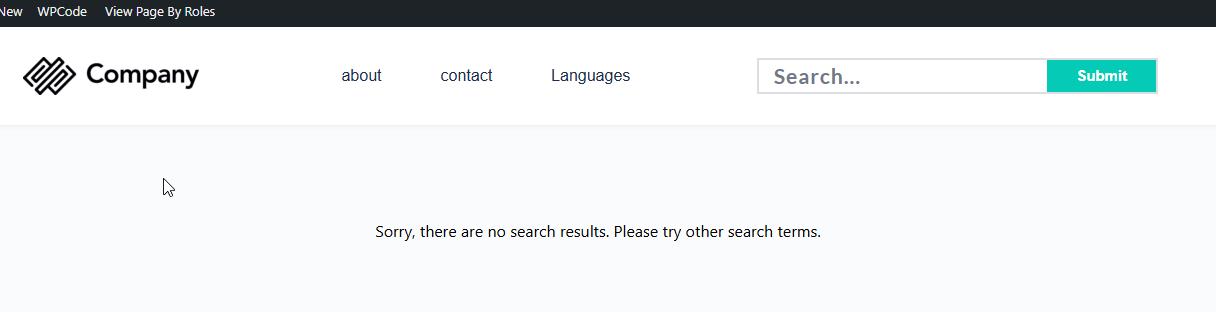
I'm a bit late to this party, but there's a fairly simple work-around until this feature is added.
When there's no results, WP adds the body class "search-no-results" to the results page.
So, I added a custom class to the search results archive element, eg: "search-results-archive". You can then add some custom CSS to create a pseudo element to display the message, for a basic example:
.search-no-results .search-results-archive:before {
content: "Sorry, there are no search results. Please try other search terms.";
}0 -

Hi Dustin,
Thank you for sharing this solution. Using the search-no-results body class with a custom pseudo-element is a good way to handle the missing feature for now. This will also help other users who are experiencing the same issue.
Best regards,
Ariel H.0
Please sign in to leave a comment.
Comments
16 comments