Brizy Template editing

Hi,
I am trying to setup my site for WooCommerce, but am having some difficulties with the template editing, specifically trying to change some colour settings. The image below on the right side shows what I'm trying to change, on the left side it shows the options, but changing those doesn't seem to make a difference. Is there an easy way for me to change those? Thank you in advance

-

Hi,
Could you please give us more details regarding this element? How did you add it? Did you use an extension for the "Add to Cart" element? What plugin did you use? Could you please check if you have the latest versions for Brizy Free 2.2.5 and Brizy Pro 2.2.1? Could you please open the options and click on a single option? Can you change the font and color? Could you please send us the URL link of this page?
Thanks!
Best regards,
Sandra0 -
It is in the Brizy Template editor, I added all of them from the side elements (image attached). I notice that the issue is with a product that has multiple variations, and it's the variation box for choosing that has the color issues. Image attached.
It's through Wordpress/Brizy/Brizy Pro/WooCommerce all fully updated. When you say"Could you please open the options and click on a single option?" what exactly are you asking?
I can change the font and colour for the text, border, etc besides what I originally pointed out above in my original post, I don't know how to access those options for the variations box.
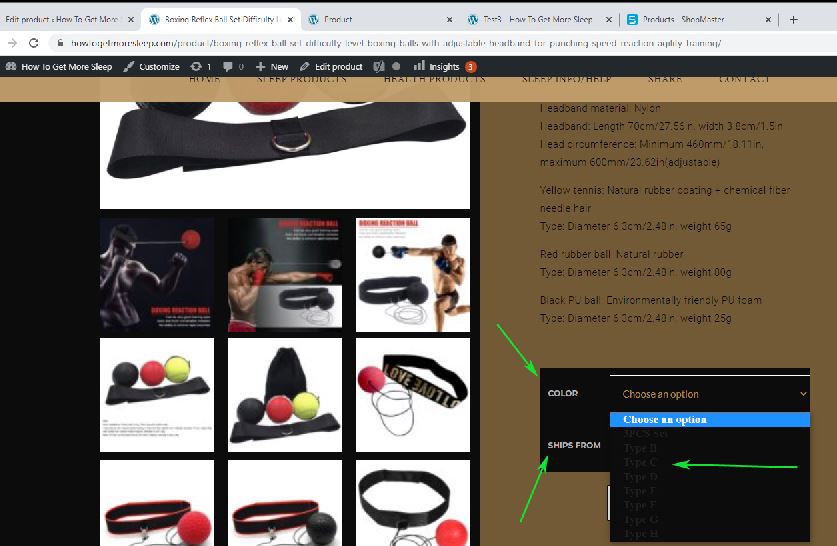
If you go to the pull down menu for Color and Ships from, when you press on it you see the color dark, I want to be able to change that color, as well as the color for where it says "Color" and "Ships from"
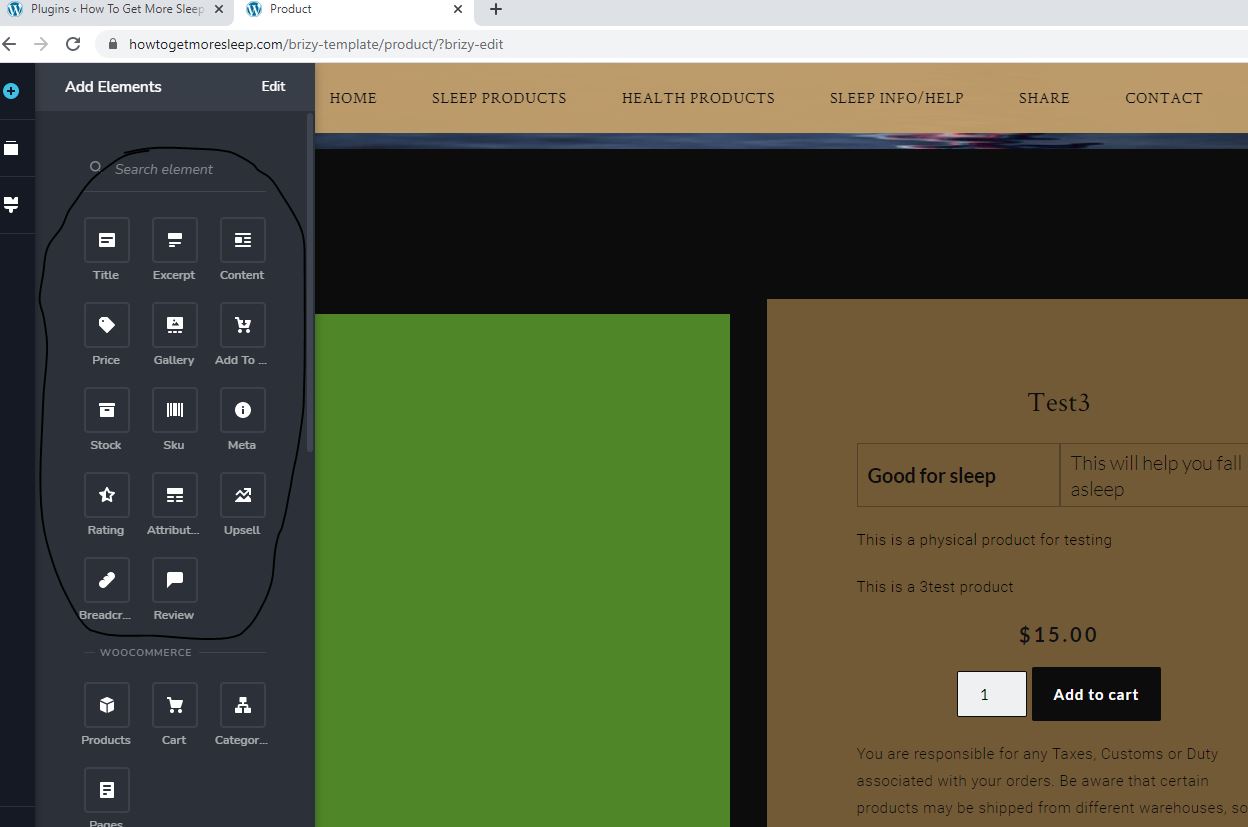 0
0 -
Hi,
We checked the link you send is and find that in the Chrome browser the options are displaying fine https://jmp.sh/y6h6vFX but in the Firefox https://jmp.sh/zJg81Gc, I receive the result as you show us. We suppose that the options list field can't be edited with Brizy and the browser add their styles as you can see here https://jmp.sh/zJg81Gc. Here isn't a Brizy code or WooCommerce one.
For checking this aspect, I can recommend to temporarily deactivate the Brizy Free and Pro plugin and check the same element with variations in the WooCommerce standard page without Brizy. If they are the same, then these details are coming from the browser.Thanks!
Best regards,
Sandra0 -
There seems to be ongoing issues with the WooCommerce elements. Another thing I notice is that the Price isn't showing up for my variable products on the actual product page, but it shows it on the template (image attached, left side is the template, right is the actual product page) . Also when one of the variables is selected the color and placement of the price is awful, how can I change that?
Single item product shows the price
Variable doesn't
https://howtogetmoresleep.com/product/self-adhesive-pleated-blinds-half-blackout/
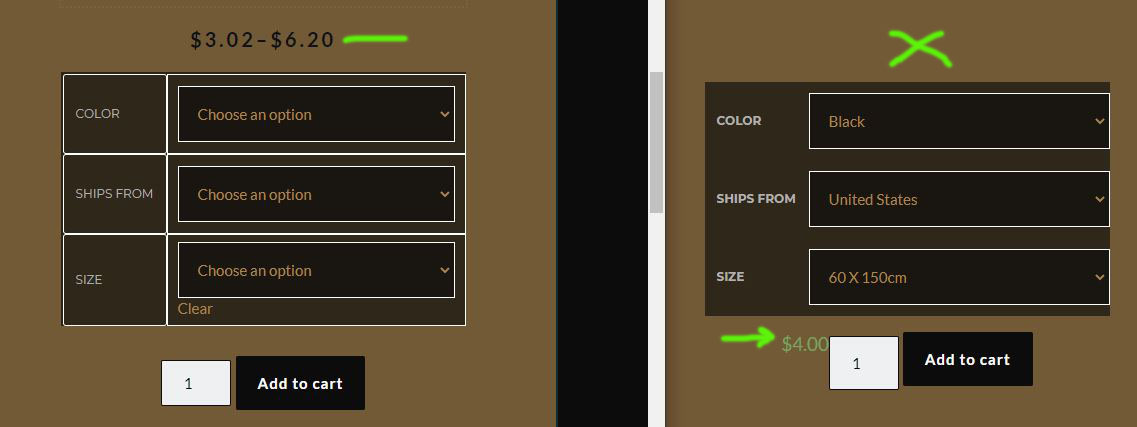 0
0 -
Hi,
Thank you for all these details and for reporting this problem. We already informed our team regarding this and they will investigate this issue. When we will receive a notification from them, we will inform you too!
Thanks!Best regards,
Sandra0 -
Hi,
is there a way you can at least tell me how to change the price position and the color (the $4.00 in green in the above picture). I would like to get my site up and running, and this is something that is keeping me from being able to do so, if I have to put in the variable pricing manually for now that's fine, but that pricing color and positioning does not work.
0 -
Hi,
Unfortunately, at the moment we don't have a temporary fix for this inconvenience. We are still investigating this issue and find a solution for it. If you know a Custom CSS code that could apply and will not cause some other problems, you can add it as a temporary fix.
Thanks!
Best regards,
Sandra0 -
Hi, I have found CSS to use for most of my issues so far, except for the variable pricing, for now I am going to have to put that in manually.
I am trying to add a WooCommerce "Cart" element to the right side of my main menu, but I can't seem to do it. Would you be able to give me some direction on that?
 0
0 -
Hi,
Thank you for updating us regarding this inconvenience and great to know that you have the Custom CSS code that could help you.
Regarding the second inconvenience - to display the Cart element belong to the menu element, I can suggest adding a new column belong to the column with the menu and inside that column to add the Cart element. See here.
Best regards,
Sandra0 -
Hi,
I received a notification about this issue. We already fixed the problem with the non-showing price for Variable products and now all should work fine. Please make sure you have the 2.2.8 version for Brizy Free and 2.2.5 for Brizy Pro.
Regarding the dropdown for the select option of the variable products - the team found that these styles are coming from the OS. There are only a few style attributes that can be applied to an <option> element. This is because this type of element is an example of a "replaced element". They are OS-dependent and are not part of the HTML/browser. It cannot be styled via CSS.
Regarding the "final" price of the selected product - we are still working on this aspect. When we will have some updates on this, we will inform you too.
Thanks!
Best regards,
Sandra0
Please sign in to leave a comment.
Comments
10 comments