Pop up doesn't display in page | CLOUD PRO

Hello,
I created a pop-up and I want to be display on this page after clicking the white button "Start free trial" → https://www.housetogrow.org/emotional-intelligence
This is the pop-up I created: https://gyazo.com/3bd840af86a415f2f2838250f4052f99
I put it in the button to be display after click on it, but for somereason it doesn't display. What's happening?
Thanks a lot for your help!
-

Hi, Sandra!
This popup contains embed code with an iframe:
<iframe style="height: 70vh; width: 100%;" src="https://easyweb-inc.com/3d/pano/" overflow="hidden" width="300" height="150"></iframe>
That link from src field works fine and there is no errors in the Console mode.
But I guess that doesn't matter, 'cause I deleted the embed element from the popup and it still won't open.
There are more strange things to it. I've created another popup for this button in hero section:
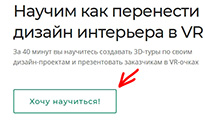
I chose one of default layouts for this new popup window:
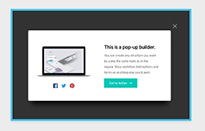
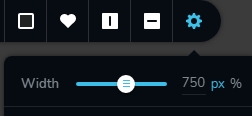
but the problem is: it opens in full-width mode (width 100%) despite the width is set as 750px
 0
0 -

Hi,
Thank you for these details. We could encounter the problem you reported in the first instance. Also, about the second one, our developers already know about it and work to fix it. Both issues will be fixed in the next Brizy Cloud updates. Unfortunately, we can't say when an ETA but we will strive to release it as soon as possible.
Best regards,
Sandra0 -

Hi Edel!
My name is Elena, Brizy customer team!
The bug in your page has been fixed. We have a new Update in the Brizy Cloud builder. Please, clear the browser cache before opening your project. If you have any other questions, please let me know.
Best Regards,
Elena
0 -

@Sandra
Having this same issue again with our Website... Any advice... Melissa was previous person you talked with about our website... We have purchased the business since then.
Kyle
0 -

Hi Kyle,
Looks like your post here is also about the same topic? https://support.brizy.io/hc/en-us/community/posts/13645823530513 Let's continue our discussion on the above thread.
0
Please sign in to leave a comment.
Comments
35 comments