Brizy forms not work

-

Hi,
Could you please give us more details abt the problem you encounter? How this problem is manifesting? Did you receive the leads in the Brizy -> Leads? Or you didn't receive leads there too? What is the form integration or email method did you use? Could you send us some screenshots with how did you connect the form?
Do you have the latest updates for Brizy Free 2.2.6 and Brizy Pro 2.2.2? If you temporary deactivate all external plugins (except Brizy Free and Brizy pro) and activate a WP default theme, do you receive the same problem?
Thanks!
Best regards,
Sandra0 -
This is still an issue. Brizy and Brizy Pro are up to date. The Wordpress option says it’s connected to the form. But it does not work as designed. As you can see, this issue has been going on for quite some time; the problem persists across different versions. Honestly, if you’re not going to fix this issue, I’d prefer not to pay full price for a product that’s defective in the sense that it doesn’t work as intended/designed.
0 -

Hi Gabriel,
Your email will be sent out through WordPress' PHP Mail feature, when you use the WordPress option to send out email notifications. Few webhosts like GoDaddy do not support PHP Mail. Please confirm that PHP Mail is supported by your web hosting company.
When you send out email notifications via a form, there is a good potential that it might be suspected as a spoof. Please follow these recommended practices to avoid having your mail rejected by mail servers.
- Subject: Please don't omit the subject line. Give a meaningful subject. You can include a subject, such as "Contact Form."
- From Email: Make sure the 'From" Email' you use has the same domain as your website. The 'From Email' field on a form hosted at CNN.com can be form@cnn.com or info@cnn.com
- From Name: This field must not be left empty. Give a meaningful 'From Name'
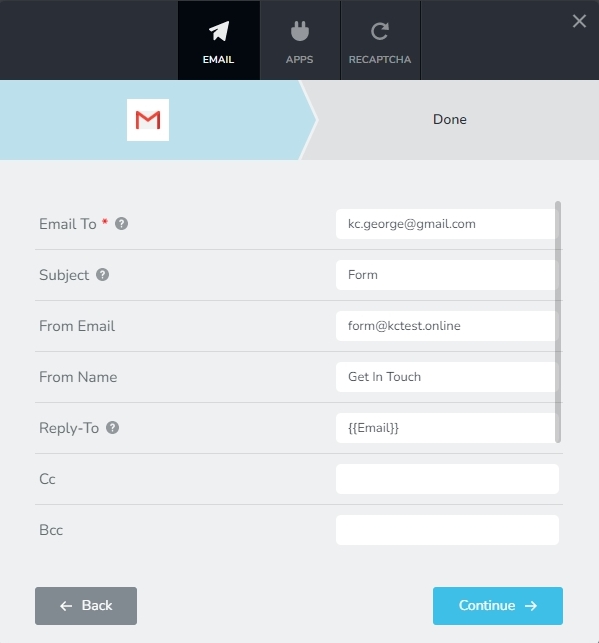
Please check your SPAM folder for email notifications while testing your form.
If after trying everything, you still can't receive emails from your form, please get back to us. We'll assist you in resolving the problem.
0
Please sign in to leave a comment.
Comments
3 comments