Popup Setting Missing "Display Conditions"

Brizy Support,
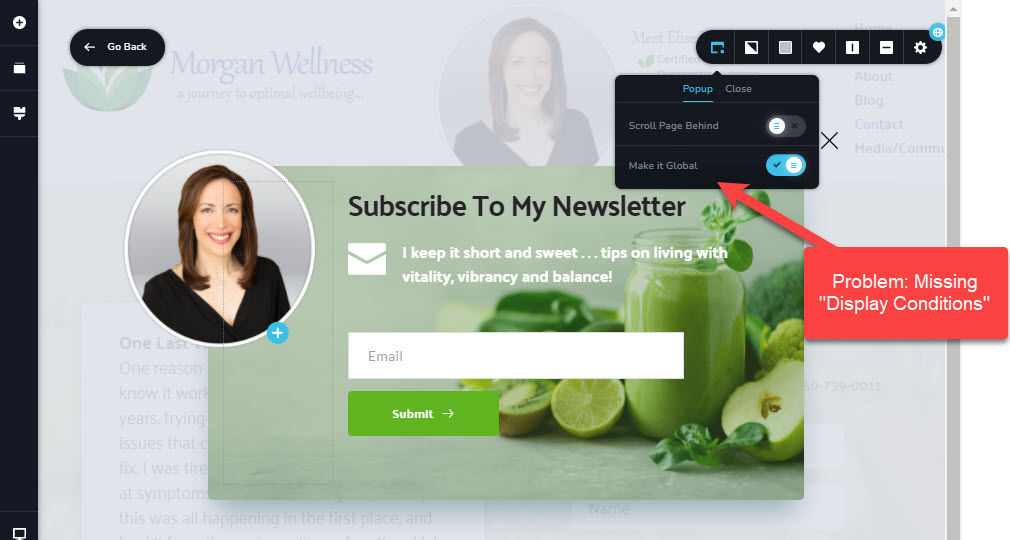
I've created a popup (very nice functionality, btw); however, its setting is missing the link to "Display Conditions" (please see image). Consequently, I cannot configure the popup's triggers and conditions. Please advise.
Using Brizy Pro 2.2.0 on WordPress 5.6, hosted by SiteGround.
Thanks!
Michael
-

Hi Michael,
Display Conditions is an option available only for the global popups but in your screenshot I see a local pop-up that appears on click. Please refer to this video: https://youtu.be/C6dNW3osASc0 -
Thanks, Alex. I understand now. There's apparently 2 types of global popups. The one I created, a local popup, which has to be set in an element's link, and then the global based on conditions which you can only create by navigating to it from the Brizy Popup section in WordPress. I may not have worded that correctly, since I'm new to WordPress.
Thanks again,
Michael
0 -
I'm glad we managed to solve this together.
Let us know if you need anything else.
0
Please sign in to leave a comment.
Comments
3 comments