Woocommerce Single Product template not being applied to products

Hi, I'm having an issue with the single product template being applied. I have the latest 2.2 version of Brizy Pro installed along with 2.2.3 of Brizy.
I created a template which I have the following settings.

The template is also published.
If I go to edit the template with Brizy things seem to work except the content element pulls data from the home page instead of the description content from the product.

If I go to the product and edit with Brizy I do not get anything but the header and the footer.

What am I doing wrong?
-

Hi,
Can you please confirm that you have done everything as explained in this video: https://youtu.be/U3tBa4AL5mM ? Did you add the condition, save the template, and then edit the template? It is important that the condition is set before editing the template. Also keep in mind that products should not be edited with Brizy if you have a template created for them. Please check the video I sent above.
0 -
Ok got everything worked out for the single product. It was something unrelated. However, now the issue is with the "shop" page. Here are my settings for the template.
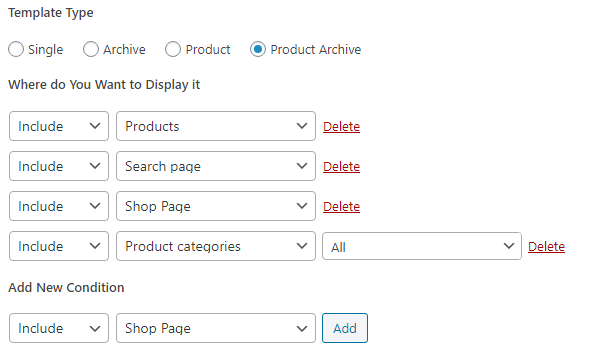
When I go to the shop page this is what I get : http://demo.twistedspokesbicycles.com/shop/
Template is set up like this:

Right now I only have 1 product loaded, but that one product is not displayed and the orientation of the categories is not displaying properly. Also is there a way to get rid of all the white space between the categories?
0 -
Hi,
Can I see an example of a page you want to create? It looks a bit confusing to me and I don't quite understand what exactly you want to achieve. Do you have a shop page that will display categories and next to each category do you want to have the products from that category?
The space can be manually reduced to each element: https://jmp.sh/gb6CJ25
0
Please sign in to leave a comment.
Comments
3 comments