Product Page Error

Hello Brizy Team,
on some Product Pages (with miltiple Pics) i get this error. 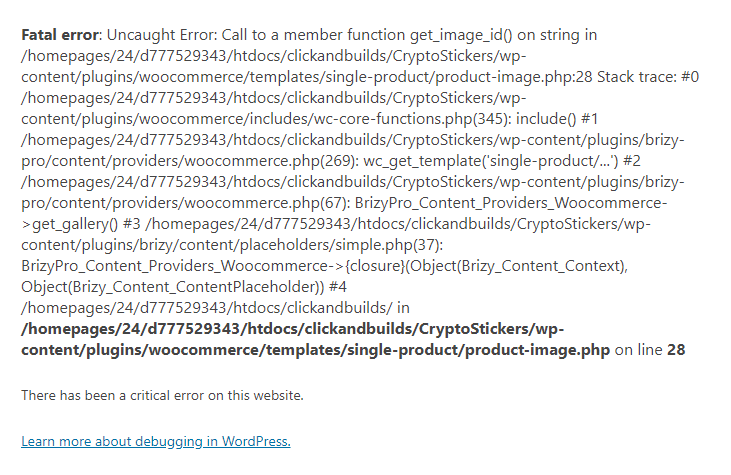
-

Hi,
Could you please check if you have the latest versions for Brizy Free 2.2.3 and Brizy Pro 2.2.0? How did you designed and build the Product Page? Did you use the template? What display conditions did you set? Could you send us a screenshot? Do you receive this error in the preview mode of some product pages? Or do you receive it on all product pages?
If you receive it on some product pages with multiple images, could you please check what is the format of those images? Does all of them have the .jpg and .png format?
Could you send us a link to check this error?Thanks!
Best regards,
Sandra0 -

Hello, I get a similar error when I try to view the pages of the products. but weird part is this error sometimes occurs and sometimes not. The error starts with
Fatal error: Uncaught Error: Call to a member function get_type() on string and It happens in
/wp-content/plugins/woocommerce/includes/wc-template-functions.php on line 1620
What I noticed is this error occurs most when I update a product page. I mean I edit the product page via brizy (I edit product pages manually, I dont use templates), and then I refresh the product page after editing, and I see this error. After another refresh, the error goes away but It comes back again occasionally when I edit some other pages that are not product related. My wordpress version is 5.7.2 and brizy versions are current. How can I solve this problem ?
0 -
I was just testing it so that I could find the source of the problem. I think the problem is with the add to cart element of brizy.
my product is variable and I think the error occurs with the variable products. I removed the add to cart button and updated the page, then checked again. I dont receive such error. but when I add the add to cart button again, I see the error. I dont think It occurs with single products because I tested it before. but still this issue requires testing by your side. I ll use custom add to cart buttons until I figure out what the problem is.
I'd appreciate If you d look into this subject.
Cheers.
Baris
0 -

Hello Baris,
Thank you for your message!
Regarding the problem that you encounter, I have created a ticket for you and one of my colleagues will contact you as soon as possible so you can talk things out. We are sorry for the inconvenience! Till then, if you have any other questions, please feel free to ask! We will be happy to help!
Have a nice day and kind regards,
Doina
0
Please sign in to leave a comment.
Comments
4 comments