How to configurate a value to a Hidden field at Form component?

Hi,
I need to create different forms for different pages. However, when I check the leads in Leads Section, I can't identify which page this lead came from. One of the solution I thought would work was use a field typed as hidden, so user won't need to fill a field asking about wich page it is.
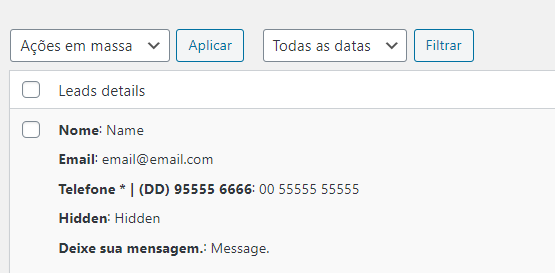
Meantime, when I go back to Leads, the value of the hidden field repeats the name of the field in placeholder. Is there a way that I can set a name and value for a field type hidden? Like hidden field name "Category" and value "Partner Page" or "Contact Page".
-

Hi,
Yes, it is the solution if you want to differentiate from where the visitor completes the form.
At the moment, when you create and add a Hidden field type in the form element, it is recommended to name the placeholder or/and the label with the value you want to hide. It can be the category name, "partner page" or "contact page". Therefore, you have to add instead of "Hidden", the "Partner page", "Contact page" or another value you need.Best regards,
Sandra0 -
Hi, Sandra.
When I change the placeholder value, the name of the field follows the same value. In the example bellow, put the placehold as "Saúde" (Heath, in english) and the collumn in the dataset keep the same label. Then, when I export to CSV, I have multiple collumns for a thing that should be a unique category like "Page".
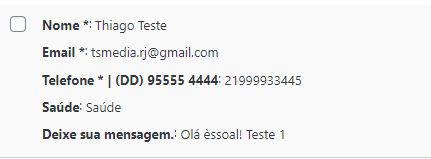
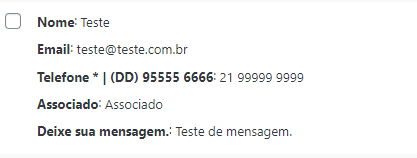
Is there a way to configure a different field name and placeholder for the same hidden field?
Best regards,
Kenzo0 -
Hi,
Yes, at the moment in such a way is working the "Hidden" field from the Contact form. If you want to use a specific value, you have to name the Hidden field with that value. The Hidden field isn't visible for the visitors, therefore the name of this field is its option. The placeholder isn't a value that is stored in the database, it is a temporary string that helps users to complete the form. Even if you set a different value to the placeholder, it will not be saved in the database, therefore will not be made visible in the "Hidden" field too. The value that will be visible is the field name.
Thanks!
Best regards,
Sandra0
Please sign in to leave a comment.
Comments
3 comments