Centered Form

Hi,
I have tried this so many times and each time without succes. Working on a Coming Soon page (watched also the video on the Under Maintenance on YouTube) and just want a Email and send button to be centered horizontally. As you can see that when I want to achieve the size as in the picture the row and forms settings are messed up. Then the button text also moves out of the button. Isn't there an option to center align the text of the Button? I feel that the text is somehow always aligned from the right.
Any help would be appreciated and I can't believe that something like this can't be setup easy. I am sure I am doing something wrong here.
Cheers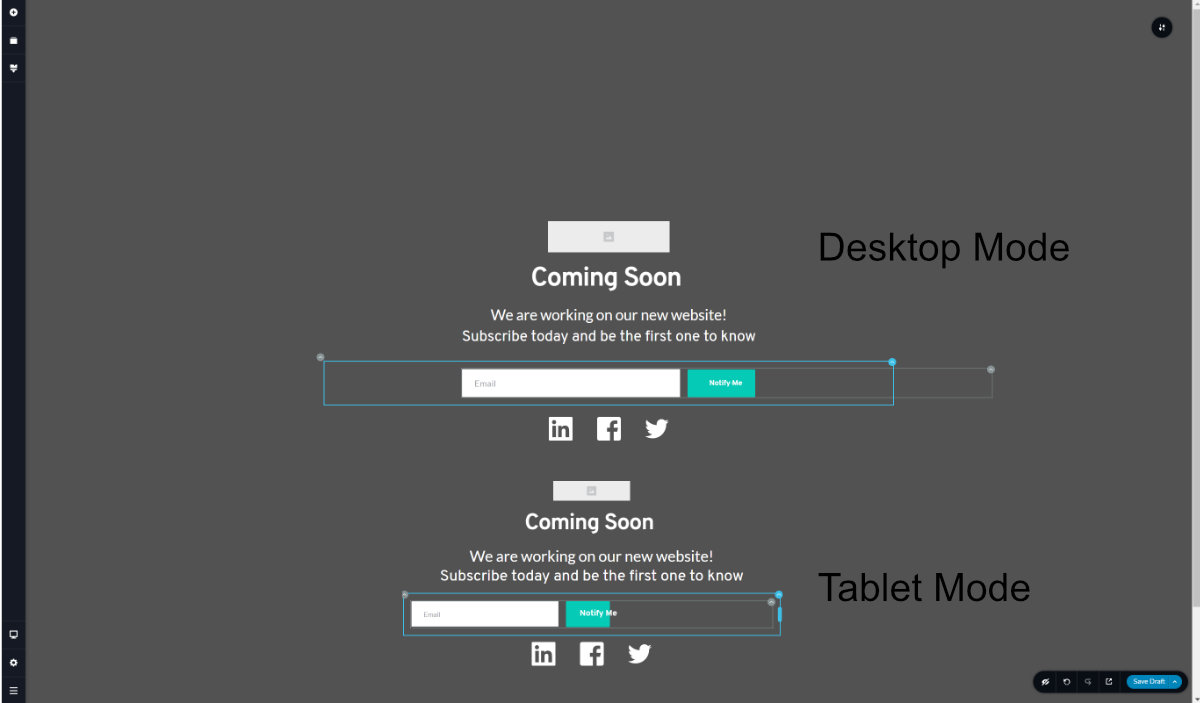
-

Hi,
Thank you for the screenshot. I checked it and find that you added a huge negative margin https://jmp.sh/Z02Ffte. Also, I suppose that you used big padding to the form. Could you please check these details? If you have them, could you set them with 0 value?
If you want to centre the form, you can set the row (where is placed the form) with 60% width (for example) and then set the form in the single row. See here. Hope it will help you.
In such a way is displaying in the tablet mode https://jmp.sh/PDbfCDB and in such a way in the mobile mode https://jmp.sh/XF4KZfL. For the mobile mode, you can make some changes and made it larger because it is looking a bit small. See here https://jmp.sh/NQL9jJy.Best regards,
Sandra0
Please sign in to leave a comment.
Comments
1 comment