WooCommerce - mini cart shows wrong subtotal

Hi there,
the woocommerce mini cart shows the wrong subtotal. WooCommerce is set to show prices including tax. It works fine in the normal cart page but not in the mini cart.
Also we would like to change the cart icon, but there is no option for changing it...
We can`t lounch with this bug...
Regards Leonhard
-
 0
0 -

Hi,
In the right sidebar isn't showing the total amount of the cart that includes the taxed also. There is showing the Subtotal. To see the detailed description and the Total of the purchase you have to open the Cart Page. In the Cart and Checkout page is showing the Total included the taxes.
"Also we would like to change the cart icon, but there is no option for changing it" - I'm sorry but at the moment isn't possible the Cart icon. We have this option in the Feature request list and we will investigate this possibility.
Thanks!
Best regards,
Sandra0 -
Hi Sandra and thanks for your answer.
- I cant quite follow. I am aware that in the mini-cart it is not the total amount, but the subtotal. But brizy shows the WRONG subtotal. We configured WooCommerce to show subtotals including tax, but it seems brizy does not recognize lot of WooCommerce settings which is crucial for a webshop to work.
It shows the cart items incl. tax, like it supposed to do, but the subtotal is excluding tax, which makes absolutely no sense. - Also the WooCommerce settings for the price style is not recognized. We've set the shop up to show the price like "154.00 €" but brizy doesn't recognize this and shows the price like this "€12"
- Ajax is not working. The cart will only update if you force WooCommerce to update the page after every click which is really kind of lame in 2020. This is also effecting simple products, were the quantitiy buttons are not working.
- Last but not least simple and various products are behaving completely different. One is applying the style, the other don't. We had to write a ton of code to compensate.
The worst part is - that the quantitiy buttons of simple proucts don't work.
We had to deactivate the subtotal in the mini-cart to lounch the shop before christmas is over!
We would appreciate if you would look at these issues. We wrote a lot of emails to *** but wont get any answers anymore. There you'll find a brizy user for you...0 - I cant quite follow. I am aware that in the mini-cart it is not the total amount, but the subtotal. But brizy shows the WRONG subtotal. We configured WooCommerce to show subtotals including tax, but it seems brizy does not recognize lot of WooCommerce settings which is crucial for a webshop to work.
-
Hi,
We use the WooComemerce shortcode in the Brizy pages. We import in pages this shortcode that is generated by WooCommerce and we can't add our code there or modify some details that are displayed and generated by WooCommerce. As a test, you can deactivate the Brizy Free and Brizy Pro and check how is displayed the Subtotal in the Sidebar. Using Brizy you can to style and customize some WooComerce pages and category but you can't change how it is working or some WooCommerce settings. All these settings are set-up from the WooCommerce.
Regarding the 2nd, 3rd and 4th question - I notice that you have opened a private ticket. Please let us a bit more time, we will get in touch with you for these questions.Thanks!
Best regards,
Sandra0 -

Hi Sandra,
the subtotal shown in the shopcart widget is incorrect. Let me show you an example with just one item in the cart:
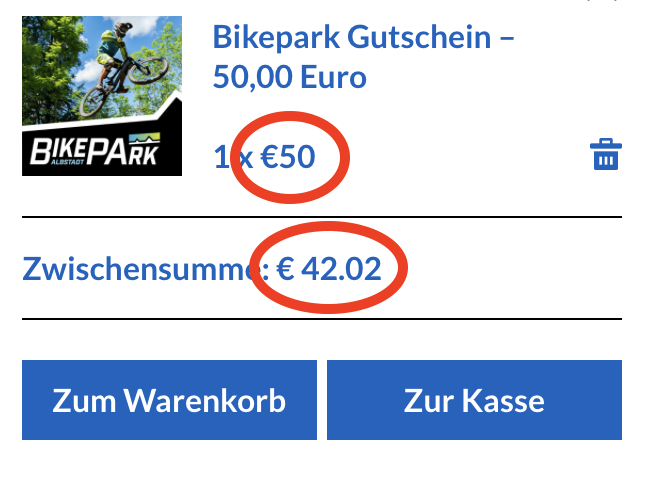
The price of the item is € 50 including tax. The subtotal however does not include the tax. This obviously makes no sense. Even worse: It is not allowed to show prices (and subtotals) without tax in many countries, including Germany. So the Brizy shopcart widget can not be used in these countries at the moment.
To reproduce this make sure to enable taxes in the WooCommerce general settings:

Please, Sandra, give this information to your developers:
WooCommerce provides subtotals with or without tax:
https://woocommerce.wp-a2z.org/oik_api/wc_cartget_cart_subtotal/
Description
Gets the sub total (after calculation).
Usage
$string = WC_Cart::get_cart_subtotal( $compound );
Parameters
- $compound
- ( bool ) optional – whether to include compound taxes.
Returns
string formatted price
Source
File name: woocommerce/includes/class-wc-cart.php
By setting the boolean parameter $compound you can choose between subtotal with or without tax. In some countries like the U.S. subtotals are usually shown without tax, in other countries like Germany subtotals must be shown including tax. It would be highly desirable to add a setting in the Brizy shopcart element to control this tax option. As you can see in my screenshot, the item price is shown including tax, the subtotal excluding tax. This makes no sense.
Additionally there is still an issue concerning the translation of the mini cart item, which needs to be fixed, see this thread. I'd really appreciate to get all this fixed.
Kind regards,
Uli0 -
@Solution Clinic:
I've seen, you've found a way to remove the subtotal in this shop: https://elektrohalle-rhomberg.net

Probably you did it using an add_filter hook in the functions.php. Would you be willing to help me out here and share your solution? Thank you very much!
Kind regards,
Uli0 -
Hi,
This is a question related to the WooCommerce settings. To check this, you can create a non-Brizy page and add there add the WooComerce Cart.
Could you please check in the WooCommerce -> Settings -> Tax, if you selected "Including tax" value for "Display prices in the shop" and "Display prices during cart and checkout" and the "Yes, I will enter prices inclusive of tax" value for "Prices entered with tax"? See here. I have this configuration and all is displaying fine. See here.
Best regards,
Sandra0 -
Hi Sandra,
thank you for your research, I've had set up everything as shown in your screenshot. But I think you forgot to enter any tax rate. Go to WooCommerce -> Settings -> Tax -> Standard rates and enter any tax rate. Probably in your case it looks like this (No matching tax rates found):
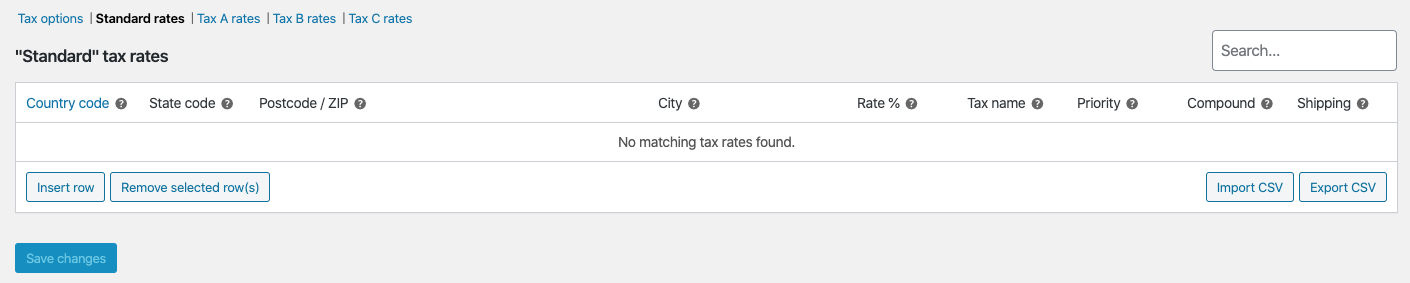
If you don't enter any tax rate the subtotal with and without tax will be the same, which can be seen in your screencast. Please enter any tax rate like so:

After you entered the tax rate you will see, that the subtotal does not include tax, as described in my post above.
Uli
0 -

Hi Sandra, we have the same issue as Uli.
We set all settings as you suggested it but still, it doesn't work.
The WooCommerce documentation doesn't help us through this issue either.
Please help us out.
Many thanks
Marco
0 -
Hi,
Thank you for all these details. I addresed this inconvenience to our team and they will investigate it. When we will receive a notification from them, we will inform you too.
Best regards,
Sandra0 -
Hi Sandra,
we looked at the code ourselves and fixed it, could you please forward the following to your developers so you can add it into the next version of Brizy? Otherwise our changes will be lost once we update.
Our solution:
WooCommerce developers officially recommend using WC()->cart->get_total(). get_total also already includes the currency symbol.
See also following issue on GitHub: https://github.com/woocommerce/woocommerce/issues/12338
Our changes are in wp-content/plugins/brizy-pro/content/providers/woocommerce.php in two places:
1.
<span class="brz-woocart__price"><span class="brz-woocart__price-currency"><?php echo get_woocommerce_currency_symbol(); ?></span><?php echo WC()->cart->get_cart_contents_total(); ?></span>
changed to
<span class="brz-woocart__price"><?php echo WC()->cart->get_total(); ?></span>
2.
<span class="brz-woocart__sidebar-price"><span class="brz-woocart__sidebar-price-currency"><?php echo get_woocommerce_currency_symbol(); ?></span><?php echo WC()->cart->get_cart_contents_total(); ?></span>
changed to
<span class="brz-woocart__sidebar-price"><?php echo WC()->cart->get_total(); ?></span>
Many thanks
Marco
0 -
Hi Marco,
Thank you for your reply and for share with us all these details. Hope it will be useful for other users too! We will inform and attach your last reply in the issue created on this subject and they will investigate it.
Best regards,
Sandra0 -
Hi Marco,
thank you very much for sharing this bugfix! It also helped for us. Great!
Kind regards,
Uli0 -
Here's another fix to the mini-cart.
Brizy Pro by default ignores the settings of currency position, thousand separator, decimal separator as well as the number of decimals:
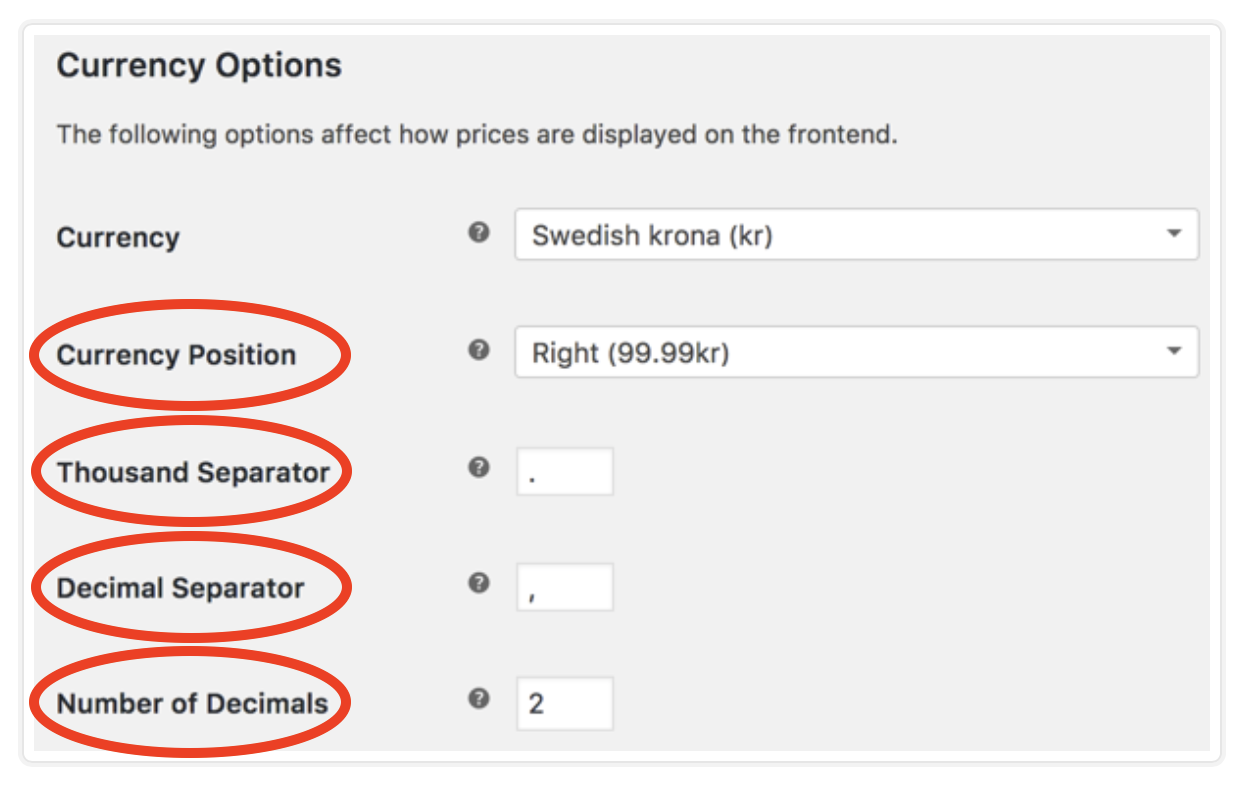
The way it is coded, the currency symbol is always left with no spacing in between. Here you can see the difference (the subtotal is displayed correctly thanks to the tweak of Marco):

To fix this, you need to change wp-content/plugins/brizy-pro/content/providers/woocommerce.php in two places:
1. Line 388 - 399:
<?php
$price_html =
'<span class="brz-woocart__sidebar__product-price-parent quantity">'.
$item['quantity'] .' x
<span class="brz-woocart__sidebar__product-price">
<span class="brz-woocart__sidebar__product-price__currency">' .
get_woocommerce_currency_symbol() .
'</span>'.
$this->get_price( $_product ) .
'</span>
</span>';
?>
change to:
<?php
$price_html =
'<span class="brz-woocart__sidebar__product-price-parent quantity">'.
$item['quantity'] .' x
<span class="brz-woocart__sidebar__product-price">
<span class="brz-woocart__sidebar__product-price__currency">' .
'</span>'.
$this->get_price( $_product ) .
'</span>
</span>';
?>
2. Line 419 - 421:privatefunctionget_price( $product ) {
return WC()->cart->display_prices_including_tax() ? wc_get_price_including_tax( $product ) : wc_get_price_excluding_tax( $product );
}Change to:privatefunctionget_price( $product ) {
return wc_price(WC()->cart->display_prices_including_tax() ? wc_get_price_including_tax( $product ) : wc_get_price_excluding_tax( $product ));
}Here is the reference for your developers: https://woocommerce.wp-a2z.org/oik_api/wc_price/By using the function wc_price() you can display the price according to the WooCommerce settings selected in the 'Currency settings'.The result will look like this: Please include this fix to the next release. Otherwise the fix will be overwritten.Kind regards,Uli0
 -
Hi Uli,
Thank you very much for your implication and the solution you find and decided to share with us! It is very useful and friendly!
Best regards,
Sandra0 -
Hi Uli,
Unfortunately, at the moment, we didn't implement a fix for this problem. We are investigating it and checking it. When we will be ready to release it, we will announce you! I'm sorry for this inconvenience!
Best regards,
Sandra0 -

Hi!
I have the same problem as Uli. Thank you Uli for your workaround! I hope there will be a fix in a near update!
Best regards,
JP.
0
Please sign in to leave a comment.
Comments
17 comments